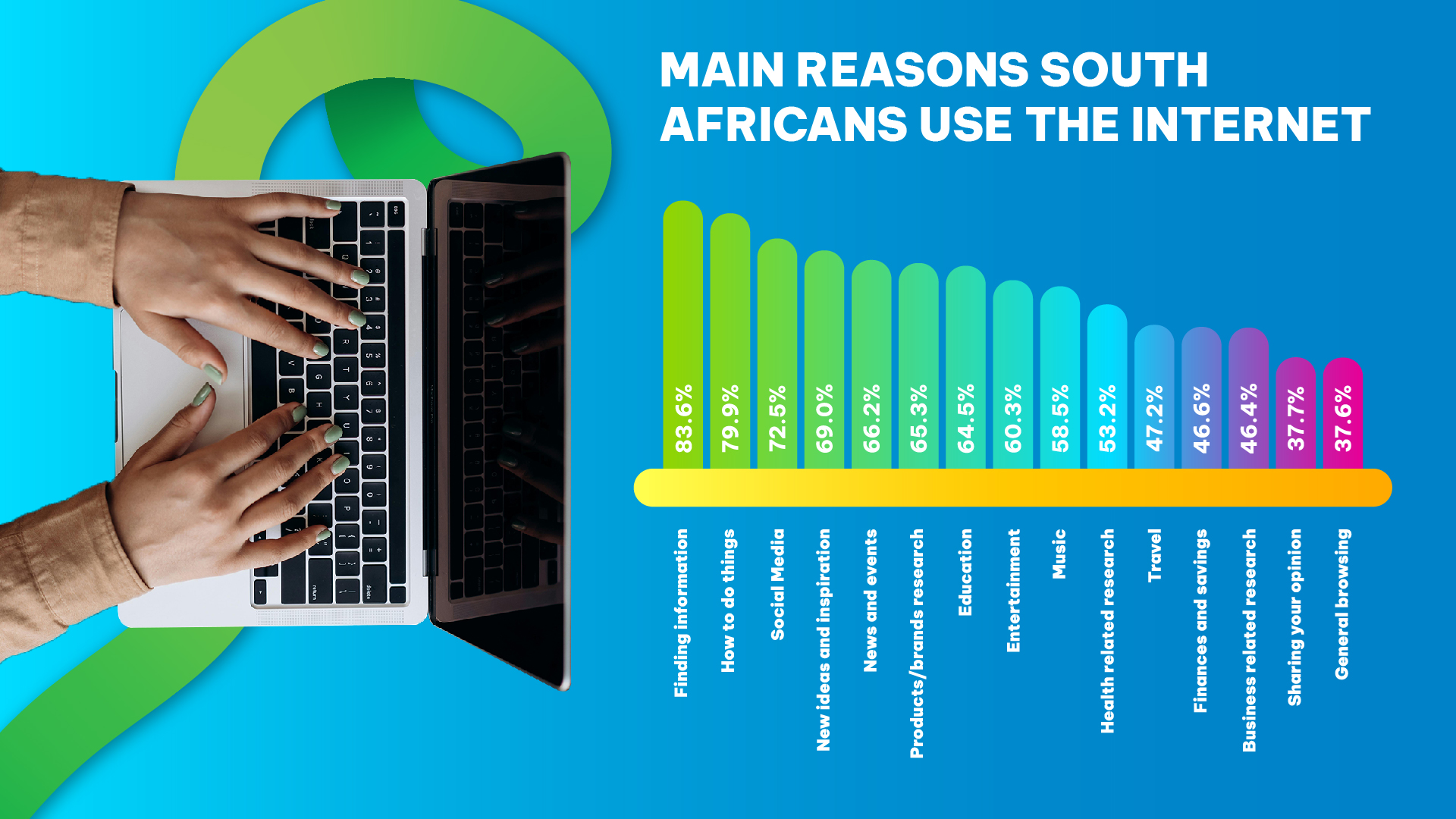
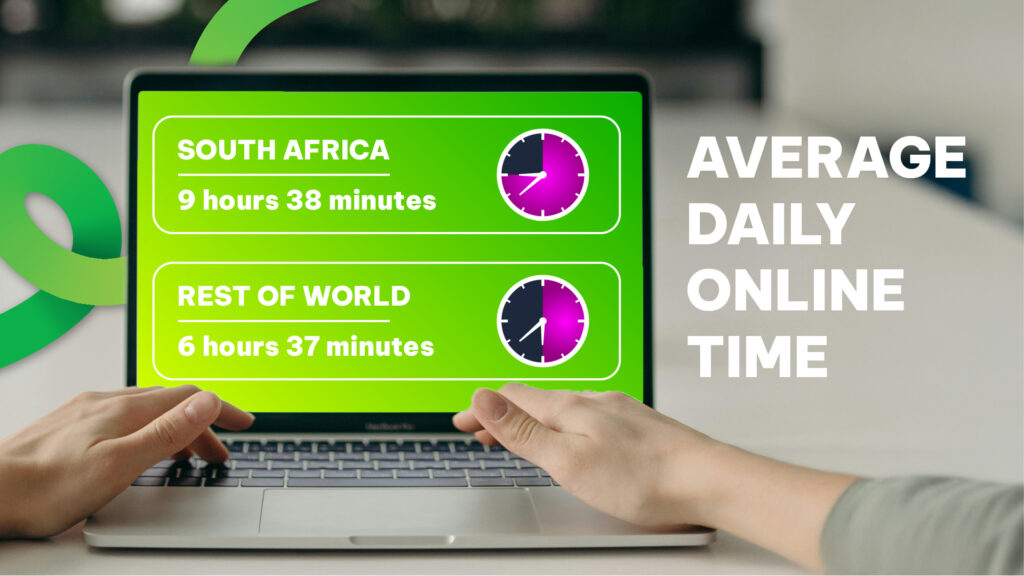
South Africans use their Internet time for much more than browsing — it’s the hub for work, entertainment, learning and connecting with friends and family. Whether you’re joining a work meeting, watching the latest series, gaming with mates or catching up on news, the way we spend our online hours tells a lot about how life has adapted to always-on connectivity. So much so, we spend over nine hours online every day, according to this report.
Here’s a clear look at the behaviours shaping internet use across the country — and simple tips to make every minute online work for you.
Internet time in the workplace — remote and hybrid routines
The shift to remote and hybrid work hasn’t vanished. Many people now split their working week between the office and home, making stable, reliable internet a must. Video calls, cloud collaboration tools and file sharing are everyday essentials; when these work smoothly, productivity stays high and work-life balance becomes easier to manage.
- Common work uses: video conferencing, cloud storage and collaboration platforms, remote desktop access.
- Top tip: prioritise a connection with consistent upload and download speeds for smoother video calls and faster file transfers.
Streaming and on-demand entertainment — evenings and weekends online
Streaming remains one of the biggest uses of household data. From global shows and local series to live sports and music, many South Africans now expect high-definition playback without buffering. Peak streaming times are generally evenings and weekends, when households tune in together.
- Common streaming uses: TV series, movies, live sport, music and podcasts.
- Top tip: Use scheduled downloads or lower playback quality for background viewing to reduce data pressure during peak times.
Social media, messaging and staying connected
Social platforms and instant messaging are central to daily life — for catching up with friends, following news and staying on top of trends. Short videos, image sharing and live streams have increased the amount of time spent scrolling and interacting online.
- Common social uses: short-form video, group chats, content sharing and live streaming.
- Top tip: Use app settings to limit auto play or background data consumption if you want to reduce usage.
Gaming and live streaming — a growing community
Online gaming and live-streaming are major draws for many South Africans, especially younger users. Competitive gaming, multiplayer sessions and watching game streams all place particular demands on latency and stable upload speeds.
- Common gaming uses: multiplayer matches, game downloads and livestream viewing.
- Top tip: For better responsiveness, choose packages with lower latency and consider wired connections for consoles or PCs.
Learning, shopping and practical tasks — everyday essentials
The Internet is the default for learning, shopping and managing services. From online courses to banking and health info, many everyday tasks now happen online. Reliable connectivity makes these activities quicker, safer and more convenient.
- Common practical uses: e-learning, online banking, shopping, telehealth and municipal services.
- Top tip: Keep devices and browsers updated, and use strong passwords or multifactor authentication for online accounts.
Managing home networks — tips for better performance
Households often juggle many devices at once: phones, laptops, smart TVs and home-office kit. A few simple steps can improve everyone’s experience:
- Place your router centrally for the best coverage.
- Use wired connections for bandwidth-heavy devices where possible.
- Schedule heavy downloads outside peak hours.
- Prioritise devices or apps that need the best performance (video call or gaming optimisation).
What this means for ISPs and users
As online habits diversify, Internet Service Providers must offer flexible packages that can handle mixed household needs — fast downloads for streaming, reliable uploads for video calls and low latency for gaming. For users, picking the right package and following smart network practices will make online life smoother.
Quick checklist — optimise your internet time
- Choose a package matched to your household’s primary use (streaming, work or gaming).
- Use ethernet for devices that need stable connections.
- Manage background app updates and scheduled downloads.
- Label and secure your Wi-Fi network to avoid unauthorised use.
- Choose Norton from Vox to manage family screen time
Make your connection work for you
The internet is no longer a luxury — it’s central to how we work, relax and learn. By understanding common patterns of use and taking a few simple steps to manage your connection, you’ll get better performance exactly when you need it. If you’re thinking about upgrading or want help choosing the right plan, a short review of your household’s usage patterns will point you to the best fit.
Questions? We’ve Got Answers
-
How do South Africans typically use the Internet?
We use the internet for work, streaming, social media, gaming and practical tasks like banking and learning — with usage often concentrated in the evenings and weekends. -
What’s the best connection for working from home?
A connection with reliable upload and download speeds, low latency and consistent performance is best for remote work — especially for video conferencing and cloud collaboration. It doesn’t get better than Vox Fibre. -
How can I reduce buffering when streaming?
Reduce playback quality, schedule downloads outside peak hours, or upgrade to a plan with higher bandwidth to reduce buffering and improve HD playback. -
Does gaming need a special type of connection?
Gaming benefits from low latency and stable upload speeds. Wired connections and prioritised network traffic for gaming devices can improve responsiveness. -
How can I check if my home internet plan is right for my family?
Review the number of devices, common online activities (streaming, work, gaming), and peak usage times. If multiple users stream or work simultaneously, choose a higher-bandwidth plan.
About Author