How to Make the Most of Your Vox Connectivity Line

Tips to make sure you’re getting what you signed up for

Picture the scene. It’s early afternoon and your small one is streaming HD videos in one room, your teenager is on a video call in their bedroom, and mom and dad are both working from home, simultaneously accessing the Internet via different laptops, in two other corners of the house. Best of all, thanks to your Fibre to the Home (FTTH) Internet connection, there’s no buffering or lagging in sight.

 

How to Make the Most of Your Vox Connectivity Line
How to make the most of your Vox connectivity line

Looking back, it’s quite surprising to think that even 15 years ago, this wasn’t a common scenario – for starters, YouTube was only started in 2005, and Netflix Streaming in January 2007. As for widespread Fibre connectivity in South Africa, it was still just a twinkle in somebody’s eye, because the first subsea Fibre cable to reach South Africa went live only in 2009. Today, Internet access has become one of the most important areas of our lives.

Internet connectivity opens us up to an incredible world of information, entertainment and opportunity, and nobody wants a slow or buffering connection, while price and value-conscious consumers are justifiably concerned about getting true value from their purchases. But what happens when you’ve paid for a decent Internet package, but it doesn’t seem to be working quite as well as you expected? When the Modern Family-inspired Internet scenario sketched out above starts stuttering and freezing?

Because even with a Fibre Internet connection – generally regarded as the crème de la crème of Internet connectivity – several factors can still reduce the performance of your Fibre to the Home (FTTH) Internet speed and reliability.

This article looks at how you can make the most of your Vox FTTH Connectivity line when certain challenges rear their heads.


Wi-Fi: Enabling Wireless Connectivity from Your Fibre Optic Line  
improve Wi Fi signal


Good Internet connectivity depends on many factors, including your Internet Service Provider (ISP) first and foremost, as well as the speed of your chosen Internet package; whether your devices are modern or no longer that new; and Wi-Fi options and challenges.

  • The job of a Wi-Fi router is to ‘convert’ the data packets carried within light pulses through Fibre Optic cables laid in your neighbourhood, into the Wi-Fi radio wave signal inside your home.
  • This then enables your family’s digital devices – laptops, tablets, smartphones and smart TVs – to link into the Internet, creating a wireless Internet connection for your home (cable-free Internet, in other words).


Wi-Fi functionality is integral to the performance of your Fibre-based Internet line.


Improving Your Wireless Signal

 If your internet connectivity line doesn’t seem to be giving you the results you were expecting, or if you’re experiencing Wi-Fi dead zones in your home (caused by the distance of your device from the wireless router, thick walls or electrical interference), there are a few things you can do to improve your Wi-Fi network, as follows:

  • Router position: Choose a central location in your home, and raise the router off the floor. Also, don’t place the Wi-Fi router inside a cupboard or desk. Sometimes just raising the router a little higher up from the floor for better signal distribution will increase its range and speed. Make sure your router is away from other electronic and electrical equipment, metal objects and solid brick or concrete walls.
  • Router speed: Your router should handle a speed rated the same or higher than your chosen Internet package. And so, if your Fibre Internet is 500Mbps, your router should be able to offer speeds at least this fast.
  • Number of devices: All Wi-Fi equipment supplied by Vox is strong enough to cover an estimated 100 square metres, depending on what material your walls are made of. Vox recommends adding an additional device for every 50 to 100 square metres extra.
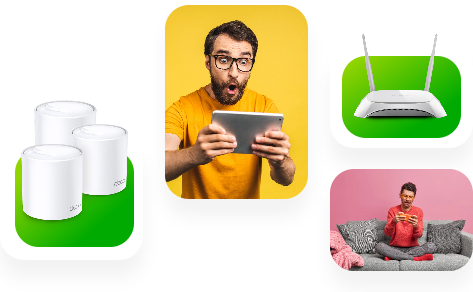
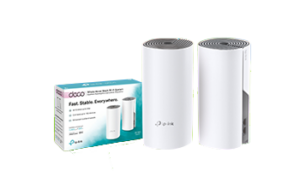
  • Mesh System to enhance signal: If the Wi-Fi range in your house is poor, a Vox mesh router system can help to push the signal further, so the whole family can stay connected throughout the house, providing an uninterrupted lag-free high-speed Wi-Fi connection for multiple devices in every corner of your home.Vox Wi Fi Home Mesh
  • How many mesh units can I have in my home? The Vox two-pack can connect up to 100 devices and you can include up to eight units in your home if more coverage is needed. A Vox Wi-Fi Home Mesh network can handle a mix of IoT products, smart TVs, smartphones, tablets and other electronic devices, such as wireless printers.
  • Other devices can interfere with your Wi-Fi connection, including microwave ovens, cordless phones, Bluetooth products, baby monitors, alarms, cameras and other wireless LANs. To prevent this, position the Wi-Fi router or mesh extender as far away as possible from microwave ovens, Bluetooth devices, and 2.4 GHz cordless phones.
  • App-Enabled: If you want to check your Wi-Fi range, there are apps available for Apple and Android smartphones, for example ‘Sweetspot’ for Apple and ‘WiFi analyzer’ for Android.
 

Not Just the Wi-Fi to Consider

A Wi-Fi router is not the only critical component that enhances your user experience.

  • Wired after all: As outlined above, a Wi-Fi Home Mesh network can provide incredibly strong Internet connectivity, but there are still times when an Ethernet cable might be the best solution – for example, if you have very thick walls, or for plugging into an HD television or gaming setup, where the speed needs to stay high and the connectivity lag-free. Look at buying an Ethernet cable that is rated for ‘Cat 5e’ or ‘Cat 6’.
  • Great Internet, old device = problem: You won’t get the maximum range and performance from a newer wireless router unless your devices also use the same Wi-Fi standard. An old laptop is unlikely to have ‘ac’ or ‘n’ Wi-Fi access, so check the specifications to see which wireless standard it is using. If you don’t want to buy a new laptop straight away, you can buy a wireless adapter that plugs into a USB port on your laptop.


The Magic of Blazing Fast Internet
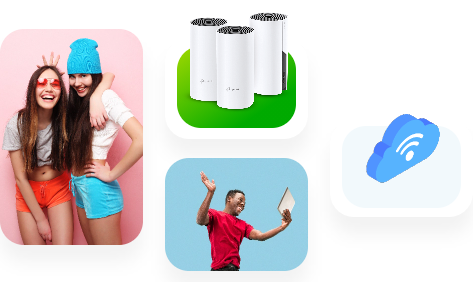
 

Vox Wi Fi Home Mesh

When you signed up for your FTTH Internet connection, you chose an option for yourself and your family that is fast, reliable and future-proof, and ready to deliver you the best possible Internet experience. Considering its scope and importance, maximising your internet connectivity line is critically important.

The good news is that you can optimise your home Wi-Fi experience with the right choice of routers, extenders and mesh options.

Your Vox Home Fibre line is future‑proof and capable of delivering outstanding home Internet, but a few simple tweaks to router placement, device choices and using mesh or Ethernet where needed will ensure the whole family gets the experience you expected.

If you need help optimising your home Wi‑Fi or want to add Vox Wi‑Fi Home Mesh, simply visit vox.co.za, sign up with Vox, or contact Vox Support on 087 805 0530.

With Vox Fibre to the Home, you are enabled by great Internet access. Welcome to a world of online opportunities.


Frequently Asked Questions

How can I tell if the issue is my Vox Fibre line or my home Wi‑Fi?

Run a speed test directly from a device connected by Ethernet to your router. If wired speeds match your plan, the issue is likely Wi‑Fi or device related.

How many Vox mesh units do I need?

A Vox two‑pack covers many typical homes and supports up to 100 devices. You can add up to eight units for larger homes or difficult layouts.

Where should I place my router for best coverage?

Position the router centrally, elevated and away from thick walls, metal objects and kitchen appliances. Avoid cupboards or behind large furniture.

Will a mesh system reduce my Internet speed?

A well-configured mesh keeps speeds high across the home. For best performance, place mesh units strategically and use wired backhaul where possible.

Do I need a new router if I upgrade my Vox Fibre package?

Your router should support the speed of your new package. If it’s rated lower than your plan, consider upgrading to a higher‑spec router or Vox Wi‑Fi Home Mesh.

Can old devices cause slow Wi‑Fi for the whole house?

Older devices can occupy airtime and reduce performance for others. Where possible, update device Wi‑Fi adapters or move bandwidth‑heavy tasks to wired connections.

Is Ethernet worth the hassle for a smart TV or console?

Yes. Ethernet (Cat 5e/Cat 6) offers the most reliable, low‑latency connection and is ideal for HD streaming and competitive gaming.

How do I contact Vox Support for help?

Visit vox.co.za for product info and self-service tools, or call Consumer Support on 087 805 0530 for assistance.


Too Big, Too Small or Just Right? Choosing the Right Internet Plan for Your Household

Getting the right fit for your household’s size, usage habits and budget

There’s an age-old fairytale for children called ‘Goldilocks and the Three Bears’. If you think about it from a South African perspective, it’s really a tale of a home invasion – a minor and harmless one at least. One takeaway from the folk tale (besides ‘Don’t enter people’s homes when they aren’t there!’) is apparently that Goldilocks is looking for her fit in life.

Vox guide to choosing the right speed, data and connection type for your household that’s just right for everyone.
Image courtesy www.kids-pages.com


Here at Vox, we obviously don’t condone home invasions of any sort, but we do endorse finding the right fit. As one of South Africa’s leading Internet Service Providers (ISPs), we understand that your online experience should allow everyone in your home to enjoy seamless connectivity for all their devices and activities. We also know that choosing the right Internet plan for your household doesn’t have to be an impossible fairytale either.  

At Vox, we’ve got multiple Connectivity plans for you to choose from, but it’s important to understand some key points to make an informed decision.

So here’s a guide on selecting the best Vox Internet plan based on the size of your household, the usage habits of everyone who lives there, and your budget – because just like Goldilocks (but not in a creepy way) we understand the importance of getting it ‘just right’.


Assess Your Household’s Internet Usage

home internet for family 

Start by assessing your household’s Internet usage patterns. How many Internet users do you have at home and what do they do online? For example, do your family members regularly spend time streaming entertainment, gaming or in online video meetings? How many devices could potentially be connected simultaneously at any given moment? Thinking about these factors will help you to determine the required speed and data allowances of your Internet plan.

Internet speed is typically measured in megabits per second (Mbps) for downloads and uploads. So: how many teenagers – or almost teenagers – are living in your house, and are any of them currently planning a career in gaming or becoming a YouTuber? You’ll want to choose higher speeds if anyone in your home is regularly involved in bandwidth-intensive activities like online gaming or HD streaming.

The table below offers some useful guidelines.

V104.1.7 How to Choose Table V1 030225 FINAL | Vox | Too Big, Too Small or Just Right? Choosing the Right Internet Plan for Your Household
choose internet plan South Africa

Select Your Internet Plan for Seamless Connectivity

When you’re choosing a household Internet plan, you want one that offers sufficient speed to support your family’s online activities without experiencing slowdowns or buffering.

Compare pricing structures among our different Internet offerings to find a plan that fits your budget and your speed requirements, as well as whether your Internet data usage will be capped or uncapped. At any given moment, you’ll find a promotional offer available and a variety of options across all our different Connectivity options (which are outlined in the next section).

Evaluate your household’s typical data consumption and choose a plan with sufficient data allowances to avoid throttling of your Internet speeds. Throttling occurs if you use more than a certain, pre-determined (as outlined within your contract) ‘fair’ amount of data in a given timeframe.

If your Internet usage is ‘throttled’, your line speed is slowed down during peak times to give other users fair access to the network. In simple terms, being throttled means that your upload and download speeds will be significantly reduced at certain times, until the new month begins and the ‘reset button’ takes you back to your contractual speeds. If you find that your home’s Internet connection is being regularly throttled, perhaps you need to upgrade to a package with higher speeds.


Types of Internet Connections 

You can find out what types of Vox Internet connections are availably simply by going to the Vox home page and typing in your address. All the options available to you in your area will then be shown.

These could include the following: Fibre to the Home, which provides blazing-fast Connectivity by using light pulses to transmit data packets through Fibre Optic cables; LTE and 5G, which work via the same wireless cellular technology that powers your mobile phone network; and Satellite, presenting your eye in the sky when other options aren’t available.

Each type of Internet connectivity for home usage has unique characteristics:

  • Fibre to the Home: Enjoy super-fast, reliable Internet with Vox’s Fibre to the Home packages, with speeds that range from 4Mbps to a whopping 1Gbps.
  • LTE and 5G: Get connected to the Fibre-like speeds of Vox’s LTE and 5G offerings without having to wait for a fixed-line Fibre option to be installed in your neighbourhood.
  • Satellite: When your area’s access to FTTH, LTE and 5G connectivity is limited, Vox offers Satellite Internet, independent of cabling, across the country. It isn’t as fast as the other options, but it’s reliable and available across South Africa.


Choose the Right Internet Plan Today 

internet speed for streaming and gaming

Selecting the right Internet plan makes sure that everyone in your home can stay connected and productive, for communication, remote work and online learning, banking, shopping and entertainment.

At Vox, we know that, just like the Three Bears in the age-old fairytale, everyone’s needs are different. Why not contact us today for expert advice on how to choose the right Internet plan for your home and your family? We’ll help you make the right choice: not too big, not too small, but just right.


Frequently Asked Questions

Is fibre always better than 5G or satellite?
Fibre typically offers the most reliable speeds and lowest latency. 5G/LTE can deliver fibre-like speeds and fast installation in many areas. Satellite is best where terrestrial services aren’t available.

What does ‘uncapped’ mean and is it worth it?
Uncapped means you don’t have a fixed data limit for normal use; check for any fair-usage policy. Uncapped plans are valuable for heavy households whose members frequently stream, game or work from home.

Why does my internet speed slow down at certain times?
That’s usually due to throttling under a fair-use arrangement or network contention during peak hours. Upgrading to a higher-tier or uncapped plan can help.

Can I mix connections (fibre with LTE backup)?
Yes. Vox and many ISPs offer redundant setups (fibre primary with LTE failover), which is useful for critical remote work or businesses operating from home.

How many Mbps do I need for remote work and video conferencing?
For reliable video calls, aim for at least 10–25Mbps per active remote worker, with good upload speeds to avoid degraded video quality.

How do I check which Vox options are available at my address?
Use the Vox availability checker on vox.co.za and enter your address to view Fibre, LTE/5G and Satellite options and the recommended plans for your area.


Great Internet Plan, Problem Router?

It’s weekend at last – but Internet access has slowed to a crawl…

Picture the scene, in this non-Vox household. (You’ll see why that’s important later in the story.)

Dad’s watching the Premier League on a streaming service; Mom’s chatting online to her friend overseas; Teenager is doing the initial download of a long-awaited new game, and Tween is on YouTube. Everyone is happy – and then the dreaded buffering starts. Everyone is instantly much less happy, and more bandwidth is clearly required.

“But wait!” says a lone voice, “we upgraded to a new home Internet plan last week and our new download speed is supposed to be blazing fast – so why is it not working?!!!”

The answer could lie with the router.

New Plan, Old Router?

Wi-Fi, as an enabler, carries most of the Internet traffic in a connected home. Your Wi-Fi router converts the Internet data received via the Fibre Optic cables in your neighbourhood into radio signals, to create your home Wi-Fi network and provide all the devices on it with Internet access, using built-in antennas.


Untitled design 2024 08 13T154659.142 | Vox | Great Internet Plan, Problem Router?

If you have a Fibre to the Home (FTTH) Internet plan that supports a download speed of say 25Mbps, an older router (and fewer users) is unlikely to cause a bottleneck in your connections.

However, if you then upgrade to a new 300Mbps plan (because of Teenagers / Tweens / the Premier League), but your previous router supports only 25Mbps wired, your Wi-Fi won’t be able to live up to the connectivity promise if your Internet Service Provider (ISP) doesn’t supply you with a newer model.

Connect With Vox

Vox connects you to the Internet and thereafter continues to manage your connection. When you sign up with Vox, we will furnish you with a suitable free-to-use Wi-Fi router based on your chosen package. We don’t charge a delivery fee for the router, or even a monthly fee for its usage – this is included as part of your bundle.

As a premium ISP, Vox ensures that, for standard installations, your Vox free-to-use Wi-Fi router is installed by a dedicated Vox engineer. Alternatively, our Self-Install process allows you to install your free-to-use Wi-Fi router, by following an easy step-by-step guide.


    • Fun fact: Different Wi-Fi devices work according to varying frequency bands. Older routers work on the 2.4 Ghz frequency, while newer phones and laptops use the more stable 5Ghz range. A dual-band device that supports both frequencies is ideal.


Not all routers over a few years old are necessarily bad, but if you’ve upgraded your Internet plan or added more devices to your network, an older router might have a harder time juggling the extra work than a newer model.

Signs that you might need a Wi-Fi router upgrade include the following: slow speeds; a weak connection; malfunctioning equipment; incompatibility with new devices and even overheating.


    • Fun Fact: Old smartphones, tablets, and other devices can slow also down your Internet access, even if you have a new, fast router and an upgraded Internet plan.


jonathan kemper ff96HE413W0 unsplash | Vox | Great Internet Plan, Problem Router?

At Home with Vox

The moral of the story is that new tech needs to meet its match – in other words, more new tech.

As outlined, older routers and network equipment can affect the household’s Wi-Fi speeds, especially when there are multiple users. We believe the issue of having the wrong Wi-Fi router for an upgraded Internet plan with Vox is highly unlikely, because we take care of that level of detail, and the responsibility, for you.

For Customer Service and General Queries, our Vox teams are on hand from 08:00 to 17:00, Monday through Friday, and from 08:00 to 14:00 on Saturdays and non-religious public holidays. You can reach us at help@voxtelecom.co.za or call 087 805 0530.

With Vox, upgrading your FTTH Internet usage plan is a straightforward process, and our Technical Support team is always able and willing to help you. We have a Wi-Fi solution for every need.

Sign up with our Fibre to the Home offerings and say goodbye to buffering and hello to hassle-free, connected weekends – for the whole family.


AdobeStock 478762309 1 | Vox | Great Internet Plan, Problem Router?


Internet, Unplugged: The Convenience of Wi-Fi

(‘The Internet’ and ‘Wi-Fi’ Are Not the Same)


“Hi, can I please use your Internet?”

“No, but you are welcome to access my Wi-Fi – let me give you the password.”

The Internet and Wi-Fi are not the same. Nobody owns the global Internet, but people pay for their connectivity and Wi-Fi services (to the home or office) to access the Internet. Knowing the difference makes for clearer understanding and communication.

And just as it’s the nature of water to flow freely through a well-built system, so does  information on the internet when it’s enabled by the correct infrastructure. Wi-Fi enables us to access this information without having to plug in our devices through a cable – let’s take a look.


The Internet of Possibilities

Back in its earliest days, people had to plug their devices into an ethernet cable (or before that, an ADSL connection, which was essentially a Telkom landline) to connect to the Internet.

That’s why people talked about ‘Being online’ – because you were ON the internet, but only because you were connected to a LINE (i.e. the cable).

Today, most people connect to the Internet in their homes (or at their office premises) through a wireless connection, in other words through Wi-Fi access. It’s a huge step up from having to have your device constantly plugged in to remain connected.

So how does Wi-Fi access enable wireless connectivity?

marvin meyer SYTO3xs06fU unsplash | Vox | Internet, Unplugged: The Convenience of Wi-Fi


From Fibre Outside to Wireless Inside

Your home Wi-Fi network begins with Fibre Optic cables that are laid outside your property within the neighbourhood by the fibre network operators (FNOs). Through these Fibre Optic cables, Internet data is transmitted at the speed of light.

When you sign up for a Wi-Fi service, an internet service provider (ISP) – like Vox – then takes over. The ISP links the FNO Fibre box outside your property boundary with a separate (shorter) Fibre Optic cable to an optical network terminal (ONT) inside your home.

The ONT is linked with one last short cable into your Wi-Fi router, which then ‘converts’ Internet data received via the Fibre optics into radio signals, to create your home Wi-Fi network.

And voila! You and your devices have access to wireless Internet access in your home.


Internet Like Water

Much like water, the Internet, with its constant access to information and services, has become fundamental to modern life today. So you could also think of the process like this:

  • Firstly, the Internet is the water that is constantly flowing.
  • The Fibre cables are your hosepipe – the actual infrastructure that carries the Internet to you.
  • Your Wi-Fi router is the primary sprinkler that makes the Internet easily accessible. Wi-Fi lets you access the Internet without having to literally plug in your device.
  • Finally, mesh units or access points placed strategically within your home further sprinkle your Wi-Fi everywhere it’s needed, allowing for the freest possible flow of the Internet and the information it allows us to share.

hose 3401513 1920 | Vox | Internet, Unplugged: The Convenience of Wi-Fi


From the way we communicate and work, to how we shop, bank and entertain ourselves, the Internet has revolutionised multiple aspects of our lives.

Vox can assist you with all of your connectivity needs, from infrastructure to Wi-Fi, with a host of additional options to quench your thirst for fully-enabled communications.

We’re proud to say that there’s no obstacle to free-flowing communications that we can’t solve for you.


Affordable High-Speed Broadband, Plus Value-Adds, for Every South African

Is that all? The importance of offering ‘more’ in a saturated environment


Today’s world is defined by Connectivity in ways that seemed unimaginable when the clock first ticked over into the current millennium. Whether it’s WhatsApp, X, LinkedIn, Pinterest, Facebook, Snapchat or TikTok, people love being connected, and online is here to stay.

Here at Vox, Connectivity lies at the heart of everything we do.

As a leading South African Internet Service Provider (ISP), we are all about connection, communication and conversation – but we also know that we’re not alone. The local telecoms landscape has more than 20 ISPs in operation – you could call it a saturated market.

And so Vox goes above and beyond to offer our customers more than the competition – you definitely won’t hear the phrase: ‘Is that all?’ about any of our offerings! At the heart of our multiple solutions is the goal of being able to offer every South African access to affordable high-speed broadband.

Let’s take a look at how we can get our customers connected.


Rocket1 | Vox | Affordable High-Speed Broadband, Plus Value-Adds, for Every South African 

Dealing With Market Saturation

In addition to high-speed broadband, Vox provides many excellent value-adds. As well as lightning-fast Internet, we offer Wi-Fi solutions to keep you connected; cost-effective and quality Voice over Internet Protocol (VoIP) offerings; energy back-up products for power outages; and even cell boosters to enhance your mobile phone experience – no more ‘dead’ zones in the house!

You can look to Vox for the following:

  • Our connectivity solutions begin with Vox Fibre, which comes with value-added extras upon sign-up, like free installation and a free-to-use router.
  • When Fibre is unavailable, other options are provided:
    • Vox Wireless presents high-speed, fixed Microwave Data Connectivity that uses the most innovative microwave technology on the market. It comes with free installation, meaning more money to invest in your business.
    • Consumers and businesses also have the option of choosing Fixed LTE, 5G, and satellite, depending on factors such as their needs and budget, and geographic location.
  • To ensure that our customers get the most out of their Internet solution, we supply best-of-breed Wi-Fi devices, which allow you to maximise your Wi-Fi experience. We also offer managed Wi-Fi network solutions, which enable remote software, firmware updates and reduced technician callouts with remote troubleshooting and fault remediation. Additionally, our expert advice is always available to enhance your overall network experience.
  • We also provide excellent access to power solutions for those times when the power goes down, to keep your Wi-Fi running even in an energy outage.
  • Vox’s shared Mobile Data offering is an ideal mobile wireless solution for a family with multiple SIM-enabled devices, to keep everyone connected while maintaining control over your mobile data bill using our simple online portal.


AdobeStock 478762309 | Vox | Affordable High-Speed Broadband, Plus Value-Adds, for Every South African

What Sets Our Connectivity Options Apart?

Vox offers our clients high network availability and an extensive national footprint, as follows:

  • We have a huge range of subscription and pricing solutions, and our sales agents will help you choose the best package for your needs, rather than upselling you on the most expensive.
  • Vox subscribers, both consumers and businesses, have the option of adding backup Internet solutions to their Fibre packages (like LTE or Wireless) to ensure they stay online all the time.
  • Our Proactive Network Monitoring offers safer, more secure Internet access and lower latency.
  • A 24/7/365 in-house Service Centre is available for troubleshooting and incident response for all our customers, across any product.
  • As far as Voice offerings are concerned, we believe that we’re the number 1 VoIP provider in the country.
    • Individual consumers and SMEs can make use of our Vobi softphone application, which is unique to Vox, and allows customers to make and receive high quality Voice and Video calls over Wi-Fi, 3G, 4G-LTE and 5G on the Vox network.
    • Organisations can make use of our Titanium partnership (the highest status possible) with global cloud PBX leader 3CX, to experience a comprehensive communication platform that includes Live Chat, WhatsApp, Facebook, SMS and Video Conferencing.


Orange woman megaphone resized | Vox | Affordable High-Speed Broadband, Plus Value-Adds, for Every South African

Vox teams are situated in multiple locations across the country, supported by our extensive footprint of over 1 000 business partners to ensure that our customers receive fast, efficient service wherever they are, whenever needed.

Value-Added Service Offerings

We take full responsibility for all our technical implementations and systems, from concept to installation.

  • The Vox Service Centre offers immediate support to all our customers.
  • The Service Centre also continuously monitors all of Vox’s networks and infrastructure, to ensure that quality of service is always maintained.
  • Specialist product managers are assigned to oversee each portfolio, for continuous research and development to ensure each product is always of the highest standard.
  • An extensive team of account managers and technical engineers offers convenient customer service and solution implementation.
  • If you’ve decided to upscale your business with better Connectivity, don’t stop there! Vox can also organise a customised domain and email address for you, to turbocharge your professionalism, as well as taking care of your email archiving needs with the most comprehensive and hassle-free cloud email and compliancy solution on the market.
  • There’s always a good time to sign up with us – you could win with our ‘Refer a friend’ campaign, and there’s always a fabulous promo running that allows you to sign up and save.

Expertise, innovation and superior quality products are at the heart of Vox. Ultimately, we have everything required to meet our customers’ needs at every stage of their journey – both now, and in the future – and that’s how we keep South Africans staying connected together.

With us, there’s always more.


AdobeStock 399195503 resized | Vox | Affordable High-Speed Broadband, Plus Value-Adds, for Every South African

The Benefits of Switching to Fibre Optic Internet

Fibre optic Internet uses light through glass Fibres to deliver far higher speeds and steadier performance than copper ADSL, making it ideal for streaming, gaming, remote work and business continuity.


Why would you NOT want to make use of the speed of light?

Because let’s face it: nothing in the current known universe is faster.

Except for The Flash, who can apparently run 13 trillion times faster than the speed of light.

81sicgpYcjL. AC UF10001000 QL80 | Vox | The Benefits of Switching to Fibre Optic Internet

The DC Universe aside, the speed of light is an amazing thing. According to Einstein’s theory of relativity, it’s the fastest speed in the universe: 300,000 kilometres per second in optimal circumstances.

It’s even more amazing to think it can be used to power our Internet usage.

But this only happens if your Internet service provider is using Fibre Optic cables. If your service provider is still using copper lines as the (much) older technology, Internet at the speed of light is completely out of the question.


How Fast Do You Want to Go?

Internet speed means the speed at which information or Data travels from the web to your connected device. It’s calculated in megabits per second (Mbps) and the downloading speed (getting information from the Internet to your device) is often higher than the uploading speed (the other way around – sending information from your device to the Internet).

In the old days, our Internet connections were only able to run on ADSL (Asymmetric Digital Subscriber Line). ADSL uses telephone lines (Telkom lines) to transmit Data along copper cables from your nearest telephone exchange to your home or office. These are frequently unreliable and heavily shared among users – which slows down the possible speed of your connection.

Two factors slow down ADSL speed significantly:

  • Distance:The further away you are from the exchange, the greater the distance the Data has to travel, and the slower your Internet.
  • Traffic:When copper cables experience more traffic, the wires heat up and the connection slows.


It’s a bit like driving on the highway: when you’re the only driver on the road, you can reach a very satisfying speed, but when it gets crowded, traffic slows down. ADSL can provide average speeds of approximately 4Mbps.

In contrast, Fibre Optic technology transmits Data as light impulses along flexible glass Fibres, enabling users to achieve speeds that are about 500 to 1,000 times faster than your average ADSL line. So how does the marvellous invention of Fibre Optic cables use this speed for Internet services?

  • Fun fact: The first actual Fibre Optic cable was invented in 1952 by UK-based Indian-American physicist, Narinder Singh Kapany, who was a pioneer in the field of Fibre Optics and popularised the term.


Harnessing the Speed of Light for Communications

Fibre to the Home (FTTH) and Fibre to the Business (FTTB) services use Optical Fibre to deliver high-speed Internet directly to individual buildings. These Fibre Optic cables, composed of strands of glass, transmit Data using light pulses. Users can achieve incredible speeds of up to 1,000Mbps.


Fibre optic internet


Some of the benefits of Fibre Optics include the following:

  • High speed: Starting with the most obvious point, Fibre Optics brings you the best available speed within the current Internet landscape.
  • Reliability: Lots of ‘hiccups’ take place during transmission in a copper cable Internet, all the time. With Fibre Optic Internet, a smooth and constant flow of Data means this no longer happens.
    • Fun fact: This is important for gamers, where a small blip at the wrong moment can lose the game.
  • No difference between upload and download speeds: Depending on your needs, you can choose an Internet package that gives you symmetrical speeds for both downloading and uploading. With ADSL copper cables, this isn’t possible (it’s in the name, after all: Asymmetric Digital Subscriber Line).
  • Connecting multiple devices: The steady signal, with more bandwidth, means you can connect with multiple tablets, laptops, smart TVs and phones at once. Even with different people streaming music and video simultaneously, Fibre Optics can handle the load.
  • Safety and security: Unlike copper wires, Fibre Optic cables have no second-hand value for criminals, which means cables are not usually targeted for theft. They are also much less easy for cybercriminals to hack.
  • Higher quality: Ultra High-Definition TVs pack significantly more pixels into the same area, which makes for better images, but also uses more bandwidth. For Fibre Optic networks, it’s not a problem.
  • Consistent reliability: Fibre Optic cables are less susceptible to interference from weather conditions or other devices, so you’re less likely to experience outages or slow speeds on your network during peak usage times.


It’s clear that Fibre Optic networks are capable of much greater speeds and bandwidth than copper-based ADSL. In recent years, prices have also come down substantially.

Why not look into Fibre to the Home from Vox? Just plug in your home address and a map will show you all our Connectivity options available in your area.

What are you waiting for? Move towards the light!


FAQs

Q: How fast is Fibre compared to ADSL?
A: Fibre commonly delivers speeds up to 1 000Mbps and can provide symmetrical upload/download rates; ADSL typically delivers much lower, asymmetric speeds that decline with distance from the exchange.

Q: Can Fibre handle multiple devices streaming at once?
A: Yes, Fibre offers greater bandwidth and steadier throughput, so multiple users can stream, game and work simultaneously without noticeable slowdowns.

Q: Is Fibre more secure than copper?
A: Fibre is harder to tap and has little resale value for thieves, making it more secure physically. It also supports network configurations (VLANs) that improve data separation and security.

Q: What’s the difference between Vox Fibre to the Home and Vox Fibre to the Business?
A: Vox Fibre to the Home targets residential customers with high‑speed packages for streaming and everyday use. Vox Fibre to the Business offers dedicated options, lower contention ratios, VLANs and support packages tailored to commercial needs.

Q: How do I check if Vox Fibre is available in my area?
A: Plug in your home address on the Vox availability page and select ‘Connect me’ to check availability and see current connectivity options for your location.


Fibre optic internet

Cyber Space? No, Cyber Oceans…

How the Internet is powered in the depths of the sea

Subsea cables, which are bundles of fragile glass Fibre protected by heavy armour, carry roughly 98% of international internet traffic, linking continents via light pulses and landing stations that connect to national Fibre networks.

Did you ever wonder how the Internet reaches across oceans so that we can communicate – via Email, social media or Internet Voice functionality – between South Africa and the rest of the world? And how is it that, in the blink of an eye, a local gamer can execute a tactical manoeuvre with a team-mate in England to annihilate an ‘enemy’ in Australia? And what enables us to download American-made YouTube videos and watch X rants in real time from Donald Trump?

The Internet is able to reach across oceans like this because a huge chunk of it is actually placed in the oceans. Many people don’t realise that around 98 percent of international Internet traffic is carried around the world by subsea cables.

Let’s take a look.

The Hidden Deep-Sea Internet Highway

The Internet ‘superhighway’ joins continents and countries through both subsea as well as terrestrial cables. The data wires in this interconnected web bring high-speed Internet access to all parts of the globe, through around 1.5 million kilometres of cable criss-crossing the ocean floor.

These cables are laid on the seabed at an average depth of 3,600 metres. Today, there are about 500 subsea cables that are either live or under construction, and if their total lengths were combined, they could stretch – roughly – from the Earth to the moon, about three times over.


TeleGeography submarine cable map headline | Vox | Cyber Space? No, Cyber Oceans…
Image courtesy of https://www.submarinecablemap.com/


The cables are typically funded by the telecom industry, sovereign nations and technology companies such as Facebook and Google. So the reality is that the backbone of the planet’s Fibre cables are deep in the sea, quietly linking people and businesses to each other, all the time (except when something happens, but that’s a different story).

Thin Cables, Extraordinary Power

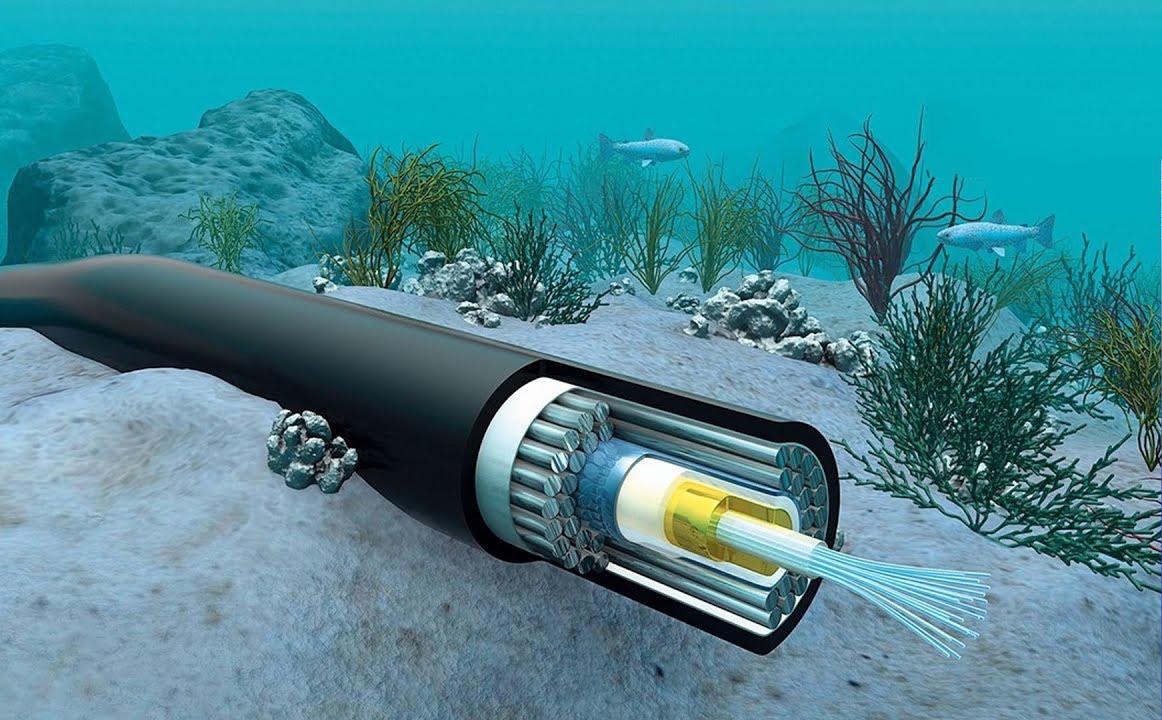
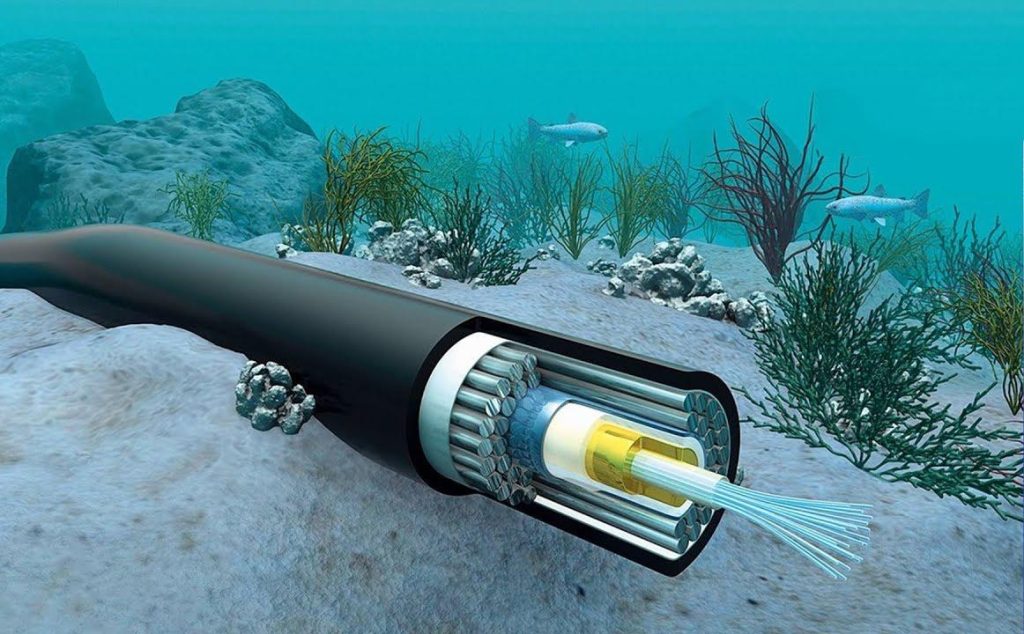
Fibre Optic cables transfer data across the world in the blink of an eye via light pulses, which travel through fragile wires just thicker than a needle. Fibre Optic cables are tiny tubes made of glass or plastic, which are in turn protected by multiple layers of hard materials like metal and rubber.


cabo submarino | Vox | Cyber Space? No, Cyber Oceans…


A single Fibre Optic can transmit 100 gigabits of data a second, with new cables able to transmit around 400 gigabytes per second. Thousands of Fibre Optics get bundled together and insulated, making one Fibre cable.

Subsea cables typically include a protective jelly around Fibre Optic cables and are also contained within multiple layers of plastic and copper wires. Under the water, ‘repeaters’ are connected at certain points. They amplify the signal and boost signal strength over long distances. The copper wires contained within the cable casing carry around 10 000 volts of electricity to power these repeaters.

The bottom line (pardon the pun) is that both within the sea and on land, the fine tubes that carry data packets at the speed of light need to be protected, which makes the cable overall – once properly wrapped up and protected – look much bigger than the thin part that actually does all the work.


underseacable | Vox | Cyber Space? No, Cyber Oceans…


From Sea to Land

When subsea cables under the world’s oceans reach the shore, they are then connected to landing stations, which are an essential part of the Fibre network infrastructure – they distribute the data carried on the networks, joining the submarine cables to terrestrial cables.

For example, there’s a landing station in Mtunzini in KwaZulu-Natal, where the SEACOM cable reaches South African shores. This cable connects the subsea cable directly to a data centre in Midrand, Johannesburg.

Once plugged into the landing stations on shore, the cables take on their overland mutation and are distributed by FNOs (Fibre network operators). The FNOs are responsible for deploying, managing and maintaining Fibre Optic networks – their role is the physical infrastructure, or, in short, running the cables under and next to roads and buildings.

Be Connected with Vox

As an Internet Service Provider (ISP), here at Vox we don’t physically lay the cables ourselves, but instead partner with a number of FNOs around the country to bring South Africans high-speed Fibre to the Home (FTTB) and Fibre to the Home (FTTH) offerings. Some of our local FNO partners include Openserve, Vumatel, Frogfoot, Metrofiber Networx and Octotel (you can find out more here).

An ISP – like Vox – provides Internet access to businesses or residential customers. An ISP’s role is to operate on top of the existing network infrastructure and manage services by offering different plans and packages based on speed and other features.

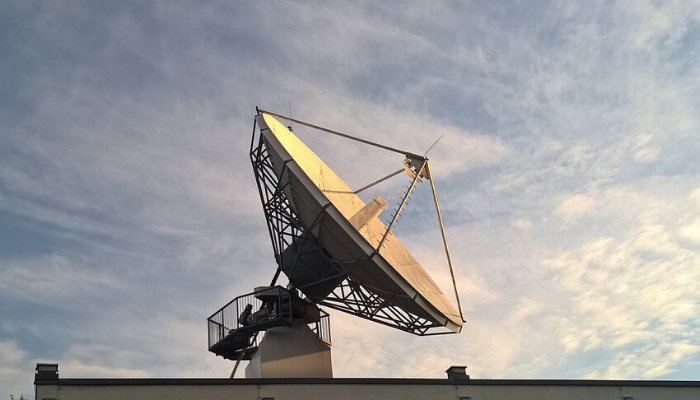
So next time someone talks about cyber ‘space’, you can point them in the right direction – that it’s mostly all about the ‘cyber oceans’. Except, of course, when it comes to a small section of Internet connectivity that’s powered by Satellite in outer space (just to talk about actual space here for a second).


Featured Image Content Hub Vox launches high speed uncapped data and voice satellite plans | Vox | Cyber Space? No, Cyber Oceans…


Satellite really comes into its own in regions where Fibre cables can’t be laid, perhaps because of rough terrain (like mountains) or because the area is just too remote. Vox also offers Satellite services – because as modern life becomes increasingly dependent on the Internet, reliable connectivity is more important than ever before.

Whether it’s for following the news, being connected for work, gaming, staying in touch with friends and family, or streaming shows and movies in your down-time, it’s great to live in today’s connected world. Whatever your needs, Vox will get you connected and keep you in the conversation.


Frequently Asked Questions

Q: What are subsea (submarine) cables and why do they matter?
Subsea cables are bundles of Fibre optic strands laid on the ocean floor that carry roughly 98% of international internet traffic. They form the global backbone that determines international speed, latency and reliability for streaming, gaming and global business traffic.

Q: Does Vox lay subsea cables?
No, Vox does not lay subsea cables. Instead, we partner with Fibre Network Operators (FNOs) and make use of landing‑station capacity so we can deliver international bandwidth into South Africa and on into local networks.

Q: How do subsea cables affect my home or business connection?
Subsea capacity affects international latency and throughput. Good access to landing stations and local distribution networks means smoother streaming, faster international downloads and better performance for cloud apps and gaming.

Q: How can I check if Vox Fibre is available at my address?
Plug in your home address on the Vox availability tool and select ‘Connect me’ to see whether Vox Fibre to the Home is offered at your location.

Q: What if Fibre isn’t available where I live?
Where Fibre is not yet available, for example in very remote or rugged areas, Vox offers Satellite services as an alternative to keep you connected.

Q: What support and contract options does Vox offer for business and residential Fibre?
Vox provides 24 / 7 / 365 support at no extra monthly cost and a range of contract terms to suit different needs. Business Fibre can include dedicated options, static IPs and VLANs; residential plans may offer zero upfront fees on qualifying 36‑month contracts. Contact Vox for package details and tailored service options.

From Sign to Surfing: How Vox Makes Your Home Internet Experience Hassle-Free

The internet is part of everyday life now and something that we access continually, whether it’s for online banking and shopping, working and studying, or gaming and entertainment options.

And the difference between having access to capped versus uncapped data can feel life-changing – not to mention that if you are constantly topping up your data, it can quickly become expensive. In comparison, Fibre to the Home (FTTH) provides lightning-fast, uncapped data – and the cost just might surprise you when you compare it to constantly having to buy data bundles.

Why not check out our Vox FTTH offerings and see how making the switch to uncapped data could change your life for the better?


What’s Your Story?

Almost everyone has had a bad experience with using uncapped data – so what’s yours?

Maybe you were working from home with an urgent deadline, but your Internet wasn’t up to the task and you missed the cut-off. (You also missed out on your next pay increase.)

Or perhaps your data ran out during a job interview? (Another potential salary increase that went whizzing by into the realm of ‘If Only’…)

What about that movie you were really looking forward to watching, but it stopped streaming halfway through? Or the times you were speaking to family members far away and the data-based call dropped, just when the catch-up was getting really enjoyable?

Maybe you were writing an online exam at home, but your data cut out and stopped you from submitting the paper. (You still passed, but that zero really brought down your grade average for the year.)

Kirill Makes Pics Pixabay despaired 2261021 1920 | Vox | From Sign to Surfing: How Vox Makes Your Home Internet Experience Hassle-Free

Running-out-of-data stories generally don’t end with a smile on the storyteller’s face – so maybe it’s time to ditch using a data package that needs constant topping up, and move over to the convenience and enjoyment of fast, uncapped data with Vox’s Fibre to the Home.


Problem, Solution: Enter Vox

If you’re still thinking: “Why Vox Fibre for your Home?” – well, Vox offers access to a home environment where super-fast Internet lets customers stream Netflix or YouTube without the annoying buffering. It allows you to connect multiple devices inside your home, simultaneously, on a single Fibre line. You can surf the Internet – for working, studying, gaming, shopping, socialising or simply being entertained – with no interruptions.

Long story short: Vox FTTH offerings bring you a home in which your Internet experience is reliable and fast (Eskom allowing, of course, and Vox has loadshedding solutions there too).

And not only does Vox FTTH bring you a fantastic Internet experience, it’s also pretty easy to sign up with us.


Easy Steps to Signing Up with Vox

Fibre Coverage?

The first step is checking that Fibre lines have been laid in the ground in your area. Go to the ‘Vox Shop’ to check out the useful coverage map. Simply put in your address – you can have a quick peak at the neighbours’ rooftops and surrounding vicinity if you enjoy cyber-sleuthing – to find out if Fibre to the Home is available in your area. The answer will come up very quickly.

Fibre Package

Next up is to choose a Fibre package option. Once you’ve matched the options to your needs, simply hit the ‘Send’ button and follow the instructions to input your details.

Quotation and RICA Time

Next, you will receive an emailed quote from one of our sales consultants. When you accept the quote, you’ll also need to send in your RICA documents.

  • A quick technical note: By law, you need to follow RICA procedures (the Regulation of Interception of Communications and Provision of Communication Related Information Act), which involves submitting certain documents, like your ID and proof of current address. RICA legislation was enacted to protect the security and privacy of South Africans.


Fibre Installation with the FNO

Once all your documents are processed, Vox will log a call with the relevant Fibre supplier associated with your chosen quotation package.

  • Another quick technical note: As an Internet Service Provider (ISP), Vox works with the Fibre Network Operators (FNOs) who own and operate the Fibre lines in the ground.


It’s a Date!

The relevant FNO will get in touch with you to bring a short Fibre line onto your property. Basically, the FNO’s job is to connect the Fibre outside in the street into your home, ultimately to be connected to your Vox Wi-Fi equipment.

The FNO will plan the route for the Fibre line and the location of the ONT inside your home, which you’ll be asked to accept and sign off.

  • Another quick technical note: The ONT is the Optical Network Terminal and is also commonly referred to as a ‘fibre box’. The ONT is what allows the fibre optic cable to be connected from inside your home, out through your property and to the fibre network at the street.


Once you have signed off the necessary paperwork for the Fibre line handover with the FNO company, it’s back to Vox.

Vox Wi-Fi Router

Vox will deliver your Wi-Fi router by courier. You’ll then set up the Wi-Fi router as per the self-installation instructions, which are simple and clear to understand. Welcome to an online experience that is easy, uncapped and FAST!


Come Home to Vox

Are you ready to make the life-changing move to uncapped data and super-fast internet?

With Vox, you will enjoy uncapped Wi-Fi, with unlimited surfing possibilities, an end to movies buffering, super-fast gaming and a working-from-home experience that, quite simply, works.

Just click here to find out more about signing up for FTTH with Vox.


Frequently Asked Questions

What is Vox Home Fibre and how does it differ from mobile data?

Vox Home Fibre is a fixed fibre connection to your house offering uncapped, high‑speed internet; unlike mobile data, Fibre provides consistent, symmetrical speeds and supports many devices simultaneously.

How do I check if Fibre is available at my home?

Use the Vox coverage map and enter your address. The tool will tell you immediately if Home Fibre is available in your area.

What documents do I need to sign up for Vox fibre?

You’ll need to submit RICA documents: a valid South African ID and proof of current address. RICA is a legal requirement for new internet connections.

What is an ONT and who installs it?

The ONT (Optical Network Terminal) is the fibre box installed by the Fibre Network Operator (FNO) to bring the fibre into your home. The FNO plans the route and hands over the ONT once installed.

Will Vox install my Wi‑Fi router?

Vox delivers your router by courier and provides simple self‑install instructions. Support is available if you prefer guided setup.

How long does installation take after I accept the quote?

Installation lead times vary by area and FNO schedules. After you accept the quote and submit RICA documents, Vox and the FNO will confirm an installation date.


How Internet Access is Changing Life for South Africans

Working together to build inclusive internet access can improve people’s lives.


Connectivity through the internet brings many benefits, but while internet access is something that many of us take for granted, accessing its benefits is still a challenge for many South Africans.

Greater connectivity allows people to learn new skills and advance their abilities. It also allows employers and businesses to create opportunities that will unlock future jobs and drive our economy forward.

The internet, you could say, opens up the highway to the future, providing tools, skills, benefits and opportunities. Like access to regular and efficient electricity and water supplies, reliable internet access should be part of modern life for everyone.


A New Basic Necessity

According to the World Bank[1], high-speed internet access is not a luxury, but a basic necessity for economic and human development in both developed and developing countries.

The World Bank clarifies: “(The internet) is a powerful tool for the delivery of essential services such as education and healthcare, offers increased opportunities for women’s empowerment and environmental sustainability, and contributes to enhanced government transparency and accountability. It also helps foster the social development of communities, including within the broader global context.”

The World Bank adds that the challenge is to expand broadband access to all, noting that: “Only about 35 percent of the population in developing countries has access to the Internet (versus about 80 percent in advanced economies).”

So where does that leave South Africa?


Spotlight on SA

The Independent Communications Authority of South Africa (ICASA) says: “As of October 2022, some 78% of South African households had access to or had used the Internet in some form or another. This includes access at home, at work, at their place of study, via an Internet café, or at a public hot spot. This represents a dramatic increase from the national average of a mere 28% from ten years ago.”

At almost 80% access, this is a surprisingly hopeful statistic. We could argue that, even if not everyone in the home is internet-savvy, having just one person in the household who is able to access the Internet is beneficial in some form or another.

However, ICASA also goes on to add the following warning: “Worrying though, Internet access at home (largely by means of a device such as a laptop computer or tablet) continues to languish at around a mere 10% of households.”

In other words, those in South Africa who actually have access to the internet at home through a laptop or tablet computer – and not only via a smart phone – number only about one in 10 households.

As ICASA points out: “…substantial and active steps remain necessary to address South Africa’s digital divide, a divide that separates urban and rural, rich and poor, men and women, and that prevents far too many of our people from exercising their fundamental human rights. Indeed, access to the Internet is now widely accepted as a fundamental human right in its very self.”

Internet access has the capacity to change and improve the lives of our citizens, from those in rural areas and small towns to metropolitan hubs. No matter where in the country we are, the internet brings new possibilities – provided, of course, that our citizens have access to it.


Benefits of Internet Access

The benefits of internet connectivity include the following: access to information; communication possibilities over various online platforms; educational opportunities; remote working possibilities; entertainment via online streaming, gaming, YouTube, TikTok and more; online shopping; banking and investment applications; and security through CCTV access – to name just a few.

Let’s unpack a few of the ways in which internet access has changed – or is changing – people’s lives in South Africa.

  • Information Access: The Internet democratises information access and makes it possible to communicate with people all over the country, in real time. Email, instant messaging, and social media platforms like Facebook, Twitter and Instagram have made it possible to share news, views and opinions, and join in conversations – without needing to wait for the ‘official’ news to break the story.
  • Lower Communication Costs: Using an internet-enabled app on your smartphone is generally cheaper than a landline or normal mobile call (check out Vox’s Vobi app for smartphones here).
  • Online Banking and eWallets: Mobile banking allows users to access and manage their bank accounts and financial information without needing to physically go to the bank all the time. In addition, eWallets are instant, easy and secure, and are offered by all the big banks, as well as some other services, bringing consumers an instant, easy and affordable money transfer service that allows anyone to send money to anyone else.
  • ICT-Related Jobs: The rolling out of internet infrastructure, such as fibre or wireless technology, brings employment opportunities to people across communities, including fibre installation, route surveying, network design and service provisioning. Here at Vox, our journey first began in 1998 with around 20 employees. Today, we employee almost 2,000 employees and interact with several business partners, while our numbers continue growing every month – we are proud to play our role in facilitating employment growth in South Africa. If you’re interested, view our job opportunities here.


On the flip side, the rise of internet connectivity has also enabled e-hailing – giving rise to fleets of drivers for apps like Uber, Bolt and others – while online shopping for groceries and takeaways has brought a new dynamic to our city roads in the form of death-defying motorbike riders bringing groceries and foods to households as fast as is humanly possible.

  • Satellite Connectivity in Remote Areas: Satellite Internet has become a game-changer for those living in rural or outlying areas, where Fibre and Wireless Internet options aren’t available. Check out our Vox Satellite options – we offer high-speed Internet, independent of conventional cabling, across the country. And unlike some others, we’re here to stay – we’ll never pull out of SA Inc.
  • Access to Weather Updates: Just for fun but still important: Vox Weather brings you the weather details through the internet. It’s a fantastic service for anyone whose job requires knowing whether thunderstorms or snow are on the horizon, as well as for the rest of us who just want to know how to dress for the day.


ICASA Assists in Democratising Broadband Access

The digital divide in South Africa is multi-faceted, encompassing not only the availability of technology but also access.

According to ICASA, the successful 2023 auction – after years of waiting for finality – of broadband radio frequencies that enable the implementation of 4G and 5G radio waves, will bring the country a significant step closer to achieving universal access and service.

ICASA gave six companies licences to acquire a large amount of additional spectrum that is suitable for providing voice and data services in both urban and rural areas. Consumers can expect greater levels of access and enhanced quality of service, giving them faster download speeds, lower latency, more capacity and connectivity for millions of connected devices. This in turn will pave the way for far better access to online information and content.

In addition, which is probably less universally realised and a Really Good Thing, ICASA has imposed a number of service obligations on the companies that bought spectrum in the auction. These obligations are aimed at increasing the pace of network rollout in previously under-served areas, and include providing connectivity to public institutions.

The licence-holders are required to connect over 18,000 government schools, over 3 900 government clinics, more than 1 700 government hospitals, over 550 police stations, and 8 200 traditional authorities (tribal offices), as well as providing zero-rated access to a range of public benefit websites, including .gov.za websites.

At Vox, we look forward to hearing positive news of this ICASA rollout, as it will move the country closer to having all its citizens able to enjoy their human rights through connectivity.


The Final Word

Between laptops, tablets and mobile phones, internet access is now enabled on the move in today’s world. Even if a smartphone is the only electronic communication device that an individual has, it is capable of giving full and widespread access to the internet in a way that was unheard of just 15 years ago.

There are other ways in which the future is already here. Smartphones today can also understand complex spoken commands; make reservations for entertainment or eating out options; control a smart home; be used to play a sophisticated video game; and stream 4K video.

But that’s a different story – a sequel maybe? Watch this space.

john mark arnold soMvIOHmdgM unsplash | Vox | How Internet Access is Changing Life for South Africans


[1] The World Bank is an international development organisation owned by 187 countries. It provides loans and grants to the governments of low- and middle-income countries to help them pursue project to improve their economies and also improve the standard of living of their citizens.

Fibre to the Home: How Fast is Fast Enough?

Slow internet isn’t just annoying; it also costs time and productivity. Whether you’re joining an important Teams call, uploading large work files, streaming 4K video or gaming online, insufficient speed creates delays, buffering and poor call quality. Choosing the right Fibre to the Home plan reduces interruptions and keeps your household or small business running smoothly.


Nobody wants to look like a zombie in a bad freeze-frame moment.

So there you are: working from home, and one minute away from joining the most important conference call of the week.

Your outfit, hair and outward demeanour are all on point. You have great input to share when it’s your five minutes in the spotlight.

And then your Internet speed lets you down.

You are hit with the dreaded freeze-frame scenario in which your eyes are closed – but only halfway – giving you the dreaded Undead-Look-of-the-Day.

Never mind the hair and outfit: perhaps it’s time to upgrade your Internet speed.


When Good Internet Goes Bad

Slow internet can have clearly negative effects on people’s lives, including detrimental results on efficiency, communication, and access to information and opportunities. For example, slow internet can:

  • Reduce productivity: Slowing down work processes and making it harder to access and share information.
  • Have a negative effect on communication: Causing delays and disruptions in online conversations and video calls.
  • Limit access to online resources and opportunities: Certain websites and services may not load or function properly.
  • Affect your leisure time: Slowing down your streaming and gaming down-time.


From faster file downloads to interruption-free video and music streaming, you don’t have to be an IT expert to appreciate the benefits of high-speed internet service.

internet speed for gaming

How Fast is Fast Enough?

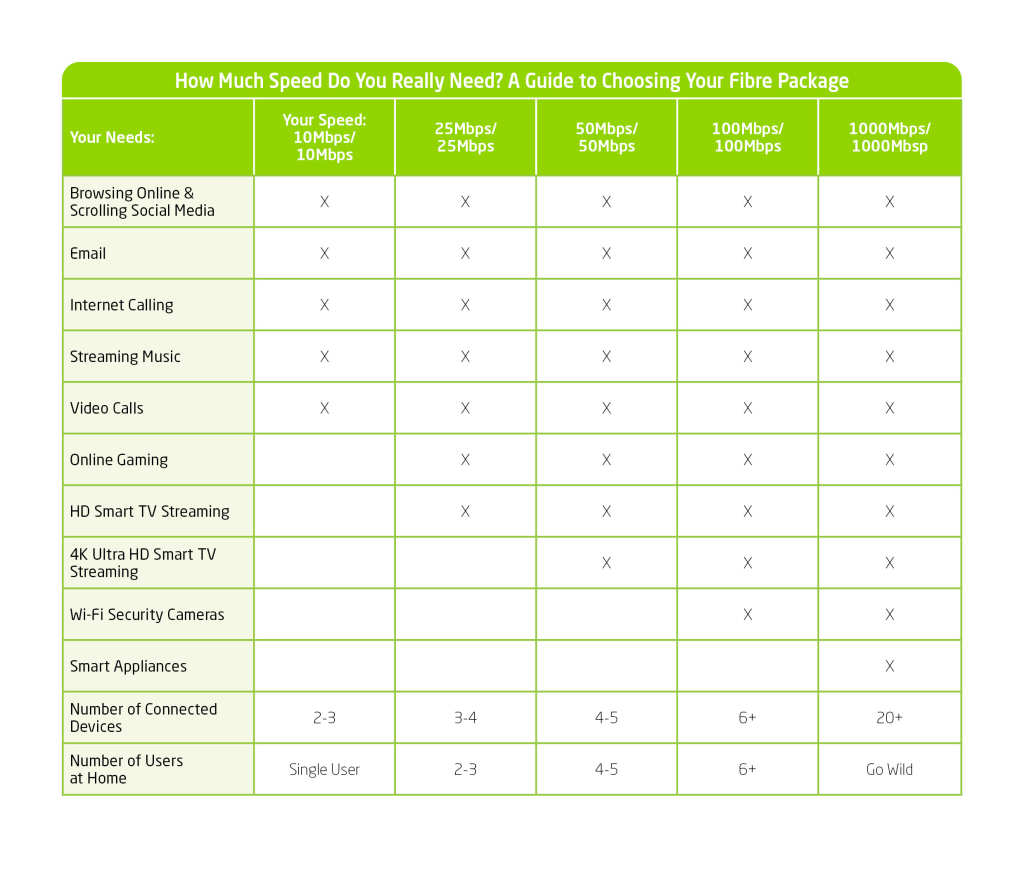
Your internet speed sets the framework for what you can do online, so it needs to be able to support your daily internet usage.

Ranging from less than 1 Mbps (very slow) to 5,000 Mbps (really fast), you can choose an internet plan to suit your needs. We recommend that a good download speed is at least 100 Mbps, while a good upload speed is at least 10 Mbps.

Let’s take a look at understanding the parameters of your internet speed in relation to your devices and usage.

  • Number of devices: If you have multiple devices (for example computers, smartphones, smart TVs, gaming consoles, etc.), you’ll want a higher speed to accommodate simultaneous usage without slowdowns.
  • Consider your specific needs: For basic web browsing, email and social media, a moderate speed should be fine. However, if you work from home and need to be online on platforms such as Teams, or else you enjoy streaming high-definition videos or participating in online gaming, you’ll benefit from faster speeds.
  • Upload versus download speed: Internet speeds are often quoted in terms of both download and upload speeds. The first number is the download speed and the second is the upload speed. If you frequently upload large files (such as videos or photos), prioritise a good upload speed.
  • Future proofing: As technology evolves and your own needs change, having a faster connection can prevent the need for upgrades later – so it’s wise to choose a speed that allows for future growth.


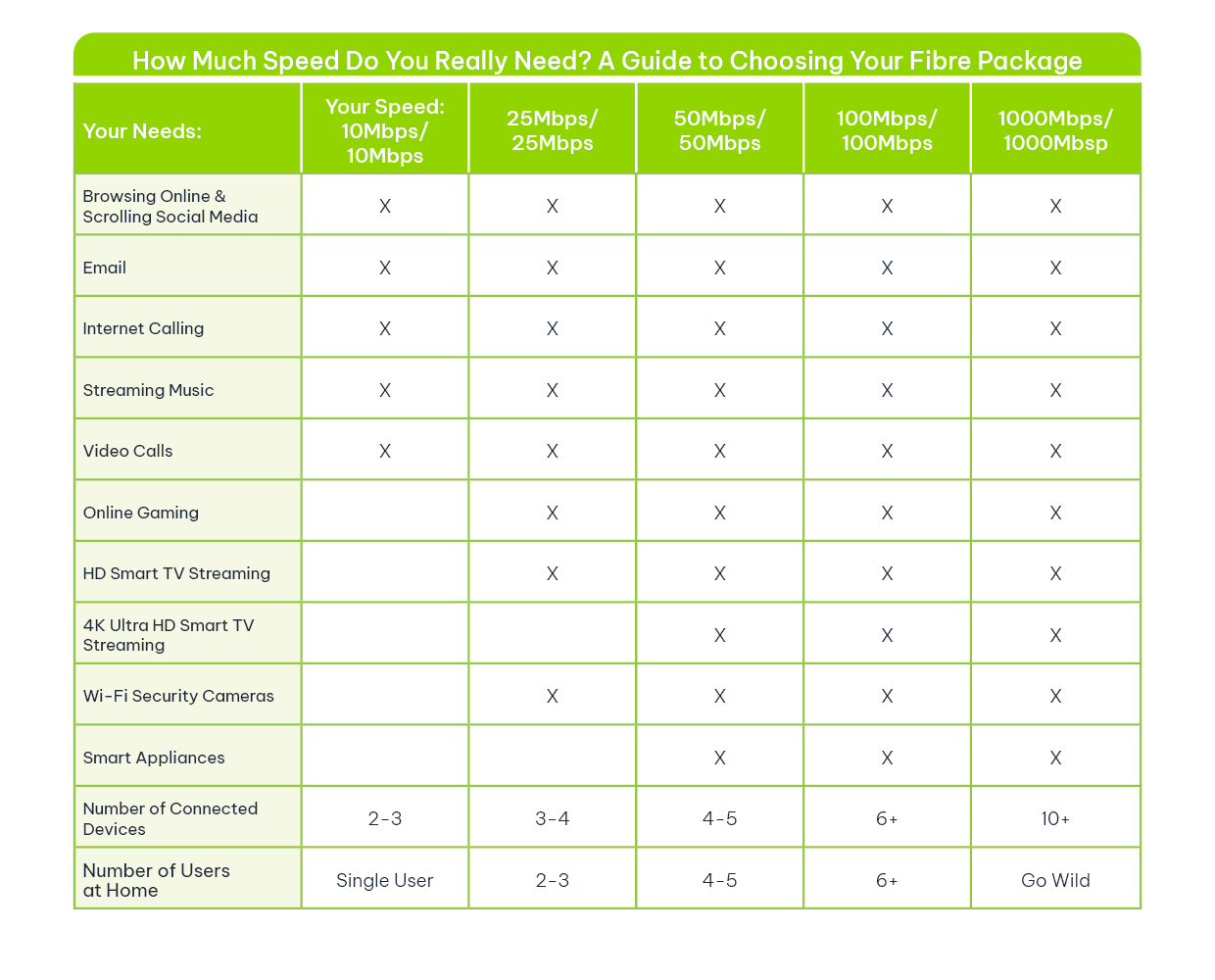
The table below shows how you can match your needs to your speeds, and you can check out some of our current offerings here.


What internet speed do I need

How About a Speed Test?

Higher internet speeds results in faster downloads and uploads – so you could notice that your internet searches are bringing up results faster, while your movie and audio downloads take just seconds.

On the flip side, if there are too many devices or users trying to use the internet connection at the same time, you’ll notice a lag, which is known as latency.

To conduct a speed test, you can:


For a more accurate speed test:

  • Connect a LAN cable directly from the router to your computer or laptop.
  • Perform the broadband test from the ONT/CPE to your device.


The bottom line: Why live with a situation in which slow internet causes tasks that should be quick and easy to become time-consuming and difficult?

At Vox, we have multiple solutions for your every speed requirement. We like to call it ‘The Vox Factor’.


FAQs

Q: What internet speed do I need for remote work and video calls?
For reliable remote work and multi‑participant video calls, aim for at least 100–200Mbps download with 10+ Mbps upload. If multiple people work from home simultaneously, choose higher tiers or symmetrical options.

Q Is 100Mbps enough for a typical family?
Yes, 100Mbps is a strong baseline for a family streaming HD video on several devices, browsing and video calling. Heavy 4K streaming or multiple simultaneous uploads may need higher speeds.

Q:What is symmetrical fibre and do I need it?
Symmetrical fibre provides the same upload and download speeds. It’s useful for content creators, frequent file uploaders, and businesses that require reliable two‑way performance.

Q How can I get the most accurate speed test results?
Use a wired connection from your ONT/CPE to a computer, close other apps and test at different times (peak and off‑peak). Use reliable tools like Speedtest.net or Nperf.

Q: What if fibre isn’t available at my address?
If Fibre to the Home isn’t yet available, Vox offers LTE and 5G, Wireless and Satellite options and works with FNO partners to expand coverage. Use the availability tool to see current options and timelines.

Q: Does a higher Mbps plan reduce latency?
Higher Mbps improves throughput but doesn’t always lower latency. Latency depends on network routing and congestion; however, better plans and lower contention ratios typically give a more responsive experience.

Q: How many devices can a 200Mbps plan support?
A 200Mbps plan comfortably supports multiple simultaneous 4K streams, several online gamers and multiple work‑from‑home users. Exact performance depends on device usage patterns.

Q: Are there cost‑effective ways to future‑proof my connection?
Choose slightly higher tiers than your current need, opt for symmetrical plans if you upload often, and check for bundle or contract options that include upgraded equipment and support.