Vox Proudly Attains Google Verified Peering Provider Status

Vox Proudly Attains Google Verified Peering Provider Status

A significant accolade in the local ISP landscape

Vox is proud to announce that it has become a Google Verified Peering Provider, one of a select group in the South African ISP arena. The Verified Peering Provider (VPP) Programme identifies a group of internet service providers (ISPs) that have demonstrated diverse and reliable connectivity to Google. ISPs are awarded a Verified Peering Provider badge based on technical criteria related to their connectivity depth with Google.

“The Verified Peering Provider Programme is a recent accreditation from Google that recognises ISPs with high-quality, optimised connectivity into Google’s global network,” says Chris Burrell, Head of Network at Vox. “The Programme identifies providers that meet stringent technical and capacity standards, including diverse peering links to Google, ensuring faster access, improved performance, and greater reliability for customers using Google services.

“The Verified Peering Provider Programme is basically a ‘trusted partner’ list. Networks on it can connect directly to Google to access the content in a way that’s fast, safe and of the highest quality. You could think of it as a shortcut to get premium, direct access to Google services and content.”

Vox Customers using Google services such as YouTube, Gmail, Google Workspace, Google Meet and applications hosted on Google Cloud infrastructure will experience improved performance, reduced latency, and greater service reliability.

We unpack how the Google Verified Peering Provider Programme works and the benefits customers can enjoy.


‘Let’s Shake Hands…’

as photography internet search engine 1433323 640 | Vox | Vox Proudly Attains Google Verified Peering Provider Status

Burrell notes that in today’s Cloud-focused world, Google customers need simple and highly available connectivity solutions to reach publicly available Google resources such as Workspace and other internet-facing applications.

He explains: “Peering is like two networks shaking hands and saying, ‘Let’s share traffic/content directly with each other, instead of sending it through a middleman.’ It makes internet usage, including websites, videos, voice and Cloud apps, faster and more reliable for users, providing higher quality of experience.

“Many customers connect to Google Workspace, Google Cloud, or Google APIs using Direct Peering or via Route Server infrastructures at Internet Exchanges. These solutions provide network operators interconnectivity to Google.

“However, not all Google customers today are able to manage the complex connections of Peering, or they don’t meet the relevant requirements to maintain the high-quality standards required by Content providers. Against this context, using a Verified Peering Provider to connect to Google simplifies connectivity to Google’s network, and removes the complexity of managing Direct Peering connectivity.”

By leaving Direct Peering to the ISPs, the Verified Peering Provider programme enables Google customers to access all Google services without the complexities of Direct Peering. Verified Peering Providers manage Direct Peering with Google over dedicated private connectivity with redundancy requirements for each enrolled provider.

When Google customers connect to a Verified Peering Provider to reach Google, they are choosing a provider that has verified diverse connectivity to Google, which enables highly available access to Google services.


Benefits of the Google Verified Peering Provider Programme

 

Vox Proudly Attains Google Verified Peering Provider Status

As Burrell outlines, Google evaluates networks that would like to be peering partners: “Vox went through a stringent application and technical review process showing that we meet their performance, network stability, reliability and capacity standards,” he says. “As a result of our successful application, we are able to offer our customers a number of benefits.”

This includes the following:

  • Simplified connectivity: There is no need to meet Google’s peering requirements; instead, customers can leave the complexities of peering arrangements to Vox as a Verified Peering Provider.
  • High availability: The Google badge shows that the ISP has a highly redundant connectivity to Google.
  • Enterprise grade connectivity: Customers can connect to Google through internet products designed for enterprises; further, they can access Google with or without the need for border gateway protocol (BGP) or an autonomous system number (ASN). In addition, customers can work directly with the ISP’s customer services teams and operational escalations


Burrell clarifies that Vox’s Verified Peering Provider Programme is suitable for enterprises and businesses running Google Cloud apps, ISPs or partners reselling internet services, and any tech-savvy user streaming, collaborating or relying on Google services.

He adds: “Because Vox is a Verified Peering Provider, this ensures Google traffic is routed over well-engineered, high-capacity direct interconnects, reducing unnecessary transit paths and improving consistency. It’s part of Vox’s ongoing investment in network quality and reliability.

“Vox is truly proud of this accolade, because it’s a mark of trust from Google, and not every local ISP will be able to qualify. It shows that Vox meets high technical standards and can deliver premium internet performance for Google services, making service better for our existing and future customers,” concludes Burrell.


Frequently Asked Questions

What is a Google Verified Peering Provider?
A Verified Peering Provider is an ISP that has met Google’s technical and capacity standards for direct peering, offering optimised and reliable access to Google’s services.

How will this improve performance for Google services?
Direct peering reduces the number of network hops and potential bottlenecks, resulting in lower latency, faster load times and more consistent performance for apps like YouTube and Google Workspace.

Do Vox customers need to change anything to benefit?
No. Vox manages the peering relationship with Google. Most customers will see improved performance without changing their configuration.

Is this available to all Vox customers?
Benefits depend on routing and service configurations, but the VPP status enhances overall connectivity for enterprise and business customers across Vox’s network.

Can resellers and other ISPs use Vox as a Verified Peering Provider?
Yes. Resellers and partner ISPs can work with Vox to provide their customers with optimised access to Google services via Vox’s peering infrastructure.

Does this replace direct peering for larger customers?
No. Organisations that already operate direct peering can continue to do so. VPP provides an alternative path for customers who prefer Vox to manage peering complexities.

How does Vox ensure redundancy and reliability?
Vox maintains diverse, redundant links and operational processes that meet Google’s VPP requirements, ensuring high availability and predictable routing for Google-bound traffic.


Which Vox Internet Option is Best for You this Holiday Season?

Staying connected as end-of-year down-time arrives

Our summer stories are starting to happen and the end of the year is really here! But even when we’ve packed our suitcases and made sure the pets are taken care of while we move into down-time, we still want (and need) to stay connected this holiday season.

Summer in South Africa means more streaming, online shopping and banking, video calls with family and online gaming – so choosing the right home Internet, and being aware of Internet options offered by your holiday location, can have an impact on your festive connectivity.

The good news is that, just as we all want a variety of ice cream options at the beach, so Vox has a connectivity option – and speed – to suit every home this holiday season. And in the spirit of the holiday season, we’re running some current and ongoing promotions to sweeten the deal even further.

Vox offers a mix of Fibre, Fixed Wireless, LTE/5G and Satellite options, with each option suited to different needs. So here’s a guide to help you pick the best option for your home, do your research on your holiday Connectivity options, and also make the most of current Vox promotions.

Let’s take a look.

wifi 2 | Vox | Which Vox Internet Option is Best for You this Holiday Season?


Fibre To the Home: Best for Top Speed and Reliability

Fibre to the Home delivers high-speed, low-latency Internet directly into your home (or holiday home).

Benefits include very fast symmetrical speeds, which is excellent for 4K streaming, multiple devices and video calls. Uncapped options are available and performance is consistent.

  • It’s ideal for large households, heavy streamers, gamers, households with multiple remote workers (if you must work during the holidays! or when the holiday season is over…).
  • Availability depends on Fibre rollout in your neighbourhood. Installation may take time in new areas.


Current promotions linked to Vox Fibre to the Home include Vox Rewards and Fibre Frenzy!

Vox Rewards

  • Vox Rewards is our super-exciting, recently-launched loyalty programme for qualifying Vox customers, offering perks and rewards for staying connected with Vox through home fibre connections. Depending on the tier that you qualify for, you could enjoy a variety of discounts and savings on groceries, fashion, takeaways, tech, travel and more! See vox.co.za/vox-rewards for eligibility and benefits.
  • Fibre Frenzy is a limited-time campaign on Vox’s Home Fibre packages so do check vox.co.za for current Fibre Frenzy deals and exact terms – you can also click on this link for more information.
  • For landlords providing Connectivity to guests, check out our Guest Wi-Fi hospitality bundle.


LTE / 5G Mobile Broadband: Flexible and Quick to Set Up

holiday Internet South Africa

LTE / 5G uses mobile networks (LTE or 5G) to deliver Internet to a home router or portable device.

Benefits include fast setup and mobile flexibility. This option is suitable for temporary needs or where Fibre isn’t available yet. 5G can offer very high speeds in covered areas.

  • It’s ideal for urban areas with strong 4G/5G coverage as well as short-term stays and holiday homes.
  • Speed and latency depend on mobile network coverage and local congestion; fairness policies may apply depending on the package.
  • Vox and Telkom are currently running our Uncapped LTE promotion, starting from R589 per month, and including a pocket router as a R199 once-off – check it out.


Fixed Wireless (Licensed or Unlicensed Spectrum): Dependable Rural and Suburban Option

fixed Wireless home Internet

Fixed Wireless using microwave signals provides a point-to-point or point-to-multipoint radio link between a home-mounted antenna and a local tower. Its benefits include good speeds and stable connections where Fibre isn’t laid, but line-of-sight to a tower exists. It is often faster and provides a lower latency than Satellite.

  • It’s ideal for suburbs, small towns and rural areas with a Vox radio site nearby.
  • Fixed Wireless requires a professional site survey and performance depends on line-of-sight availability and network capacity.
  • You can find out more on Vox Fixed Wireless to the Home.


Satellite: Providing Coverage where Nothing Else Reaches

Satellite Internet South Africa

Internet delivered via Satellite dishes is ideal for remote or rural properties beyond terrestrial networks. Its benefits include coverage that is available almost anywhere, making it perfect for some coastal areas, farms and remote homes, including holiday rentals.

  • It’s ideal for houses outside Fibre and mobile coverage areas, where connectivity is otherwise unavailable.
  • Higher latency means that it’s not ideal for competitive gaming. In addition, weather can affect reliability, and costs/data policies may be higher than terrestrial options.
  • Find out more on Satellite connectivity.


Considerations for the Holidays (and Beyond)

A few factors should be considered as you think about your Connectivity options for the holiday season and even next year, if you want to take advantage of our Vox Rewards programme.


Vox launches Kiwi Wireless

  • If you stream 4K, game and have many users, Fibre is your best bet.
  • If you need a quick setup or a temporary solution, LTE/5G works well.
  • If you’re in a small town or on the fringe of Fibre rollout, Fixed Wireless often gives the best compromise of speed and reliability.
  • If you’re remote and need coverage regardless of location, Satellite is the reliable fallback.


Practical Tips Before You Switch

Vox usually runs localised or seasonal promotions (discounted installation, bonus data or limited-time bundle savings). Check the Vox website regularly, including the promotions pages, for the most up-to-date specials and Ts and Cs. Here are some tips:

  • Check coverage: Use the coverage tool on vox.co.za to see what’s available at your address.
  • Match package to use requirements: Choose speeds that suit your household’s peak usage.
  • Ask about promos: Promotions can change monthly, so ask a Vox consultant about current offers and how long they run, and you can also check here.


Check coverage and current Fibre Frenzy or Vox Rewards offers at vox.co.za or on the latest deals page, or call Vox Consumer Support on 087 805 0530 for a personalised recommendation.

South Africans work hard and they play hard also, and never more than during our end-of-year summer holiday season! Stay connected with Vox – we have a solution for your location and your needs, no matter what time of year it is.

ice cream 2202605 640 | Vox | Which Vox Internet Option is Best for You this Holiday Season?
You always have choices – and sweet deals! – with Vox!


FAQs

Which Vox option is best for streaming and gaming during the holidays?
Fibre is best for low-latency, high-speed needs like 4K streaming and gaming. If Fibre isn’t available, 5G or fixed Wireless are the next-best options.

What is Vox Rewards and how do I join?
Vox Rewards is a loyalty programme for qualifying customers. Visit vox.co.za/vox-rewards to see eligibility and benefits.

What is Fibre Frenzy?
Fibre Frenzy is Vox’s limited-time promotion on selected Fibre packages. Check the Vox website for exact bundles and promotional periods.

How do I know if Fibre is available at my home?
Use the coverage checker on vox.co.za or contact Vox support to confirm availability for your address.

Is Satellite Internet good for a holiday home?
Yes, Satellite brings connectivity to remote holiday homes, though latency and weather impact should be considered.

Can I use LTE/5G as a permanent home solution?
Yes, in areas with strong coverage LTE/5G can be a permanent solution, especially where Fibre isn’t available, but check data fairness policies.

How long does installation take for Fibre or fixed Wireless?
Installation times vary by location and demand — ask Vox for a projected install date when you sign up.

Can I switch between Vox services if I move or change needs?
Yes. Vox offers different home connectivity products and can advise on switching based on coverage and your new address.

Vox Launches Kiwi Wireless to Bring Fibre-like Broadband to South African Homes

Uncapped, unshaped data with no fair use policies, Kiwi Wireless is about to change the face of connectivity in South Africa

Vox, a specialist provider of top-class internet and voice solutions for homes and business, has announced the launch of Vox Kiwi Home Wireless, a new consumer broadband service that delivers a fibre-like experience without the need for trenching or cabling. Powered by Tarana’s next-generation technology, Kiwi offers speeds of 50 Mbps, 100 Mbps, and up to 200 Mbps, on an uncapped, unshaped and unthrottled line.

Fibre-like Speeds where Fibre Can’t Reach

Designed for South African households that don’t have access to fibre and where installation is prohibitively slow or expensive, Kiwi Wireless offers customers a simpler wireless alternative. One that delivers exceptional connectivity without the need for extensive infrastructure or disruption.

“Consumers have told us that they want fibre-quality internet without the hassle and with no fair-use policies or unpredictable throttling,” said Nikita Appelman, Product Manager for Wireless at Vox.

“Vox Kiwi Home Wireless is a smooth and simple alternative to disruptive trenching or fibre installation delays, offering consistent, high-quality connectivity people can rely on. Installation is also painless – a small, flat panel antenna is mounted on the roof connected to a router inside the home.”

The result is consistent connectivity for streaming, remote work, online learning and smart home devices, without the disruption of trenching or digging.

Affordable Costing

Vox Kiwi Home Wireless is also launching at an affordable price point, making it an accessible choice for consumers. It costs R849 per month for the 50 Mbps service with installation priced at just R999 as a once-off fee.

This upfront cost is competitive, lowering the barrier to entry for households wanting a trusted connectivity solution that doesn’t leave their wallet gasping. The 100 Mbps service is available for R1,039 a month and it is possible to upgrade to the 200 Mbps option if the home fits specific conditions, such as proximity to high sites.

Vox has a proven track record. The Service spans more than five million homes across South Africa, spanning both major metros and smaller towns.

Vox Kiwi Home Wireless is giving South Africans more choice,” says Appelman. “If you can’t get fibre or you don’t want the wait and disruption that comes with installing fibre, then you can use Kiwi to get connected almost immediately. The service is fast and consistent and is designed to deliver high-quality connectivity.”

Vox Kiwi Home Wireless with the Vox backing, brings unmatched quality and reliability and a   fresh and innovative new product offering to the South African consumer.

Available to order from 19 November 2025, with installations handled directly by Vox’s national support and service teams, Kiwi Wireless is the perfect fit for consumers who want access to the digital lifestyle without having to hurry up and wait for fibre.

Kiwi Wireless offers choice – a way to access a modern, connected lifestyle even when fibre isn’t feasible. With transparent pricing and uncapped data, it’s a practical, future‑ready option for many South African homes.

Ready to stop waiting for fibre? Discover Kiwi Wireless and order here:


FAQs

What is Vox Kiwi Home Wireless?
Vox Kiwi Home Wireless is a fixed wireless consumer broadband service using Tarana technology that delivers fibre-like speeds (50/100/200 Mbps) without trenching or cabling.

Is the data capped or throttled?
No. Kiwi is uncapped, unshaped and unthrottled, and it does not have a fair‑use policy.

How is Kiwi installed?
A small flat panel antenna is mounted on the roof and connected to a router inside the home. Installation is managed by Vox certified teams.

Who is Kiwi best suited for?
Households without access to fibre, properties where trenching is expensive or disruptive, renters, and anyone needing a quick, reliable broadband solution.

Does Vox provide support and maintenance?
Yes. Vox handles installation and ongoing support through its national service teams.

How do I check availability at my address?
Visit the Vox Kiwi product page and enter your address to check coverage and order options: https://www.vox.co.za/wireless-to-the-home/

Now launched – Vox Rewards!

Everyone Loves Getting Cash Back…

The good news is out – the Vox Rewards programme for our loyal clients has been officially launched! As household budgets continue to take strain for millions of South Africans, we’ve designed our Vox Rewards programme – available since the 17th of November – to help our customers with a variety of ways to get through the month.

We’re proud that our loyalty programme sets us apart from our competitors by offering extra value to our clients, through the provision of carefully chosen lifestyle benefits. By signing up with Vox Rewards, customers are given access to thousands of Rands in monthly savings, through discounts and coupons from some of South Africa’s favourite brands.

rewards for Vox customers

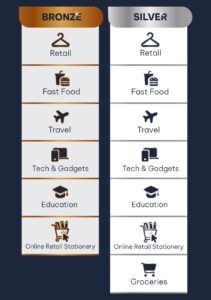
Vox customers, both new and existing, will be rewarded with retail choices, fast food options, travel discounts, reduced prices on tech and gadgets, access to lower costs for online education options, online retail and stationery purchases, and up to R1,250 in grocery rewards every month (Silver Tier only).

Simply by signing up with Vox Rewards, Vox customers get help with their budgeting and planning, across a number of different categories.

Vox Rewards programme

  • Calling all fashionistas: Update your wardrobe with up to 10% off retail gift cards from Edgars, Legit, Style and Beaver Canoe OR get 10% off online purchases at BRANDZ.
  • Enjoy takeaways: Treat your tastebuds with discount coupons from KFC, Steers, Debonairs Pizza and Hungry Lion.
  • Enjoy travel deals: With partners including FlySafair, Citiliner, Intercape and Luxliner.
  • Tech and gadgets: Keep up to date with Dress Your Tech, and enjoy up to 25% off (minimum spend of R500 online), as well as up to 8% off ASUS.
  • Online learning: Empower yourself through access to online learning through IT Upskill.
  • Online Stationery: Enjoy 10% off all your online stationery purchases at Statesman Stationery.
  • Groceries (Silver Tier only): Save up to R1,250 on groceries every month by using your Shoprite & Checkers coupons.


As you can see, the Vox Rewards are designed to help our customers with financial assistance in a holistic way.

Why not register today to start enjoying the benefits available to you through Vox Rewards? Visit our website at https://benefits.voxrewards.co.za  – the process of signing up and participating in the programme is simple!

We look forward to signing up our new and existing customers and helping you to put real cash value back into your wallet.


Frequently Asked Questions

What is the Vox Rewards programme?
Vox Rewards is a loyalty programme for qualifying Vox customers that provides discounts, coupons and monthly savings across retail, food, travel, tech, online learning and groceries.

When did Vox Rewards launch?
Vox Rewards officially launched on 17 November 2025.

How do I sign up for Vox Rewards?
Register at https://benefits.voxrewards.co.za and follow the on‑screen steps to join.

How much can I save on groceries?
Silver Tier members can save up to R1,250 per month using Shoprite & Checkers grocery coupons.

Which partners and discounts are included?
Partners include Edgars, Legit, BRANDZ, KFC, Steers, Debonairs, FlySafair, Dress Your Tech, ASUS, IT Upskill and Statesman Stationery, among others.

Where can I find full terms and more information?
Visit https://benefits.voxrewards.co.za/terms or the Vox Rewards sign‑up page for full terms and conditions.


Vox Rewards programme

Fibre-Like Microwave Connectivity with Vox Kiwi Home Wireless

When ‘Kiwi’ means more than just nicely-packaged Vitamin C

Vox is shaking up some common kitchen features into Connectivity territory with our newest offering: Vox Kiwi Home Wireless.

Yes, it looks like a kiwi fruit (the branding).

Yes, it’s microwave (the connectivity technology).

No, it’s got nothing to do with your kitchen and everything to do with your Internet Connectivity!

Vox Kiwi Home Wireless is a Fixed Microwave connectivity solution available countrywide in selected areas where Fibre isn’t available, providing a Fibre-like experience and quick installation. So let’s take a look at what makes it such a juicy offering.


Not Just for the Kitchen

Fixed Microwave Internet – also known as Wireless – is a great alternative to Fibre, especially in areas where the Fibre Network Operators (FNOs) haven’t yet laid the required cabling infrastructure. Microwave signals provide a fixed wireless broadband connection through a high-capacity Microwave radio link, with speeds up to 200Mbps, and widely available.

The Vox Kiwi Home Wireless service is Uncapped, Unshaped and not restricted to any Fair Use Policy – it’s perfect for the home user who needs more for less!

  • Having a capped connectivity service essentially means that your internet access will be cut off as soon as you reach your data cap.
  • Uncapped Internet plans with a Fair Use Policy (FUP) limit the amount of data you can consume at your purchased speed. If your data threshold has been reached, then your speeds will be slower for the rest of the month.
  • Uncapped internet plans without a Fair Use Policy (FUP) don’t limit the amount of data you can consume and do not throttle your service. Users don’t have to worry about exceeding data limits and facing slower speeds or additional charges. Connectivity is never interrupted, providing a seamless browsing experience regardless of your usage experience.


And so, Vox Kiwi provides an uncapped, No FUP Fixed Microwave connectivity option that gives you constant, reliable and fast access to the Internet at all times, meaning that you will experience no drop in your connection speed, and you’ll have access to fast and reliable internet at all times – perfect for online gaming and streaming.


How It Works

Vox Kiwi Home Wireless

The Vox Kiwi Home Wireless service provides a Fibre-like-experience, with low latency and low jitter, and high throughput.

Vox Kiwi uses the latest fixed Microwave technology, meaning we will be installing a small flat panel (about the size of a A4 sheet of paper) on your roof, as opposed to using a Fibre cable, as well as providing you with a free-to-use Wi-Fi router!

It’s quick to deploy in feasible areas, with no delays caused by trenching requirements and wayleave approvals, as occurs with Fibre installations (a wayleave is a contractual agreement between municipalities and a telecoms provider, enabling the provider to install, maintain and repair telecoms equipment).

Vox provides easy upgrades, to a service of up to 200Mbps, and our Managed Service offering provides you with 24 / 7 / 365 support.


When Life Gives You Lemons…

lemons 2434941 640 | Vox | Fibre-Like Microwave Connectivity with Vox Kiwi Home Wireless

Vox took note of the old saying that says: ‘When life gives you lemons, make lemonade’, meaning that when you’re faced with a challenge, find a way to sweeten it. In this case, we prefer to say: ‘When life gives you lemons, choose Kiwis instead’, meaning that when Fibre is unavailable in your area, choose Fixed Microwave!

Now isn’t that something to sweeten the deal? Contact us for more information.


FAQs

What is Vox Kiwi Home Wireless?
A fixed microwave (fixed wireless) internet service from Vox that uses a roof‑mounted flat panel antenna to deliver Fibre-like connectivity where Fibre isn’t available.

Is Kiwi Home Wireless uncapped?
Yes. Vox Kiwi Home Wireless is uncapped and offered without a Fair Use Policy (no FUP), so you don’t face throttling when you use more data.

What speeds can I get with Kiwi Home Wireless?
Packages scale up to 200Mbps in feasible areas. Exact speeds depend on site feasibility and the package you select.

How long does installation take?
Installation is typically quick once feasibility is confirmed because it doesn’t require trenching or wayleave approvals; exact lead times depend on local scheduling.

Do I get a router and equipment?
Yes. Vox supplies the roof-mounted microwave panel and a free-to-use Wi‑Fi router as part of the service.

Is Kiwi Home Wireless suitable for gaming and streaming?
Yes. With low latency, low jitter and high throughput, it’s well suited to online gaming, streaming and real-time applications.

How do I check if Kiwi Home Wireless is available at my address?
Visit vox.co.za to check availability in your area. Availability is determined by line‑of‑sight to the nearest microwave site.

Protect Your Older Parents Online with Norton from Vox

No, Mom – DON’T click on that link! 

I know an elderly lady who is dignified and respectable, with grown-up children and grandchildren. She is, as they say, a ‘pillar of her community’. She also, rather startlingly, has some, shall we say, unfortunate images on her phone at the moment, involving various anatomical closeups of naked people.

But this is not an article about a seemingly-sweet old lady who is at the helm of a mafia-style criminal empire – no, that’s not it at all, because she actually has NO IDEA that these images are currently on her phone (and her family members haven’t yet had the courage to tell her).

Vox has teamed up with global cybersecurity expert company Norton™ to offer comprehensive protection for your devices and online privacy, for the whole family, all in one solution. Traditionally, people have worried about their own online safety as well as their children’s, but there is no reason why your older parents can’t benefit also.

In this article, we look at how so many older people today have absolutely no idea of the perils that lurk online. We discuss how to protect people of an older generation who didn’t grow up with technology at their fingertips.

And we look at how acquiring the right software can take away the stress of having to keep saying: “NO, Mom – DON’T click on that link!”

Elderly Exploitation | Vox | Protect Your Older Parents Online with Norton from Vox


Why Older People Are Especially Vulnerable Online

Criminals have always seen older people as being a soft target, and today’s digital world simply presents long-existing criminal tendencies in a brand-new wrapping. When the goal is to scam older people out of their hard-earned savings, the Internet, online banking and social media all just make it easier for cyber criminals, because many older people are just not that comfortable with today’s technology.

This is largely because, in contrast to younger generations, older citizens had to learn to use information technology when they were already adults. It’s something that was initially entirely new to them.

And so the relationship that today’s senior citizens have with technology can be an uneasy or uncomfortable one, as shown in this clip from the popular and acclaimed Netflix sitcom, ‘Grace and Frankie’.

In the video clip, we see clearly just how some of the older generation think about technology – Frankie is deeply afraid of it at first. (Grace, as a retired former CEO, does at least know how to boot up a new laptop.)

Take a look for a bit of show, not tell!

fc69f28d b309 4d37 9f05 288f37f7e25a screenshot | Vox | Protect Your Older Parents Online with Norton from Vox

The video clip raises another point: if so many of today’s older generation are uncomfortable simply with acquiring new technology, you can imagine that they’re even more vulnerable once they’re finally online.

Senior citizens can be particularly vulnerable to cybercriminals who use social engineering – deception intended to manipulate people into sharing confidential or personal information – to lure their victims into handing over valuable personal details.


Why The Older Generation Is Vulnerable Online

Online criminals prey on qualities shared by many older users, including a fear of technology that they don’t fully understand, loneliness as their children grow up and leave home, an ingrained respect for authority and institutions, and an increasing need to feel financially secure as they get older.

If this is all sounding just a bit too familiar and close to the bone, the good news is that there are ways in which you can help protect your older parent or relative against would-be online scammers.


Keep It Simple — Three Rules to Teach Your Parent

Firstly, share the following information with your older parent to try to help them recognise when a criminal is trying to steal their bank account information, passwords or credit card numbers, or otherwise trying to separate them from their money.

  • Trust no one: never click links or open attachments from unexpected senders.
  • Ask first: establish a rule — “Call or text me before you act.”
  • Don’t share security details: never send PINs, passwords or banking details by message or phone.


These short, repeatable rules are easier to remember than long lectures. Think of them as being the digital equivalent of “Don’t open the door to strangers.”

In summary: ‘Don’t click on every link that looks like fun or promises you a great bargain.’ It’s the Internet version of ‘If it looks too good to be true, it probably is.’

Things that Make It Difficult for Older Adults to Use Technology 1 | Vox | Protect Your Older Parents Online with Norton from Vox


How Norton from Vox helps — Straightforward, Family-Wide Protection

You can try to teach all the rules in the world, but intuitive software makes prevention easier. Stop the malware from getting in by blocking those seductive ‘Click here’ messages before they even reach your parent’s phone, tablet or laptop with their exotic and interesting click-bait messaging.

Norton’s software safeguards your entire family’s PCs, Macs®, tablets and smartphones from viruses, ransomware, phishing and other cyber threats while you bank, shop and browse online.

Norton 360 family protection provides multiple layers of defence against viruses, malware, ransomware and phishing, which are the common tools criminals use to target seniors. Key benefits for elderly parents:

  • Blocks malicious links and phishing attempts before they land.
  • Protects PCs, Macs, Android and iOS devices with one app.
  • Simplifies security for non‑tech users — automatic updates and background protection.
  • Centralised family protection so you can check that your parent’s devices are safe.


Buying Norton via Vox gives you a local, reliable channel to purchase and manage the licence, which is one less thing to worry about.


Practical steps for immediate protection

  • Install Norton on every device your parent uses and enable automatic updates.
  • Turn on email and web protection to block suspicious links.
  • Set up one shared contact (you) who your parent must call before sharing money or details.
  • Back up important files so ransomware can’t hold photos or documents hostage.


Norton from Vox  offers robust, all-in-one protection against viruses, malware, ransomware and online threats – for the whole family, including your elderly parents. It’s Internet safety for the elderly – like the virtual equivalent of a home security guard, refusing to allow the criminal over the threshold while your mom or dad are blissfully unaware and watching their favourite show or match on TV.

And if your elderly family members aren’t downloading dodgy links, you don’t have to spend precious time cleaning up their phones at a later stage.


Frequently Asked Questions

How do I start a sensitive conversation with my ageing parent?

  • Choose a calm moment, be honest but respectful, ask open questions and listen to their priorities


How can I suggest home-safety changes without upsetting them?

  • Frame changes as ways to keep them independent, offer choices and involve them in decision-making.

Secure Your Connectivity with our Fibre Plus Firewall Bundle October Special

Secure connectivity is about speed and protection.


South African networks face multiple threats on a daily basis. Recent reporting shows that Interpol detected roughly 230 million cyber threats in South Africa, which is a clear signal that homes and businesses must harden their borders.

Secure connectivity prevents unauthorised access, data loss and downtime, helping you to keep operations and productivity running smoothly within your business.


Sophos Firewalls with Vox

Vox has partnered with Sophos to offer next-generation firewalls to help you better protect your network, quickly and efficiently.

Sophos Gold Partner 1 | Vox | Secure Your Connectivity with our Fibre Plus Firewall Bundle October Special

With Sophos firewalls from Vox, you can enjoy no hidden costs – just great security, and you will find that it’s easy to use, even if you’re not technical.

The advanced threat protection blocks viruses, ransomware and hackers, leaving you with peace of mind. You can also block websites and non-work apps so that your employees’ efficiency is boosted, allowing you to boost security and productivity at the same time.

The solution is designed to promote a fast and secure network that continues running at high speed, which serves as another productivity value-add.


Why A Fibre Plus Firewall Bundle Is Crucial

Vox’s Fibre Plus Firewall bundle gives you both speed AND protection.

Our October 2025 special offer combines resilient Vox Fibre with next‑gen Sophos Firewall protection, allowing you to protect your devices, data and productivity with a single, easy solution.


Firewalls: Your First Line of Defence

Optimised SophosXGSSeries Web ValueAdd Banner V2 | Vox | Secure Your Connectivity with our Fibre Plus Firewall Bundle October Special

A Firewall monitors and filters incoming and outgoing traffic based on set rules, creating a perimeter between your trusted network and the internet. Modern, next‑generation Firewalls also:

  • Detect and block intrusions and malware (IDS/IPS).
  • Support VPNs for secure remote access.
  • Log activity for rapid incident response.
  • Block malicious websites and non‑work apps to protect users and increase productivity.


Why Pairing Fibre with a Firewall is a Great Idea

Fibre delivers fast, symmetrical bandwidth essential for cloud apps, video conferencing and backups. Pairing that connectivity with a dedicated Firewall ensures high performance isn’t offset by exposure to threats. The Fibre plus Firewall bundle gives you:

  • Speed and security in one purchase.
  • Simpler billing and deployment with Vox.
  • Managed support to keep both connectivity and protection performing.


Sophos Firewalls with Vox: What You Get

The key benefits include the following:

  • Advanced threat protection against viruses, ransomware and hackers.
  • VPN support for secure remote workers and branch offices.
  • Centralised logging and reporting for faster incident handling.
  • Options to block websites and non‑work apps to boost staff productivity.
  • Backed by Vox 24/7 support and clear pricing with no hidden costs.


October special: Fibre plus Firewall bundle

This October, Vox is running a limited‑time Fibre plus Firewall bundle special. It’s an ideal time to:

  • Move to faster Fibre connectivity;
  • Add enterprise‑grade Sophos Firewall protection; and
  • Consolidate services and simplify billing.


Enquire early to reserve bundle availability and special pricing.


How To Get Started

Assess your needs in terms of the required bandwidth, number of users and remote access requirements. Then:

  1. Choose a Vox Fibre package and Sophos Firewall level.
  2. Book installation and configuration with Vox support.
  3. Activate monitoring and policies with assistance from Vox 24/7 support.


Protect Your Network with Vox and Sophos

By protecting your sensitive data, devices and systems from threats like malware, hackers, denial of service attacks and malicious software, firewalls are a fundamental component of any network security strategy.

Contact us today to find out more on how you can implement a firewall to protect your network.


Frequently Asked Questions

What is a Fibre plus Firewall bundle?

A Fibre plus Firewall bundle combines Vox Fibre internet connectivity with a managed next‑generation Sophos Firewall, to deliver both high performance and network security in a single package.

Why should I buy a Firewall if I already have Fibre?

Fibre gives you speed; a Firewall protects that connection. Without a Firewall, your fast connection can make attacks more damaging. A combined solution ensures both performance and protection.

What protection do Sophos Firewalls provide?

Sophos Firewalls include intrusion detection and prevention, anti‑malware and ransomware protection, VPN support, web and app control, and central logging for incident response.

Who is the Fibre plus Firewall bundle suitable for?

The bundle is ideal for small businesses and larger organisations that need reliable Fibre speeds with enterprise‑grade security and managed support.

When is the Vox October special available?

Vox will run the Fibre plus Firewall bundle special in October 2025 – contact us to confirm availability, exact pricing and terms.

Can Vox manage the Firewall for me?

Yes. Vox offers managed services and 24/7 support to help configure, monitor and maintain your Firewall and connectivity.

Will a Firewall slow down my Fibre connection?

Properly configured next‑gen Firewalls are designed to protect without significant performance impact. Vox matches Firewall capacity to your Fibre speed to preserve throughput.

How do I enquire about the October bundle?

Click here on the Vox website to request details and a tailored quote.

Protect Your Kids from Online Predators

Some practical thoughts to guide parents and grandparents

It can’t happen in my home… can it?

Just because your children are playing online games in the safety of your home doesn’t mean that they are safe from perverts.

This is the reality of today’s digital world.

It’s hard to believe, but every parent’s worst worry is now partly digital: how to protect kids from online predators who can reach children through games, apps and social networks in the safety of your own home. This guide discusses online grooming, practical steps you can take at home, and how tools from Vox and Norton™ can help you keep children safer online.

[Editor’s note: This article comes with a sensitivity warning, particularly for parents, grandparents and other concerned family and friends.]

According to the United Nations Children’s Fund (UNICEF), in South Africa, according to its ‘SA Kids Online Study’, one-third of children in the country are at risk of online violence, exploitation and abuse.

  • One-quarter (25%) of those surveyed confirmed that they had added people whom they’d never met face-to-face to their friends or contacts list.
  • Similarly, nearly one-fifth (18%) of those surveyed had sent a photo or video of themselves to someone they had never met in real life.


These stats also confirm just how naïve and vulnerable children can be – and why parents and guardians need to protect them.

Protect kids from online grooming_1

And so, when we read about the pervasiveness of online grooming, your first response as a parent might be: ‘It can’t happen in my home – can it?’ but your second response should be: ‘How can I make absolutely sure that it doesn’t?”

With Vox and global cybersecurity expert company Norton™, parents can exert real parental control by setting up tools to help your kids explore the Internet more safely.


Unpacking Online Grooming

In decades past, parents and caregivers worried about ‘flashers’ – perverts lurking around schools in long coats, who waited to suddenly give their young victims an eyeful that they weren’t expecting.

Today, the perverts are looking for the reveal to be the other way around – and the effects can be far more lingering and devastating.

Online grooming

Norton™ warns that, as part of the attempted grooming process: ‘…predators may spend months steadily getting to know their potential victims. They might start this process by contacting children as they play popular online games such as Fortnite or Minecraft.

‘…Once predators gain the trust of their victims, they will then steer conversations more often toward sexual topics and will eventually ask children to engage in sexual conversations, send explicit photos, or meet them in real life.’

Reports have also surfaced of cyber predators infiltrating another online game popular with kids, namely Roblox.

But there ARE ways to fight back – and in the Vox family, we’re definitely here to help.


The Danger Lurking Behind Everyday Apps

Vox has teamed up with Norton™, which provides industry-leading antivirus and security software for PC, Mac and mobile devices.

According to Norton, children today gravitate toward social media apps that allow them to connect easily with their friends. But these social networking apps and websites are also favoured by predators who use them to communicate with their intended victims.

Norton says that, in addition to online games, some of the apps that predators may use to communicate with children include WhatsApp, Snapchat, TikTok, Kik, Monkey, Whisper and Chat Avenue.

For any parent, it’s frightening to think about the multiple ways that predators can use technology to find and target their victims.

So let the experts take care of it for you.

child 1073638 1920 | Vox | Protect Your Kids from Online Predators


What Norton and Vox can do for you 

Vox has partnered with Norton to make industry-standard protections readily available to families with Norton Family and Norton 360 providing one app for many devices.

These tools don’t replace conversations, but they give you clear alerts, activity reports and the ability to set safe boundaries.

Smart monitoring allows parents to monitor search terms, videos and app downloads; receive alerts for unsafe behaviour; and get detailed activity reports.

In addition, options such as location tracking allow you to define safe zones for your children and receive real-time alerts if those boundaries are crossed. Children can share their location through the mobile app.

All of these safety features – and many more – are available from Norton’s comprehensive protection for your devices and online privacy.


Protect Kids from Online Predators at Home

UNICEF says that keeping children safe online also relies on parents and caregivers maintaining open communication; using technology to protect children; spending time with them online; and encouraging healthy online habits

  • Talk regularly and openly: Start conversations about online life the same way you’d talk about who your child plays with in the street. Ask gentle questions: who are your friends online? What games do you play? What apps do you use?
  • Agree house rules: Device-free zones (dinner table, bedrooms at night), time limits for play, and rules about sharing photos or personal information.
  • Use parental controls: Industry tools such as Norton Family and Norton 360 offer activity monitoring, content filtering, screen-time limits, location supervision and alerts for risky behaviour. These tools help you set boundaries while still allowing kids to explore.
  • Co-play and co-view: Sit with younger children while they play online and encourage older children to show you new apps and settings. This builds trust and gives you a live view of who they interact with.
  • Check privacy and friend lists: Make sure profiles are set to private, review followers and friends together, and remind children never to share addresses or phone numbers in chats.
  • Watch for signs: Increased secrecy, sudden changes in behaviour, new devices or new online friends that appear overnight are all red flags.


Balancing Safety and Privacy

Monitoring doesn’t mean spying. Explain to your child why you’re using parental controls and that the aim is safety, not punishment. As children grow, shift from more direct monitoring to regular check-ins and shared agreements about responsible online behaviour.

Quick checklist for parents and grandparents (bullet list for snippet targeting)

  • Have an open conversation about online risks this week.
  • Set simple house rules for devices and sharing.
  • Install parental controls and review activity reports weekly.
  • Make social profiles private and review friend lists together.
  • Know how to report abuse to the app/platform and to local authorities.
  • Keep devices in communal spaces for younger children.


Before our world became as digital as it is today, parents only had to worry about their children’s safety in the physical environment. Today, we have to be concerned about online predators that can access our homes through our digital devices.

This is all a lot to think about, so why not let Vox and Norton take care of it for you with our comprehensive and proactive suite of solutions?

We’re here to help you keep your children safe in the online world for as long as possible without becoming another statistic.  Please click here for more information.


 

“Making the decision to have a child is momentous. It is to decide forever to have your heart go walking around outside your body.” ~Elizabeth Stone, author

mother 2935723 1280 | Vox | Protect Your Kids from Online Predators


Frequently Asked Questions

How can I tell if my child is being groomed online?
Look for signs such as secrecy around devices, sudden new friendships, unexplained gifts, changes in mood or sleep, or attempts to isolate the child from family. If a child is using private messaging apps or deleting chat histories, take note and ask open, non-judgemental questions.

What do Norton parental controls actually do?
Norton Family and Norton 360 provide content filtering, web and search supervision, screen-time controls, social media monitoring, location supervision and alerts for unsafe behaviour. They produce activity reports so you can spot potential problems early.

Will parental controls invade my child’s privacy?
Used thoughtfully, parental controls are a safety tool. Be transparent: explain why you’re using them, involve your child in setting the rules, and gradually reduce monitoring as your child demonstrates responsible behaviour.

At what age should I set up parental controls?
Start young, because even pre-schoolers benefit from basic content filtering and supervised access. For older children, combine tools with conversation and digital literacy lessons so they understand safe behaviour.

What should I do immediately if I suspect grooming?
Stay calm, listen to the child, preserve any evidence (screenshots, chat logs), report the account to the platform, and contact local authorities or child-protection organisations for guidance.

Where can I get help in South Africa if I need to report abuse?
Report serious threats to the police (SAPS) and the platform where it occurred. Seek support from child-protection organisations and trusted local counselling services.


How To Manage Your Digital Footprint

Protect your personal data – how much key information are you really exposing?

Wherever there are people, there are those who decide to prey on them – this is true for the digital world just as much as the physical. And so, before you take the fun-looking quiz that popped up in your social media feed, think twice – and learn how to manage your digital footprint!

Do you really need to know what your ‘spooky Halloween’, ‘Harry Potter alter ego’ or ‘professional wrestler’ names are, based on a combination of – let’s say – your birth month, the first letter of your name, your street address details and the name of your pets / children?

It’s clear how easy it is to start building up personal information about you based on some of those details.

Most of us have had these seemingly innocent quizzes popping up on our social media feeds at some point. But the software program that’s going to send back the amusing ‘answer’ based on the personal information you shared… might just be a hacker.

Individual pieces of data may seem harmless, but when collected, they can tell a detailed story about your habits, preferences and even personal details like your birthday or location, which allows cybercriminals to go deeper into your online profile for their own personal gain.

Let’s look at ‘digital footprints’ and how much personal information you are actually exposing to the underworld.


Footprints Across the World Wide Web

Manage your digital footprint
Learn how to manage your digital footprint!

 A digital footprint means the trail of data you leave when using the Internet, and it can be used to track a person’s online activities and devices. Internet users create their digital footprint either actively or passively, through everyday activities that create it such as social media, browsing, shopping, apps and location services.

The types of data being exposed includes personally identifiable information (PII) such as a phone number or ID number, your financial data, browsing and shopping habits, location tracking, and metadata, including information about your device, your IP address and cookies. Your digital footprint can be used legitimately enough for targeted advertising, when companies use your data to categorise you and show you personalised ads; as well as for data analysis, when companies use technology to collect and analyse this data to build profiles about you – let’s say to offer you better service as a customer.

More sinisterly, though, a comprehensive footprint makes you an attractive target for hackers and scammers and puts you at risk of identity theft and scams. And everyone should be aware that your reputation and potential employment can also be affected, because your online activity can be seen by potential employers.

We look at how to reduce your online footprint.


Active Versus Passive

laptop 614213 1280 | Vox | How To Manage Your Digital Footprint

Active digital footprints take place when the Internet user has deliberately shared information about themselves. They include:

    • Social media posts, comments and messages;
    • Emails and newsletters you send and receive;
    • Online purchases and shopping history; and
    • Website content you upload or download.


Passive digital footprints are created when information is collected about the user without them being aware that this is happening. They include:

    • Internet browsing and search history;
    • Location data from your phone or devices;
    • Data collected by cookies on websites; and
    • Information from apps and wearable devices.


Online Privacy Tips to Protect Your Personal Data and Reduce Your Online Footprint

shield 9553555 1280 | Vox | How To Manage Your Digital Footprint

Here are some tips for protecting your personal data and help you to manage your digital footprint.

  • Double-check your privacy settings on social media to control who sees your posts.
  • Use search engines to check your digital footprint: You could contact the site administrator to see if information about you that you find can be removed. You could also set up Google alerts to keep an eye on your name.
  • Avoid oversharing on social media: Think twice before revealing your location or travel plans, or other personal information like your phone number or email address.
  • Avoid unsafe websites: Make sure you’re transacting with a secure website – the URL should start with https:// rather than http:// – the ‘s’ stands for ‘secure’ and indicates that the site has a security certificate. There should also be a padlock icon to the left of the address bar.
  • Don’t send personal information on public Wi-Fi: A public Wi-Fi network is less secure than your personal one.
  • Delete old accounts: This reduces your exposure to potential data breaches.
  • Create strong passwords and use a password manager: Using a password manager will help generate, store and manage all your passwords in one secure online account.
  • Don’t log in with Facebook: Every time you sign into a third-party website using your Facebook credentials, you give that company permission to mine your Facebook user data.
  • Keep software up to date: Cybercriminals can access a victim’s devices and data by exploiting vulnerabilities in software. You can help prevent this by keeping your software up to date.
  • Review your mobile use: Set a passcode for your mobile device, and when installing an app, read the user agreement. Is the app possibly going to mine personal data like your email, location and online activities?
  • Act fast after a breach: If a financial loss is involved, contact your bank or credit card provider. Change passwords that might have been exposed.
  • Use a VPN: Using a virtual private network, or VPN, can help safeguard your digital footprint. This is because VPNs mask your IP address which makes your online actions virtually untraceable.


Digital footprints matter because cybercriminals can exploit your digital footprint, for example using it for phishing for account access, or creating false identities based on your data. You can’t erase your digital footprint entirely, but you can control its visibility.

Why not use the steps outlined here to look at your online presence today and see how you can make your digital footprint more manageable, to better protect your online privacy and yourself?

Keeping your digital privacy in South Africa (and around the globe) safer and more secure will help to keep your banking and other details private and therefore safer, in turn bringing you increased peace of mind.

The message is clear: no more funny quizzes to find out your Harry Potter alter ego, because there’s nothing at all magical about being hacked.

Vox has teamed up with Norton to help individuals and also families to stay safe online – you can block hackers from accessing your devices, keep your online activity private and better protect your identity.


Frequently Asked Questions

What is a digital footprint?
A digital footprint is the trail of information you leave online from actions like social posts, searches, purchases and app use. It includes active data you deliberately share and passive data collected about your device, location and browsing habits.

Why does my digital footprint matter?
Your digital footprint can be used for personalised services and ads, but it also makes you a target for scams, identity theft and reputation risks — for example, employers or fraudsters may view or use that information.

How can I check what’s in my digital footprint?
Start by Googling your name, checking social profiles, and using Google Alerts for your name. Review privacy settings on social sites and request removal from sites or directories that publish your personal details.

What simple steps help manage your digital footprint?
Limit what you share on social media, tighten privacy settings, delete old accounts, use strong unique passwords with a password manager, and avoid logging into third‑party sites with Facebook or Google where possible.

Are online quizzes and personality apps safe?
Many quizzes ask for pieces of personal data that, when combined, can be exploited. Treat them sceptically — don’t give out real birthdates, ID numbers, addresses or your mother’s maiden name for a bit of fun.

How can I protect personal data on my mobile device and apps?
Set a passcode or biometric lock, check app permissions before installing (location, contacts, microphone), update apps and the OS regularly, and avoid using public Wi‑Fi for sensitive transactions unless you use a trusted VPN.

What should I do if my personal data is exposed in a breach?
Act quickly: change passwords, notify your bank or card provider if financial details were involved, enable two‑factor authentication, and monitor accounts for unauthorised activity or identity fraud.

Will a VPN and password manager improve my digital privacy?
Yes. A reputable VPN masks your IP and helps protect activity on public networks, while a password manager generates and stores strong unique passwords — together they significantly reduce your exposure when managing your digital footprint.


Can Minecraft Help to ‘Craft’ Budding Engineers, Architects and Designers?

Online gaming – it’s categorically bad for your kids, right? Or is it…? 

So there you are – having yet another argument with your six-year-old about video games. The last half-an-hour has seen whining, snot-en-trane and threats about who has control over the controller – and that’s just the adults.

portrait little girl upset because game resized | Vox | Can Minecraft Help to ‘Craft’ Budding Engineers, Architects and Designers?

Your youngster, meantime, is on the brink of a meltdown rivalling the tantrums you last saw during the Terrible Two’s period. Wasn’t parenting supposed to get easier when they were out of nappies and actually sleeping through the night?

You know you have to win this battle because ‘The School Said That Screen Time Must Be Limited to Maximum One Hour Per Day’ in the last newsletter – or something deeply unrealistic like that; but anyway Junior is definitely well over that limit on average every day… And resorting to bribery is going to prove difficult because screentime normally *is* the prize at the end of the bribery equation.

If only there was a game that wasn’t so bad…


Everything In Moderation?

Most parents today have wrestled at some time or another with how to manage their children’s daily online screen time, starting with movies and shows, and graduating to online gaming. ‘How much is too much?’ is an ongoing question.

The bad news is that, in excess, online games CAN be bad for your kids. This happens when your children, both younger and older, become too fond of gaming to the detriment of – or even the exclusion of – other ways to occupy themselves in real life. (This, of course, goes for adults as well.) Even the World Health Organization (WHO) has developed a description of ‘gaming disorder’ as an addictive behaviour.

But the good news is that, properly managed, the opposite can also be true, and playing video games can actually be beneficial in some ways for your kids. Here, you can read how a mom of nine sets out some suggested do’s and don’ts around video games and your children.

From a Vox perspective, we wanted to be more specific, so in this article we look at whether playing Minecraft could actually encourage your youngsters in such career path options as architects, engineers and interior designers – never mind graphic designers and software animation.

It seems there just might be a video game that’s actually good for your kids – in moderation, of course.


How Minecraft Works

Wiles Minecraft 11 1020x638 1 | Vox | Can Minecraft Help to ‘Craft’ Budding Engineers, Architects and Designers?

It’s a game where the players can build things with blocks or resources – think Lego, only online, with almost unlimited possibilities – and you work your way up through basic resources to more complex ones. You can choose to work in either a creative mode – where you build virtual structures and worlds – or a survival mode, where you must harvest the materials and try to stay alive without dying. Because of the visual style of the graphics – the little block-like people in motion are really quite funny! – it never really looks very violent (even if someone gets terminated).

imrs | Vox | Can Minecraft Help to ‘Craft’ Budding Engineers, Architects and Designers?

A description from Minecraft itself is as follows: “Minecraft is a game made up of blocks, creatures, and community. You can survive the night or build a work of art – the choice is all yours.

“…Minecraft has no set goal and can be played however you’d like! This is why it’s sometimes called a ‘sandbox game’ – there are lots of things for you to do, and lots of ways that you can play. If you like being creative, then you can use the blocks to build things from your imagination. If you’re feeling brave, you can explore the world and face daring challenges.”

The ‘mining’ part of Minecraft means removing or taking away, while the ‘crafting’ refers to creating by using materials within the online world. You can progress in the game by scavenging or ‘mining’ blocks of various materials such as stone, wood, iron, gold, emeralds and a whole lot more (if only it was as easy to get precious metals and jewels in the real world!). These are used as the basis for creations, or combined to create more advanced materials, tools and objects.

Players can design houses, cities, and even machines, and so the requisite problem-solving skills include learning how to plan, adapt and experiment. We shared a link earlier to an article giving tips on managing kids and video games in general – here’s another useful parental resource about Minecraft itself.


Besides Creativity, What Else Does Minecraft Encourage?

2829340 6515276496 maxre | Vox | Can Minecraft Help to ‘Craft’ Budding Engineers, Architects and Designers?

Wall-E in Minecraft [courtesy: https://www.gamespot.com/gallery/17-amazing-minecraft-creations-that-will-blow-your/2900-84/#13]


According to many educators and child development experts, playing Minecraft can be great for children, if used responsibly. Playing Minecraft supports a range of skills, including:

  • Creativity: Players design houses, cities and even machines, and you can work in a free-form design that just keeps growing, or strictly according to design parameters.
  • Problem-solving: Players learn to plan, adapt and experiment.
  • Teamwork: Being in a multiplayer game encourages collaboration and communication.
  • Computational thinking: By designing and building complex structures and automated systems, players develop their computational thinking skills, learning to break down problems into smaller steps and devising logical solutions.


Having been released in November 2011 (the earliest version was released for PC players in May 2009 and was called Cave Game), Minecraft was bought by Microsoft in November 2014 (for a staggering amount of money!).

Microsoft then wasted no time in releasing Minecraft Education in November 2016, a special version of Minecraft created specifically for use in schools, with extra tools and features that allow teachers to harness the fun and creativity of Minecraft to teach everything from reading to chemistry to coding.

Can Minecraft Encourage Career Choices?

Besides the creation and use of Minecraft Education in schools, there are other ways in which Minecraft can help children with learning in a more focused way.

In mid-2024, an event in the United Kingdom showcased the use of Minecraft to explore careers in aerospace, during the annual Farnborough International Airshow of that year. The event, Pioneers of Tomorrow, is a dedicated STEM-focused (Science, Technology, Engineering and Mathematics) event designed to inspire and engage the next generation of aerospace leaders.

During Pioneers of Tomorrow in July 2024, over 300 children played the Skills Miner aerospace game. As they proceeded through each game level, students explored core STEM principles and gained insight into engineering careers by experiencing the different roles from designers to coders, and maintenance engineers to aerodynamicists and stress engineers.

Analysis revealed that playing the game improved participants’ understanding of engineering concepts and left a lasting positive impression, encouraging many to consider a future career in the field:

  • 91 percent of participants said they had gained new insights into engineering; and
  • 87% expressed increased interest in pursuing a career in engineering.


fallingwater | Vox | Can Minecraft Help to ‘Craft’ Budding Engineers, Architects and Designers?

Anecdotal evidence is also available for people who say they’ve chosen their career because of a love of playing Minecraft as a child. One such person is Arihant Bhattacharjee, a student in Year 11 at The British School of Beijing, Shunyi – China. He told his story of how he was inspired to become an architect during a Ted Talk entitled ‘From Blocks to Bricks’ – you can listen to his story here. On the design side of life, Lucas Pion believes that playing Minecraft inspired him to become a designer.

While some people don’t agree that Minecraft is necessarily going to lead to a career in architecture and similar design- or building-related careers, others have strongly positive views. James Delaney, who studied architecture at Cambridge University in the UK, says: “Whilst the architects of today grew up playing with LEGO, I have no doubt the next generation will have played Minecraft. People have to stop thinking of it as a game. It’s a CAD tool, and as such it is the most widely used one in the world. We’re looking forward to bridging the gaps between design and reality.”

And then there was the release earlier this year of ‘A Minecraft Movie’, starring Jason Momoa, Jennifer Coolidge and Jack Black. According to a Google Trends analysis, there was a nearly 200% (194.1%) surge in interest around building, design and architecture careers among younger generations, with searches for ‘builders’ alone almost tripling following the premiere of the movie. (We’re not so sure about how many people searched for ‘pink fringed leather jacket’ after the movie’s release but that’s a different conversation.)

MV5BNjgxMWQ3ZTgtMDJhZi00N2ZkLWI5MTUtOTZjZThiMDM2ZmM1XkEyXkFqcGc@. V1 FMjpg UX1800 1024x576 1 | Vox | Can Minecraft Help to ‘Craft’ Budding Engineers, Architects and Designers?

While the jury is out for some, for others the message is very clear: Minecraft can inspire people to pursue careers in architecture, design, and engineering. The game’s creative environment definitely encourages players to experiment with building, spatial reasoning and problem-solving, and these are all fundamental aspects of these professions. It can also act as a stepping stone to more advanced design tools and concepts.

And so back to your kids and the ongoing debate in your home about online gaming time.

Perhaps good advice would be to follow a similar attitude to car pioneer Henry Ford, in the early days of car production lines, when he said: “You can have it in any colour as long as it’s black.”

Ok then.

“Kids, you can play any video game you like, as long as it’s Minecraft.”

Because it’s actually good for you… Have fun!

[Editor’s note: Of course, good gaming requires a fast Internet connection, and Vox is always available to help with your connectivity!]


contentname Thumbnail 0 | Vox | Can Minecraft Help to ‘Craft’ Budding Engineers, Architects and Designers?