How to Make the Most of Your Vox Connectivity Line

Tips to make sure you’re getting what you signed up for

Picture the scene. It’s early afternoon and your small one is streaming HD videos in one room, your teenager is on a video call in their bedroom, and mom and dad are both working from home, simultaneously accessing the Internet via different laptops, in two other corners of the house. Best of all, thanks to your Fibre to the Home (FTTH) Internet connection, there’s no buffering or lagging in sight.

 

How to Make the Most of Your Vox Connectivity Line
How to make the most of your Vox connectivity line

Looking back, it’s quite surprising to think that even 15 years ago, this wasn’t a common scenario – for starters, YouTube was only started in 2005, and Netflix Streaming in January 2007. As for widespread Fibre connectivity in South Africa, it was still just a twinkle in somebody’s eye, because the first subsea Fibre cable to reach South Africa went live only in 2009. Today, Internet access has become one of the most important areas of our lives.

Internet connectivity opens us up to an incredible world of information, entertainment and opportunity, and nobody wants a slow or buffering connection, while price and value-conscious consumers are justifiably concerned about getting true value from their purchases. But what happens when you’ve paid for a decent Internet package, but it doesn’t seem to be working quite as well as you expected? When the Modern Family-inspired Internet scenario sketched out above starts stuttering and freezing?

Because even with a Fibre Internet connection – generally regarded as the crème de la crème of Internet connectivity – several factors can still reduce the performance of your Fibre to the Home (FTTH) Internet speed and reliability.

This article looks at how you can make the most of your Vox FTTH Connectivity line when certain challenges rear their heads.


Wi-Fi: Enabling Wireless Connectivity from Your Fibre Optic Line  

improve Wi Fi signal


Good Internet connectivity depends on many factors, including your Internet Service Provider (ISP) first and foremost, as well as the speed of your chosen Internet package; whether your devices are modern or no longer that new; and Wi-Fi options and challenges.

  • The job of a Wi-Fi router is to ‘convert’ the data packets carried within light pulses through Fibre Optic cables laid in your neighbourhood, into the Wi-Fi radio wave signal inside your home.
  • This then enables your family’s digital devices – laptops, tablets, smartphones and smart TVs – to link into the Internet, creating a wireless Internet connection for your home (cable-free Internet, in other words).


Wi-Fi functionality is integral to the performance of your Fibre-based Internet line.


Improving Your Wireless Signal

 If your internet connectivity line doesn’t seem to be giving you the results you were expecting, or if you’re experiencing Wi-Fi dead zones in your home (caused by the distance of your device from the wireless router, thick walls or electrical interference), there are a few things you can do to improve your Wi-Fi network, as follows:

  • Router position: Choose a central location in your home, and raise the router off the floor. Also, don’t place the Wi-Fi router inside a cupboard or desk. Sometimes just raising the router a little higher up from the floor for better signal distribution will increase its range and speed. Make sure your router is away from other electronic and electrical equipment, metal objects and solid brick or concrete walls.
  • Router speed: Your router should handle a speed rated the same or higher than your chosen Internet package. And so, if your Fibre Internet is 500Mbps, your router should be able to offer speeds at least this fast.
  • Number of devices: All Wi-Fi equipment supplied by Vox is strong enough to cover an estimated 100 square metres, depending on what material your walls are made of. Vox recommends adding an additional device for every 50 to 100 square metres extra.
  • Mesh System to enhance signal: If the Wi-Fi range in your house is poor, a Vox mesh router system can help to push the signal further, so the whole family can stay connected throughout the house, providing an uninterrupted lag-free high-speed Wi-Fi connection for multiple devices in every corner of your home.Vox Wi Fi Home Mesh
  • How many mesh units can I have in my home? The Vox two-pack can connect up to 100 devices and you can include up to eight units in your home if more coverage is needed. A Vox Wi-Fi Home Mesh network can handle a mix of IoT products, smart TVs, smartphones, tablets and other electronic devices, such as wireless printers.
  • Other devices can interfere with your Wi-Fi connection, including microwave ovens, cordless phones, Bluetooth products, baby monitors, alarms, cameras and other wireless LANs. To prevent this, position the Wi-Fi router or mesh extender as far away as possible from microwave ovens, Bluetooth devices, and 2.4 GHz cordless phones.
  • App-Enabled: If you want to check your Wi-Fi range, there are apps available for Apple and Android smartphones, for example ‘Sweetspot’ for Apple and ‘WiFi analyzer’ for Android.
 

Not Just the Wi-Fi to Consider

A Wi-Fi router is not the only critical component that enhances your user experience.

  • Wired after all: As outlined above, a Wi-Fi Home Mesh network can provide incredibly strong Internet connectivity, but there are still times when an Ethernet cable might be the best solution – for example, if you have very thick walls, or for plugging into an HD television or gaming setup, where the speed needs to stay high and the connectivity lag-free. Look at buying an Ethernet cable that is rated for ‘Cat 5e’ or ‘Cat 6’.
  • Great Internet, old device = problem: You won’t get the maximum range and performance from a newer wireless router unless your devices also use the same Wi-Fi standard. An old laptop is unlikely to have ‘ac’ or ‘n’ Wi-Fi access, so check the specifications to see which wireless standard it is using. If you don’t want to buy a new laptop straight away, you can buy a wireless adapter that plugs into a USB port on your laptop.


The Magic of Blazing Fast Internet

 

Vox Wi Fi Home Mesh

When you signed up for your FTTH Internet connection, you chose an option for yourself and your family that is fast, reliable and future-proof, and ready to deliver you the best possible Internet experience. Considering its scope and importance, maximising your internet connectivity line is critically important.

The good news is that you can optimise your home Wi-Fi experience with the right choice of routers, extenders and mesh options.

Your Vox Home Fibre line is future‑proof and capable of delivering outstanding home Internet, but a few simple tweaks to router placement, device choices and using mesh or Ethernet where needed will ensure the whole family gets the experience you expected.

If you need help optimising your home Wi‑Fi or want to add Vox Wi‑Fi Home Mesh, simply visit vox.co.za, sign up with Vox, or contact Vox Support on 087 805 0530.

With Vox Fibre to the Home, you are enabled by great Internet access. Welcome to a world of online opportunities.


Frequently Asked Questions

How can I tell if the issue is my Vox Fibre line or my home Wi‑Fi?

Run a speed test directly from a device connected by Ethernet to your router. If wired speeds match your plan, the issue is likely Wi‑Fi or device related.

How many Vox mesh units do I need?

A Vox two‑pack covers many typical homes and supports up to 100 devices. You can add up to eight units for larger homes or difficult layouts.

Where should I place my router for best coverage?

Position the router centrally, elevated and away from thick walls, metal objects and kitchen appliances. Avoid cupboards or behind large furniture.

Will a mesh system reduce my Internet speed?

A well-configured mesh keeps speeds high across the home. For best performance, place mesh units strategically and use wired backhaul where possible.

Do I need a new router if I upgrade my Vox Fibre package?

Your router should support the speed of your new package. If it’s rated lower than your plan, consider upgrading to a higher‑spec router or Vox Wi‑Fi Home Mesh.

Can old devices cause slow Wi‑Fi for the whole house?

Older devices can occupy airtime and reduce performance for others. Where possible, update device Wi‑Fi adapters or move bandwidth‑heavy tasks to wired connections.

Is Ethernet worth the hassle for a smart TV or console?

Yes. Ethernet (Cat 5e/Cat 6) offers the most reliable, low‑latency connection and is ideal for HD streaming and competitive gaming.

How do I contact Vox Support for help?

Visit vox.co.za for product info and self-service tools, or call Consumer Support on 087 805 0530 for assistance.


Too Big, Too Small or Just Right? Choosing the Right Internet Plan for Your Household

Getting the right fit for your household’s size, usage habits and budget

There’s an age-old fairytale for children called ‘Goldilocks and the Three Bears’. If you think about it from a South African perspective, it’s really a tale of a home invasion – a minor and harmless one at least. One takeaway from the folk tale (besides ‘Don’t enter people’s homes when they aren’t there!’) is apparently that Goldilocks is looking for her fit in life.

Vox guide to choosing the right speed, data and connection type for your household that’s just right for everyone.
Image courtesy www.kids-pages.com


Here at Vox, we obviously don’t condone home invasions of any sort, but we do endorse finding the right fit. As one of South Africa’s leading Internet Service Providers (ISPs), we understand that your online experience should allow everyone in your home to enjoy seamless connectivity for all their devices and activities. We also know that choosing the right Internet plan for your household doesn’t have to be an impossible fairytale either.  

At Vox, we’ve got multiple Connectivity plans for you to choose from, but it’s important to understand some key points to make an informed decision.

So here’s a guide on selecting the best Vox Internet plan based on the size of your household, the usage habits of everyone who lives there, and your budget – because just like Goldilocks (but not in a creepy way) we understand the importance of getting it ‘just right’.


Assess Your Household’s Internet Usage

home internet for family 

Start by assessing your household’s Internet usage patterns. How many Internet users do you have at home and what do they do online? For example, do your family members regularly spend time streaming entertainment, gaming or in online video meetings? How many devices could potentially be connected simultaneously at any given moment? Thinking about these factors will help you to determine the required speed and data allowances of your Internet plan.

Internet speed is typically measured in megabits per second (Mbps) for downloads and uploads. So: how many teenagers – or almost teenagers – are living in your house, and are any of them currently planning a career in gaming or becoming a YouTuber? You’ll want to choose higher speeds if anyone in your home is regularly involved in bandwidth-intensive activities like online gaming or HD streaming.

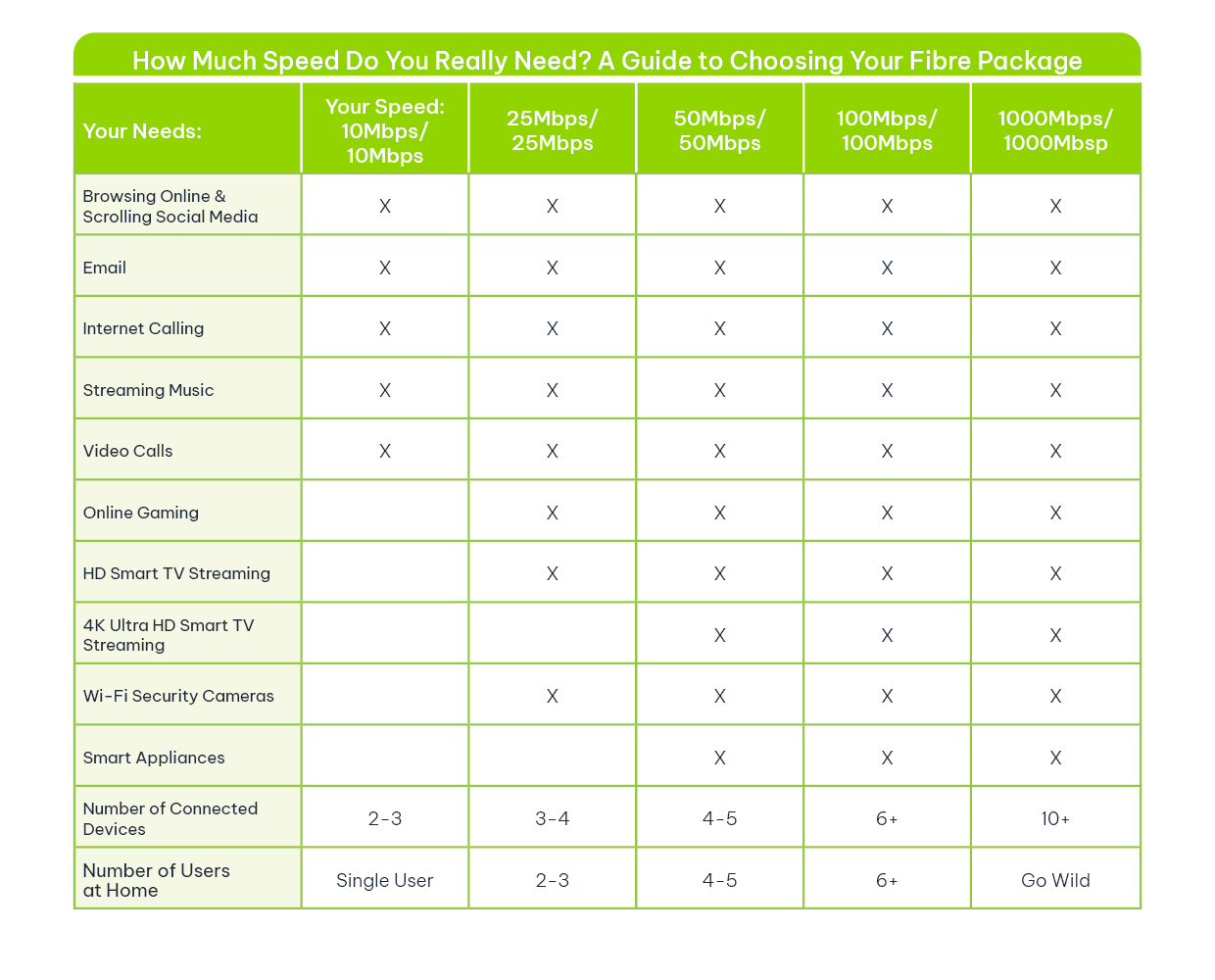
The table below offers some useful guidelines.

V104.1.7 How to Choose Table V1 030225 FINAL | Vox | Too Big, Too Small or Just Right? Choosing the Right Internet Plan for Your Household
choose internet plan South Africa

Select Your Internet Plan for Seamless Connectivity

When you’re choosing a household Internet plan, you want one that offers sufficient speed to support your family’s online activities without experiencing slowdowns or buffering.

Compare pricing structures among our different Internet offerings to find a plan that fits your budget and your speed requirements, as well as whether your Internet data usage will be capped or uncapped. At any given moment, you’ll find a promotional offer available and a variety of options across all our different Connectivity options (which are outlined in the next section).

Evaluate your household’s typical data consumption and choose a plan with sufficient data allowances to avoid throttling of your Internet speeds. Throttling occurs if you use more than a certain, pre-determined (as outlined within your contract) ‘fair’ amount of data in a given timeframe.

If your Internet usage is ‘throttled’, your line speed is slowed down during peak times to give other users fair access to the network. In simple terms, being throttled means that your upload and download speeds will be significantly reduced at certain times, until the new month begins and the ‘reset button’ takes you back to your contractual speeds. If you find that your home’s Internet connection is being regularly throttled, perhaps you need to upgrade to a package with higher speeds.


Types of Internet Connections 

You can find out what types of Vox Internet connections are availably simply by going to the Vox home page and typing in your address. All the options available to you in your area will then be shown.

These could include the following: Fibre to the Home, which provides blazing-fast Connectivity by using light pulses to transmit data packets through Fibre Optic cables; LTE and 5G, which work via the same wireless cellular technology that powers your mobile phone network; and Satellite, presenting your eye in the sky when other options aren’t available.

Each type of Internet connectivity for home usage has unique characteristics:

  • Fibre to the Home: Enjoy super-fast, reliable Internet with Vox’s Fibre to the Home packages, with speeds that range from 4Mbps to a whopping 1Gbps.
  • LTE and 5G: Get connected to the Fibre-like speeds of Vox’s LTE and 5G offerings without having to wait for a fixed-line Fibre option to be installed in your neighbourhood.
  • Satellite: When your area’s access to FTTH, LTE and 5G connectivity is limited, Vox offers Satellite Internet, independent of cabling, across the country. It isn’t as fast as the other options, but it’s reliable and available across South Africa.


Choose the Right Internet Plan Today 

internet speed for streaming and gaming

Selecting the right Internet plan makes sure that everyone in your home can stay connected and productive, for communication, remote work and online learning, banking, shopping and entertainment.

At Vox, we know that, just like the Three Bears in the age-old fairytale, everyone’s needs are different. Why not contact us today for expert advice on how to choose the right Internet plan for your home and your family? We’ll help you make the right choice: not too big, not too small, but just right.


Frequently Asked Questions

Is fibre always better than 5G or satellite?
Fibre typically offers the most reliable speeds and lowest latency. 5G/LTE can deliver fibre-like speeds and fast installation in many areas. Satellite is best where terrestrial services aren’t available.

What does ‘uncapped’ mean and is it worth it?
Uncapped means you don’t have a fixed data limit for normal use; check for any fair-usage policy. Uncapped plans are valuable for heavy households whose members frequently stream, game or work from home.

Why does my internet speed slow down at certain times?
That’s usually due to throttling under a fair-use arrangement or network contention during peak hours. Upgrading to a higher-tier or uncapped plan can help.

Can I mix connections (fibre with LTE backup)?
Yes. Vox and many ISPs offer redundant setups (fibre primary with LTE failover), which is useful for critical remote work or businesses operating from home.

How many Mbps do I need for remote work and video conferencing?
For reliable video calls, aim for at least 10–25Mbps per active remote worker, with good upload speeds to avoid degraded video quality.

How do I check which Vox options are available at my address?
Use the Vox availability checker on vox.co.za and enter your address to view Fibre, LTE/5G and Satellite options and the recommended plans for your area.


How Premium Hosting is the ‘Blue Tick’ your Business Needs

Join the club and enjoy the benefits


The issue of how to become part of an elite, exclusive grouping that others urgently want to belong to has been around for centuries and more. An invitation to ‘join the club’ usually speaks to people’s pre-programmed desires to be part of the In-Crowd and enjoy positive outcomes in one way or another.


band 8330128 1920 | Vox | How Premium Hosting is the ‘Blue Tick’ your Business Needs

In the UK and across Europe, we have royalty and rock stars. In America, there’s the huge celebrity that comes with being part of the crème de la crème of Hollywood. (Oh yes, and these days, if you’re a Tech Billionaire you automatically snagged an invitation to the 2025 Presidential Inauguration.) In South Africa, we had our own even-bigger-than-royalty home-grown celebrity with our late, truly great President Mandela, and we admire and revere our sports heroes (preferably when they’re winning, of course).

On social media we have the Blue Tick badge – a verification sign to show that the site is authentic. And when it comes to web hosting, here at Vox we know that Premium Hosting with WordPress is the Blue Tick that your business needs.

(Not to be confused with WhatsApp blue-ticking, which means you’re being ignored or even ghosted.)

So let’s look at why Premium Hosting from WordPress gives you and your target market peace of mind that you’re dealing with the real deal – and why you would want your business to join this club.


Your Web Hosting: The Real Deal

Meta Verified | Vox | How Premium Hosting is the ‘Blue Tick’ your Business Needs

A social media Blue Tick is a recognised stamp of approval that provides ways to separate an account from a duplicate or spam account. The advantages of this badge – which is different for Facebook, Twitter, YouTube, Instagram, Pinterest, and LinkedIn – include greater credibility and a reduced fear of impersonation, higher search results, potential increased engagement and increased brand awareness.

Now if only there was a way to apply all those benefits to your website.

Enter WordPress and Premium Hosting.

WordPress is a Content Management System (CMS) that’s used to manage blogs, full-blown websites, online e-commerce stores, news portals and other types of websites. Its mission is to enable the creation and editing of content on a website without needing to be fluent in a programming language. WordPress makes it easy for content producers without any previous coding knowledge to design and manage their entire portal, store or blog, simply and intuitively.

WordPress Premium Hosting goes further by offering a reliable, locally hosted WordPress website without the administrative challenges of managing a server. Your company gains the benefits of a professional site that is secure and able to grow with your business.

But why should you choose WordPress Premium Hosting over some of the other options that are available? And how does Vox assist?


No More Singing the Blues of Shared Web Hosting

With e-commerce enabled functionality, your website is a place of business in its own right. It’s often the first experience customers have of your organisation.

  • Traditionally, shared web hosting means that more than one website shares the resources of a single virtual or physical server. This makes for a low-cost solution but means that service levels can’t be guaranteed.
  • Unlike shared web hosting, Vox’s Premium WordPress offering is a solution for customers who require better performance, uptime and scalability.

Vox Premium WordPress hosting offers the following:

  • Dedicated hosting infrastructure – no more shared web hosting.
  • High-speed storage, ensuring premium performance.
  • Built on the Vox Internet network, meaning guaranteed performance with the ability to upgrade when required.
  • Monthly Website Vulnerability Assessments to identify risks and be proactive with your website’s cybersecurity.
  • Ongoing backups to ensure you don’t lose your website.
  • Locally hosted servers with 99.9% uptime guarantee.


Taking Your Business to the Next Level

businessman 2682712 1920 geralt Pixabay | Vox | How Premium Hosting is the ‘Blue Tick’ your Business Needs

WordPress hosting is tweaked for high traffic websites, providing excellent performance and faster loading websites. Vox’s Premium WordPress offering delivers performance and scalability to your fingertips, with three different package options depending on your needs:  WordPress Starter; WordPress Innovator and WordPress Fanatic.

With all of these benefits, be prepared to turbo-charge your website – and your business – and enjoy greater credibility, rock-solid e-commerce performance, increased engagement and positive brand awareness. Welcome to the Premier Club.

Fibre or Wireless for Business: When Your Real Estate Makes a Difference

Vox has a business solution no matter where you’re based, because location matters. Whether your premises sit in a newly cabled business park or in an area where fibre isn’t yet available will determine the most practical, cost‑effective and resilient connectivity option. Vox offers both Business Fibre  and licensed Wireless for Business so your organisation can stay connected, wherever you are.

‘Location, location, location.’

It’s the mantra that estate agents everywhere live by, and it also works in the world of Business Connectivity – where your business is located can have significant implications for your Internet options.

Is your organisation situated in an area where Fibre Optic Cables are already laid – or at least in the planning stage? If so, sorting out excellent Internet Connectivity for your organisation is guaranteed, and you’ll be able to make use of the fantastic speed of Fibre to the Business (FTTB), with its clear benefits for all users.

But what if the neighbourhood doesn’t yet have FTTB on its radar?

That’s when you look to another phrase that starts with the letter ‘L’ – and find out how ‘Line-of-sight’ can also help with excellent Internet access, through Wireless for Business Connectivity, delivered by Microwave radio technology.

We take a look at the different features and benefits provided by both FTTB and Wireless Connectivity for organisations.


Business Fibre: A Premium Cabled Service

Internet Connectivity that’s provided by Fibre to the Business, or FTTB (as well as Fibre to the Home, FTTH) uses Fibre Optic cables, composed of strands of glass, to transmit Data at incredibly high speeds using light pulses sent through the glass Fibre. This means that Fibre Optic networks are capable of much greater speeds and bandwidth than the traditional copper-based ADSL lines.


Fibre to the Business

Fibre Optic solutions bring you the best available speed within the current Internet landscape – users can achieve incredible speeds of up to 1,000Mbps. They’re also highly reliable due to the smooth, constant flow of Data during transmission, while the steady signal, with increased bandwidth, means that even with multiple users, Fibre Optics can handle the load.

Overall, Fibre Optic Internet is generally regarded as being the pinnacle of Connectivity. However, it’s not the only option for businesses to consider today.


Not Just for the Office Kitchen

Microwave Internet – also known as Wireless – is a worthy alternative to FTTB, especially in areas where the Fibre Network Operators (FNOs) haven’t yet laid the required cabling infrastructure. It’s just as fast as Fibre, and more widely available.

Microwave signals provide a fixed wireless broadband connection through a high-capacity Microwave radio link, requiring arguably less infrastructure than Fibre Optics. A fixed Microwave signal delivers both voice and data traffic over long distances and to more remote locations and rural areas.

Wireless Microwave Connectivity requires power and a clear line of sight, with its access towers connected to Fibre lines. A device is pointed at a tower which services the area in which your business operates. While the last-mile connection may be wireless, the backhaul is provided by Fibre Optics.


Wireless for business
Image courtesy of: https://protowermaintenance.com/what-is-microwave-communication/

Vox Business Wireless, using licensed Microwave spectrum, is an excellent replacement for traditional fixed-line last-mile connections. With Vox, you can ensure that your business is always connected where Fibre connectivity is limited or not available, and the deployment is significantly quicker than with Fibre.

You can also choose to connect a Temporary Vox Wireless connection while you wait for your Fibre – our rapid Installation saves you time and gets your Internet operating at world-class standards. Vox Wireless can also be used as a redundancy option to Fibre, to ensure that your business is always connected.


Which Option is Right for Your Business?

Fibre to the Business is generally regarded as being the ‘standard bearer’ of Internet connectivity today. Often referred to as the ‘gold in the ground’, it opens a fantastic doorway to the business requirements of the digital age.

However, Vox’s Wireless for Business is an excellent alternative to Fibre to the Business, particularly when the Fibre Optic cabling infrastructure hasn’t yet been laid in your neighbourhood. One potential drawback is that, because the connection is delivered over the air, line-of-sight is needed between both points. This can make installation more difficult in certain locations – for example if your business premises is in a valley surrounded by hills.

A Microwave Internet link can also be used as an excellent backup solution to Fibre, because when a company isn’t reliant on only one technology, this allows for business continuity and resilience planning. If a fault should occur with a Fibre connection, the Microwave Internet solution isn’t likely to be experiencing the same type of failure: one solution runs through cabling while the other is air-based.


An Added Bonus: The Best of Both Worlds

The choice between FTTB and Wireless to the Business is essentially a win-win for our customers. But what if there was a reason NOT to make a choice? What about an option that provides the best of both worlds?

If downtime would be a catastrophe for your business, then check out our Active-Active offering and enjoy the best of both worlds – Vox is the first local ISP to offer this exciting new product!

Vox has always been able to incorporate both FTTB and Wireless to the Business into our business failover solutions, which are designed to keep your organisation’s Connectivity up and running even during challenging periods. And now, we’ve proudly gone one step further.

Our new Active-Active failover offering is a groundbreaking new option that no other local ISP is presenting. This option maximises the use of both a Business Fibre connection as well as a Wireless to the Business solution, to make sure that your organisation never loses connectivity.

system 3541577 1920 | Vox | Fibre or Wireless for Business: When Your Real Estate Makes a Difference

Our National Footprint

The great news is that Vox is able to offer viable solutions for your business, no matter where your organisation is located. Our innovative Connectivity solutions can be customised to the specific challenges of your business location and buildings, as well as your Internet speed requirements.

Our Wireless offerings range from 5Mbps up to 100Mbps, with alternatives in between. As for our Business Fibre solutions, our range can go up to 1Gbps, and we offer scalable options with tailored value-adds to suit your business needs – for example, state-of-the-art Wi-Fi connectivity and DDoS attack defences.

Our offerings criss-cross South Africa no matter where your business is situated. Contact us today for more information, because we’ve got the ‘Location, location, location’ philosophy sorted.


Frequently Asked Questions

Is Wireless as reliable as Fibre?
Wireless (licensed microwave) is highly reliable and carrier‑grade, especially when mounted on properly surveyed sites, but it usually requires line‑of‑sight. Dedicated Fibre offers uncontended bandwidth and typically the highest resilience for heavy, continuous workloads.

What speeds can I get with Vox Wireless?
Vox Wireless licensed microwave services are available from 5 Mbps up to 100 Mbps (symmetrical), offered as either broadband (shared) or dedicated (1:1) links.

Can Wireless be used as a failover to Fibre?
Yes. Wireless is commonly used as a temporary connection while waiting for Fibre or as a redundant/failover link to keep your business online during cable faults.

What is Active‑Active and do I need it?
Active‑Active uses both fibre and wireless concurrently to maximise availability. It’s recommended where downtime would be costly, for example within retail, call centres, data replication and payment processing environments.

How long does installation take?
Wireless installations are typically faster because they don’t require trenching; Fibre timelines depend on local build status and site readiness. Contact Vox for a site assessment and estimated lead time.

Are speeds symmetrical?
Yes. Vox offers symmetrical lines for both Fibre and Wireless where specified (important for uploads, cloud backups and VoIP).

Do Vox services include SLAs and business support?
Vox provides 24/7 business support. Premium and Dedicated services offer stronger SLAs and priority support; details are provided during quoting.

What if my site is in a valley or has obstructions?
If line‑of‑sight is an issue, Vox will recommend alternative options based on a site survey, for example a nearby rooftop relay, temporary wireless, fibre where available, or hybrid redundancy.

Vox Hosting with the Mosting

Providing a solution to meet your business requirements

Customer loyalty today demands digital options. If your business doesn’t have an attractive and well-functioning website, your potential customers will shop elsewhere.

South Africa’s online retail sector showed a significant increase in the past few years, growing by almost 30 percent (29 percent) between 2022 and 2023. Having reached the R71 billion mark in 2023, online sales are now anticipated to break the R100 billion barrier by 2026 – which is just around the corner.

And so, with South Africa’s online sales soaring, there’s never been a better time to make sure your business has a functioning website. Even with a bricks-and-mortar operation, it’s essential to back it up with an online option as well.

If you’re keen to upgrade your company’s online presence quickly and effectively – or even kickstart one if you haven’t got a website already – Vox offers several different hosting experiences with solutions to meet your business’s unique requirements, no matter your budget.


Domain and Web Hosting: The Right Address and Functioning Operations

street 767772 1920 edited | Vox | Vox Hosting with the Mosting

In the physical world, you need an address so your customers can find you, and you need premises from which to operate. These two terms represent different things in terms of getting your website infrastructure up and running.

  • Start with an address: Domain hosting is a service that allows you to choose and register a unique online name for your website and brand, in other words your web address.
  • Make sure your premises are fit for purpose: Behind the address lies the property from which your business operates. Web hosting is essentially what stores all your site’s information and files. It’s usually a server, or space on a server.
  • Let your customers come inside: When someone uses your domain to access your website, signals are sent to the server, which then opens up your live site for the customer – the online version of ‘going into your shop’.


With Vox Web Hosting, you rent space on our server and host your website contents through us. We offer multiple platforms to choose from, including WordPress, Linux and Windows. Vox Web Hosting includes a free .co.za domain.


Backed by Vox Expertise

difference 7370145 1920 | Vox | Vox Hosting with the Mosting

As well as being able to choose from multiple platforms and have a free domain, Vox Web Hosting also offers the following benefits:

  • Extensive network coverage: Vox Web Hosting has an established national and international backbone with over 13 local PoPs (Point of Purchase outlets) and footprints in all the Teraco Data Centre environments.
  • Security Team: All servers sit behind Vox’s state-of-the-art firewall infrastructure, with virus management and security updates.
  • 24/7 Expert Support: Our servers are locally hosted and managed around the clock by our engineering team for peace of mind.
  • Includes a Free SSL Certificate: If you’re going to run a prosperous website that is secure for your users and browsers, SSL certificates are an essential. Vox SSL Certificates keep your customers’ confidence by ensuring the safety of their data while they visit your website.


WordPress, Linux and Windows are some of the world’s most popular website hosting platforms today, and Vox Web Hosting is proud to bring you different options across each brand.


Shared Web Hosting: Linux and Windows

Shared hosting makes getting started online simpler and easier, saving you money, as well as taking the headache out of hosting.

With Vox shared Web Hosting, our customers experience a form of web hosting in which more than one website shares the resources of a single virtual or physical server, which means a stable but also low-cost solution.

Choose from Linux options as follows:

  • Linux Basic: 1GB of storage, 25 email addresses;
  • Linux Standard: 4GB of storage, 75 email addresses;
  • Linux Advanced: 20 GB of storage, 200 email addresses; and
  • Linux Ultimate: 30 GB of storage, 250 email addresses.

Alternatively, Vox Web Hosting also offers Windows options, as follows:

  • Windows Standard: 2GB of storage, 100 email addresses;
  • Windows Advanced: 4GB of storage, 200 email addresses; and
  • Windows Ultimate: 20GB of storage, 250 email addresses.


Premium WordPress Hosting

If you want to kick your website functionality up a notch, consider WordPress. Over the last two decades, WordPress has grown from being a simple blogging website to one of the world’s most used hosting platforms today.

Our premium WordPress offering delivers performance and scalability to your fingertips. It’s an excellent solution for customers who require better performance, uptime and scalability – although please note: it doesn’t come with email addresses built into the offering.

  • WordPress Starter is ideal for startups that require a professional WordPress website, offering 50GB storage and able to cater to up to 30,000 visitors monthly.
  • WordPress Innovator is perfect for growing businesses that need to scale and require speed and reliability, with 100 GB storage and ideal for up to 120,000 monthly visitors.
  • WordPress Fanatic is excellent for running an e-commerce website, with 150GB storage. It’s capable of catering to an unlimited number of visitors monthly.


Which Option to Choose?

Whether your business is already established or a startup about to take off, you need a strong online presence. From your website address to the online ‘premises’ behind it, Vox has the right option to help you with your online sales.

open sign 1309682 1920 | Vox | Vox Hosting with the Mosting

Shared hosting shares a single physical server with hundreds (if not thousands) of other websites, giving you a low-cost service. WordPress hosting is tweaked for high traffic websites, providing excellent performance and faster loading websites.

Contact us for more information and we can assist you with working out the option that’s best for your business. We can help you establish a business identity, give your organisation a professional look and feel, and build credibility on the web.

Join the sales revolution and be part of the drive to reach the one billion Rand online sales mark next year!

Vox and the Lions Group – A Case Study

The Lions Group consists of three entities, namely the Golden Lions Rugby Union, the Lions Rugby Company, and EPS Management. Collectively, the three companies are the custodians of rugby in their region, from grassroots development all the way up to international interprovincial teams. While their primary focus is rugby, the Group has diversified its revenue streams to include various other activities, including concerts, sporting events, commercial rentals, and private functions and conferencing.

Pieter Burger, Manager Director: EPS, explains: “We have a passion for innovation and doing things differently, and consistent improvements in and around our facilities make them not only relevant, but also industry leaders in certain areas. This flexibility in our product offering, combined with innovation, is what distinguishes us from our competitors.”


The Business Challenge

During big games or concerts, stadiums face unique challenges due to their large, dense crowds, and one of these challenges involves providing connectivity to the highest standard.

Excellent connectivity is needed for broadcasting purposes, both within the stadium as well as to external broadcasting channels; financial transactions, including the sales of food and beverages and retail items; and Wi-Fi connectivity for the fans, which is an imperative for any live entertainment experience.

“As with any large sports and entertainment stadium, technology plays an important role in customer experiences at the Emirates Airline Park (Ellis Park Stadium), the home of the Golden Lions rugby team,” notes Stefan Pretorius: Enterprise Key Account Manager at Vox.

“Through Vox’s use of innovative technology, we assist in providing both stadium employees and customers alike with positive experiences during high-profile events. The use of network optimisation techniques can help maintain a high-quality Wi-Fi connection for everyone, but it all starts with sufficient and optimal broadband infrastructure.”

“As part of the entertainment industry, it is critical for the Lions Group to know that innovative technology and leading connectivity are together able to enhance high performance, as well as the consumers’ experience and preferences,” adds Burger. “Connectivity access networks, and their reliable uptime, is key in our industry.”


465008034 8772678062797376 4077640001360117771 n | Vox | Vox and the Lions Group – A Case Study


The Business Solution

Pretorius clarifies that Vox is responsible for supplying all connectivity to Emirates Airline Park, as follows:

  • Two 1Gbps dedicated Business Fibre links;
  • One 200Mbps dedicated Business Fibre link to the practice stadium next door;
  • Firewalls; and
  • An SD-WAN Solution for load balancing.


“Vox is a strategic partner of the Lions Group,” says Burger, “and we have benefited from our existing partnership with them for some years now. One of these advantages is that, as our technology requirements progressively increase, so we turn to Vox to implement enhancements as required.

“Before signing up with Vox, our main concerns and challenges involved Voice over Internet Protocol (VoIP), Connectivity and cloud solutions. Today, as our infrastructure partner, Vox provides excellent bandwidth and reliable uptime, and takes care of any required upgrades following a needs assessment and consultation. We also enjoy efficient support from Vox very quickly whenever required.”


Overall Experience with Vox

“We never have any concerns or issues with the implementation processes for our chosen solutions, which are always effectively handled by Vox engineers,” comments Burger. “Just like the Lions Group, we know that Vox has a strong entrepreneurial spirit and always strives to improve and enhance its service offering and effectiveness, and we admire and appreciate this shared synergy.

“We believe that Emirates Airline Park has the best bandwidth and reliability of any stadium in South Africa, as was displayed to such good effect during the Springboks versus New Zealand test in August 2024. Our relationship and overall experience with Vox is excellent – we could not ask for a better partner!”

From Good to Great: Making the Most of Your M365

Empowering you and your family across multiple devices


“There is no reason anyone would want a computer in their home.” – Ken Olsen, founder of Digital Equipment Corporation, 1977

This sentence definitely goes down in history as one of those things people deeply regret saying later. And while it’s easy to predict things in retrospect – ‘Hindsight is 20/20 vision’, as the saying goes – it seems incredible to think that people once lived in a world without access to personal laptops and smartphones in their lives, which have now become such an integral part of our home functioning for work, homework, financial planning and operating, entertainment and simply staying in touch.

The installation of Microsoft 365 (‘M365’) onto your devices will upgrade this even further – this brilliant software can maximise your devices and create truly next-level experiences.

Let’s look at how you can go from good to great with Microsoft 365.


Always Better with M365

monique carrati ONn4OfAnxZY unsplash | Vox | From Good to Great: Making the Most of Your M365

“Life is like a box of chocolates. You never know what you’re gonna get.” —Forrest Gump

But the great thing about Microsoft 365 is that you know exactly what you’re going to get (and it’s always a sweet deal). With Vox and Microsoft 365 for personal use, you can communicate, write, edit, do complex maths-based planning, share ideas, create presentations, and generally stay productive from anywhere, at any time.

Microsoft 365 Personal (for one individual) or Family (up to six people) will empower you and the rest of your family to stay productive from anywhere, at any time, across multiple devices. The subscription comes with 1TB of secure cloud storage space, advanced security features and innovative apps, all in one plan.


Features and Benefits

Some of the features and benefits include the following:

  • Microsoft 365 works on PC, Mac, iPhone, iPad, and Android phones and tablets.
  • Applications like Word, Excel, PowerPoint, and OneNote come with offline access and features that make your life easier.
  • Microsoft Defender provides advanced security for your personal data and devices.
  • Outlook gives you advert-free secure email.
  • Microsoft Editor provides advanced spelling, grammar and writing assistance.

  • Clipchamp video editor’s robust tools, including premium filters and effects, lets you create and edit videos easily, while AI-powered tools give you next-level productivity options.
  • Stay in touch with 60 minutes of Skype calling per month.
  • Create and manage databases for big or small projects with Access (PC only).
  • When you’re stuck, Microsoft 365 Family and Personal Subscribers have access to ongoing 24/7 technical support, via chat or email, with Microsoft-trained experts.


Making Your M365 Experience Better

Enable your life with M365’s multiple tools. Here are some tips to make your M365 experience even better.

brooke cagle g1Kr4Ozfoac unsplash | Vox | From Good to Great: Making the Most of Your M365

  • Organise Notes with OneNote: Microsoft’s OneNote is an app used for storing information and taking notes. OneNote notebooks allow you to store links, save photos and drawings and write with a stylus, keeping research notes in one convenient spot.
  • Recall Sent Messages: The next time you mistakenly click ‘send’ on an Outlook email, it’s possible that you can still recall an unread sent message. (Please note: Message recall is only available if both you and the recipient have a Microsoft 365 or Microsoft Exchange email account within the same organisation. You cannot cancel an email sent through Outlook on the web, and you are not able to recall a message that’s already been read.)
  • Use Keyboard Shortcuts: Microsoft offers dozen of keyboard shortcuts in Windowsto make your life easier. It’s useful to remember a few that work for you the best.  For a fun example, hold down Shift + [colon] plus [closing bracket on the zero key] and you get a smiley face. 😊
  • Don’t Recreate, Restore: Who hasn’t had the awful experience of working for hours on a document, only to accidentally delete it? Microsoft Office 365 enables you to restore your last saved copy (and a number of previous copies). View and restore files in SharePoint or OneDrive by clicking File > Infoand selecting View. You can see previous versions and restore prior content, and  while it might not take you back to exactly where you left off, you can still get back a lot of your hard work and then carry on.


With Microsoft 365, you get smart assistance features that help you create amazing content fast on any device. Imagine living in a world without access to Microsoft 365… No thanks!

Click here to find out more about how Vox can help you with Microsoft 365 for home use.

“Greatness is a lot of small things done well.” – Eric Thomas (American motivational speaker and author)


Great Internet Plan, Problem Router?

It’s weekend at last – but Internet access has slowed to a crawl…

Picture the scene, in this non-Vox household. (You’ll see why that’s important later in the story.)

Dad’s watching the Premier League on a streaming service; Mom’s chatting online to her friend overseas; Teenager is doing the initial download of a long-awaited new game, and Tween is on YouTube. Everyone is happy – and then the dreaded buffering starts. Everyone is instantly much less happy, and more bandwidth is clearly required.

“But wait!” says a lone voice, “we upgraded to a new home Internet plan last week and our new download speed is supposed to be blazing fast – so why is it not working?!!!”

The answer could lie with the router.

New Plan, Old Router?

Wi-Fi, as an enabler, carries most of the Internet traffic in a connected home. Your Wi-Fi router converts the Internet data received via the Fibre Optic cables in your neighbourhood into radio signals, to create your home Wi-Fi network and provide all the devices on it with Internet access, using built-in antennas.


Untitled design 2024 08 13T154659.142 | Vox | Great Internet Plan, Problem Router?

If you have a Fibre to the Home (FTTH) Internet plan that supports a download speed of say 25Mbps, an older router (and fewer users) is unlikely to cause a bottleneck in your connections.

However, if you then upgrade to a new 300Mbps plan (because of Teenagers / Tweens / the Premier League), but your previous router supports only 25Mbps wired, your Wi-Fi won’t be able to live up to the connectivity promise if your Internet Service Provider (ISP) doesn’t supply you with a newer model.

Connect With Vox

Vox connects you to the Internet and thereafter continues to manage your connection. When you sign up with Vox, we will furnish you with a suitable free-to-use Wi-Fi router based on your chosen package. We don’t charge a delivery fee for the router, or even a monthly fee for its usage – this is included as part of your bundle.

As a premium ISP, Vox ensures that, for standard installations, your Vox free-to-use Wi-Fi router is installed by a dedicated Vox engineer. Alternatively, our Self-Install process allows you to install your free-to-use Wi-Fi router, by following an easy step-by-step guide.


    • Fun fact: Different Wi-Fi devices work according to varying frequency bands. Older routers work on the 2.4 Ghz frequency, while newer phones and laptops use the more stable 5Ghz range. A dual-band device that supports both frequencies is ideal.


Not all routers over a few years old are necessarily bad, but if you’ve upgraded your Internet plan or added more devices to your network, an older router might have a harder time juggling the extra work than a newer model.

Signs that you might need a Wi-Fi router upgrade include the following: slow speeds; a weak connection; malfunctioning equipment; incompatibility with new devices and even overheating.


    • Fun Fact: Old smartphones, tablets, and other devices can slow also down your Internet access, even if you have a new, fast router and an upgraded Internet plan.


jonathan kemper ff96HE413W0 unsplash | Vox | Great Internet Plan, Problem Router?

At Home with Vox

The moral of the story is that new tech needs to meet its match – in other words, more new tech.

As outlined, older routers and network equipment can affect the household’s Wi-Fi speeds, especially when there are multiple users. We believe the issue of having the wrong Wi-Fi router for an upgraded Internet plan with Vox is highly unlikely, because we take care of that level of detail, and the responsibility, for you.

For Customer Service and General Queries, our Vox teams are on hand from 08:00 to 17:00, Monday through Friday, and from 08:00 to 14:00 on Saturdays and non-religious public holidays. You can reach us at help@voxtelecom.co.za or call 087 805 0530.

With Vox, upgrading your FTTH Internet usage plan is a straightforward process, and our Technical Support team is always able and willing to help you. We have a Wi-Fi solution for every need.

Sign up with our Fibre to the Home offerings and say goodbye to buffering and hello to hassle-free, connected weekends – for the whole family.


AdobeStock 478762309 1 | Vox | Great Internet Plan, Problem Router?


Internet, Unplugged: The Convenience of Wi-Fi

(‘The Internet’ and ‘Wi-Fi’ Are Not the Same)


“Hi, can I please use your Internet?”

“No, but you are welcome to access my Wi-Fi – let me give you the password.”

The Internet and Wi-Fi are not the same. Nobody owns the global Internet, but people pay for their connectivity and Wi-Fi services (to the home or office) to access the Internet. Knowing the difference makes for clearer understanding and communication.

And just as it’s the nature of water to flow freely through a well-built system, so does  information on the internet when it’s enabled by the correct infrastructure. Wi-Fi enables us to access this information without having to plug in our devices through a cable – let’s take a look.


The Internet of Possibilities

Back in its earliest days, people had to plug their devices into an ethernet cable (or before that, an ADSL connection, which was essentially a Telkom landline) to connect to the Internet.

That’s why people talked about ‘Being online’ – because you were ON the internet, but only because you were connected to a LINE (i.e. the cable).

Today, most people connect to the Internet in their homes (or at their office premises) through a wireless connection, in other words through Wi-Fi access. It’s a huge step up from having to have your device constantly plugged in to remain connected.

So how does Wi-Fi access enable wireless connectivity?

marvin meyer SYTO3xs06fU unsplash | Vox | Internet, Unplugged: The Convenience of Wi-Fi


From Fibre Outside to Wireless Inside

Your home Wi-Fi network begins with Fibre Optic cables that are laid outside your property within the neighbourhood by the fibre network operators (FNOs). Through these Fibre Optic cables, Internet data is transmitted at the speed of light.

When you sign up for a Wi-Fi service, an internet service provider (ISP) – like Vox – then takes over. The ISP links the FNO Fibre box outside your property boundary with a separate (shorter) Fibre Optic cable to an optical network terminal (ONT) inside your home.

The ONT is linked with one last short cable into your Wi-Fi router, which then ‘converts’ Internet data received via the Fibre optics into radio signals, to create your home Wi-Fi network.

And voila! You and your devices have access to wireless Internet access in your home.


Internet Like Water

Much like water, the Internet, with its constant access to information and services, has become fundamental to modern life today. So you could also think of the process like this:

  • Firstly, the Internet is the water that is constantly flowing.
  • The Fibre cables are your hosepipe – the actual infrastructure that carries the Internet to you.
  • Your Wi-Fi router is the primary sprinkler that makes the Internet easily accessible. Wi-Fi lets you access the Internet without having to literally plug in your device.
  • Finally, mesh units or access points placed strategically within your home further sprinkle your Wi-Fi everywhere it’s needed, allowing for the freest possible flow of the Internet and the information it allows us to share.

hose 3401513 1920 | Vox | Internet, Unplugged: The Convenience of Wi-Fi


From the way we communicate and work, to how we shop, bank and entertain ourselves, the Internet has revolutionised multiple aspects of our lives.

Vox can assist you with all of your connectivity needs, from infrastructure to Wi-Fi, with a host of additional options to quench your thirst for fully-enabled communications.

We’re proud to say that there’s no obstacle to free-flowing communications that we can’t solve for you.


Don’t Sleep on Data Backup and Recovery

Even Presidents Can Be Hacked

Data is the life blood of all organisations, and any loss of data can have serious implications for a business. The sudden loss of sensitive financial records or confidential information would be devastating to a company, with potential consequences including operational disruption, financial loss and reputational damage, as well as emotional distress to its customers.

Data loss can occur in many different ways. A hardware failure, a power outage, a natural disaster, or a cyber attack could all result in the loss of critical business data. Without a data backup plan, your organisation could be at risk of losing everything.

This means it’s essential to have proactive cybersecurity in place, as well as steps to control data backup and recovery, to protect an organisation’s digital assets. Having a reliable and redundant backup solution can assist companies to recover from incidents such as ransomware or hardware failure.

cyber 1654709 1920 | Vox | Don’t Sleep on Data Backup and Recovery


Three, Two, One: Go! For Data Backup

Data backup is a proactive measure that involves creating duplicate copies of critical data to guard against potential loss. These copies act as insurance against unforeseen events like hardware failures, accidental deletions and even cyberattacks.

Establishing a reliable backup strategy is like giving yourself a digital safety net to protect against risks – or an insurance policy, to put it another way.

Effectively implementing data backup and cybersecurity requires a strategic approach. Establishing a solid data backup plan involves adhering to the 3-2-1 backup rule, which has been used for many years and is supported by solution providers, businesses and even governments.

The 3-2-1 backup rule outlines that three backups must be kept, two of which should be on two different media (usually disk and tape), while one copy must be outside the primary data centre. This approach ensures protection against various scenarios, from hardware failures to natural disasters.

SA President Not Immune from Ransomware Attacks

South African government institutions have been battered by ransomware gangs over the last year.

The Development Bank of Southern Africa was targeted by a ransomware attack in June 2024, with servers, logfiles and documents stolen. In September this year, South Africa’s defence department was hacked by a gang that also allegedly leaked the personal phone number and email of President Cyril Ramaphosa, as well as a portion of the 1.6 terabytes of data stolen from the country’s defence systems.

The country’s International Trade Administration Commission also said it was hit with ransomware in early 2024. More recently, in June, the National Health Laboratory Service (NHLS) was targeted by a ransomware attack in which hackers deleted sections of their system, including backup servers, which meant that they were required to rebuild many of the affected parts. The attack took place at a time when Mpox outbreaks in the country were of concern.

These statistics show that data loss is a severe problem that can have a significant impact on an organisation, causing financial and reputational damage.

cyber 4444450 1920 | Vox | Don’t Sleep on Data Backup and Recovery 

Protect Your Data with Vox

At Vox, we understand the critical importance of keeping your data safe with a backup and recovery plan. As a Veeam Gold Partner, we offer your business the opportunity to create a copy of your data through our Backup as a Service, which uses the 3-2-1 rule.

As a trusted leader in the data protection space, Veeam provides backup, recovery and replication for critical workloads, like VMware, AWS, Microsoft Azure, SQL Server, Oracle, Windows, Linux and NAS, across physical, virtual and cloud platforms, in a single offering.

With the Vox 3-2-1 Backup solution, we provide an onsite data store for fast local restores, and replicates the data to our Cloud repository in case of major onsite disaster. It supports onsite virtual or physical servers as well as Windows and Linux desktops.


AdobeStock 572971403 | Vox | Don’t Sleep on Data Backup and Recovery

We offer a number of benefits:

  • A fully managed solution with proactive monitoring to ensure data isn’t lost
  • Ongoing integrity testing ensures that data is not corrupt and that backups can be recovered
  • The option to quickly restore to Vox Cloud so that users can continue to work.

Companies implementing a backup strategy often only keep data on-site, believing this to be infallible. However, a ransomware attack or critical hardware failure, in most instances, renders the data unrecoverable. With our Vox solution, you can protect against this risk by adding an additional layer of redundancy, as follows:

  • 3 copies of your data: This is the primary copy of the data you are using as well as two backups.
  • Saved on 2 different mediums: In addition to your primary copy, an onsite NAS device stores your backups, enabling quick restore functionality to reduce downtime.
  • 1 copy offsite in the Vox Cloud: Using Veeam’s Cloud connect, a backup copy is stored and maintained in the Vox Cloud.


The urgency to backup data lies in the potential devastation that is caused by data loss. You don’t want your organisation to become another statistic – or another bad news story in the headlines.