
Microsoft Family and Personal Licences Unlock the Power of Ai

The speed at which artificial intelligence (AI) has transformed from being a niche technology into a mainstream tool these past few years is astonishing. The key differentiator in the recent AI journey has arguably been the introduction of ‘generative AI’, meaning a type of AI that can create new content and ideas, including conversations, stories, images, videos and music.

Artificial intelligence is the broader concept of making machines more human-like. It includes everything from smart assistants like Alexa, chatbots and image generators to robotic vacuum cleaners and self-driving cars. Generative AI is a subset that generates new content meaningfully and intelligently.

Generative AI has been a major step-up from the relatively simple chatbots that we’ve been used to for a while now. For some people, it’s exhilarating and for others, a little intimidating.

In this article, we look at Microsoft Copilot – a generative AI chatbot developed by Microsoft – and how it can help people in their work and home lives with the Microsoft 365 Personal and Family plans.

But first, let’s take a quick glance at how we got to this point.

ai generated 8620394 1280 smaller | Vox | Microsoft Family and Personal Licences Unlock the Power of Ai


From ELIZA to LLMs

The history of generative AI dates back further than you might think, to the 1960s in fact. The first historical example of generative AI was called ELIZA, created in 1966 by Joseph Weizenbaum, a computer scientist and professor at the Massachusetts Institute of Technology (MIT). ELIZA was a talking computer program that would respond to a human, using a natural language and responses designed to sound empathic. We could say that ELIZA was the first chatbot!

weizenbaum at computer w eliza | Vox | Microsoft Family and Personal Licences Unlock the Power of Ai
Image courtesy https://www.cbc.ca/radio


The transition from basic chatbots to advanced platforms like Microsoft Copilot represents a shift from rule-based interactions to large language model (LLM)-powered conversational AI.

Microsoft explains that LLMs: ‘are advanced AI systems that understand and generate natural language, or human-like text, using the data they’ve been trained on through machine learning techniques.’

Traditional chatbots are limited by their predefined scripts, while today’s generative capabilities allow for context-aware and human-like responses, enabling more natural and flexible interactions.

Let’s fast-forward to the 21st century. In November 2022, OpenAI introduced ChatGPT, a generative AI combined with large language models. This was closely followed by Microsoft Copilot in 2023.

The combination of generative AI training with large language models has resulted in artificial intelligence that is able to think and reason. With today’s ‘smarter chatbots’, we’ve achieved a new level of artificial intelligence – they can perform research; support reasonably good writing; and generate realistic videos, audio and images.

So how can Microsoft Copilot help you and your family members?


Technology Working Smarter for the Whole Family
M365Copilot HeroBanner Apps BLOG FEATURE | Vox | Microsoft Family and Personal Licences Unlock the Power of Ai

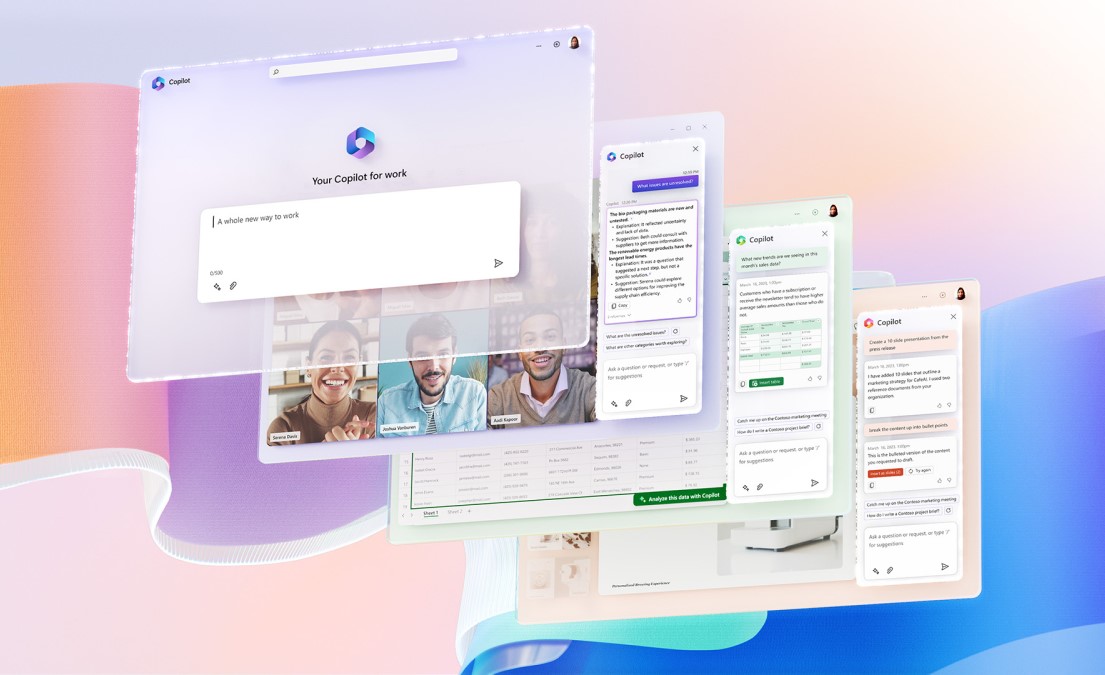
Microsoft 365 Copilot is now available in Microsoft 365 Personal and Family plans.

It’s an AI-powered assistant built right into the Microsoft 365 ecosystem – a digital assistant designed to help you with a range of tasks and activities. It’s not just a chatbot bolted onto Office but instead can interact with your content, understand context, and execute complex tasks using your data securely.

You could think of it as a digital co-worker that understands your documents, spreadsheets and conversations, and then helps you work faster with automated ideas.

Microsoft Copilot can create drafts of content, recommend different ways to reword something you’ve written, suggest and insert images or banners, create PowerPoint presentations from your Word documents, and many other helpful things.

With your licence, enjoy intelligent features like:

  • Smart suggestions for faster document creation and editing;
  • AI-driven insights to help you stay organised and make informed decisions;
  • Enhanced security with AI-powered threat detection for peace of mind; and
  • Personalised experiences tailored to your preferences and usage patterns.


From seamless collaboration to smarter everyday tools, Microsoft’s AI integration ensures that you get the most out of your Personal and Family plans.

Bring the future to your fingertips with cutting-edge AI features included in our Family and Personal licences. Whether you’re managing household tasks, boosting productivity, or exploring creative projects, our AI-powered tools are designed to simplify your life and elevate your experience.

Choose a Family or Personal licence today and step into a world where technology works smarter for you – and the whole family!


From Good to Great: Making the Most of Your M365

Empowering you and your family across multiple devices


“There is no reason anyone would want a computer in their home.” – Ken Olsen, founder of Digital Equipment Corporation, 1977

This sentence definitely goes down in history as one of those things people deeply regret saying later. And while it’s easy to predict things in retrospect – ‘Hindsight is 20/20 vision’, as the saying goes – it seems incredible to think that people once lived in a world without access to personal laptops and smartphones in their lives, which have now become such an integral part of our home functioning for work, homework, financial planning and operating, entertainment and simply staying in touch.

The installation of Microsoft 365 (‘M365’) onto your devices will upgrade this even further – this brilliant software can maximise your devices and create truly next-level experiences.

Let’s look at how you can go from good to great with Microsoft 365.


Always Better with M365

monique carrati ONn4OfAnxZY unsplash | Vox | From Good to Great: Making the Most of Your M365

“Life is like a box of chocolates. You never know what you’re gonna get.” —Forrest Gump

But the great thing about Microsoft 365 is that you know exactly what you’re going to get (and it’s always a sweet deal). With Vox and Microsoft 365 for personal use, you can communicate, write, edit, do complex maths-based planning, share ideas, create presentations, and generally stay productive from anywhere, at any time.

Microsoft 365 Personal (for one individual) or Family (up to six people) will empower you and the rest of your family to stay productive from anywhere, at any time, across multiple devices. The subscription comes with 1TB of secure cloud storage space, advanced security features and innovative apps, all in one plan.


Features and Benefits

Some of the features and benefits include the following:

  • Microsoft 365 works on PC, Mac, iPhone, iPad, and Android phones and tablets.
  • Applications like Word, Excel, PowerPoint, and OneNote come with offline access and features that make your life easier.
  • Microsoft Defender provides advanced security for your personal data and devices.
  • Outlook gives you advert-free secure email.
  • Microsoft Editor provides advanced spelling, grammar and writing assistance.
  • Clipchamp video editor’s robust tools, including premium filters and effects, lets you create and edit videos easily, while AI-powered tools give you next-level productivity options.
  • Stay in touch with 60 minutes of Skype calling per month.
  • Create and manage databases for big or small projects with Access (PC only).
  • When you’re stuck, Microsoft 365 Family and Personal Subscribers have access to ongoing 24/7 technical support, via chat or email, with Microsoft-trained experts.


Making Your M365 Experience Better

Enable your life with M365’s multiple tools. Here are some tips to make your M365 experience even better.

brooke cagle g1Kr4Ozfoac unsplash | Vox | From Good to Great: Making the Most of Your M365

  • Organise Notes with OneNote: Microsoft’s OneNote is an app used for storing information and taking notes. OneNote notebooks allow you to store links, save photos and drawings and write with a stylus, keeping research notes in one convenient spot.
  • Recall Sent Messages: The next time you mistakenly click ‘send’ on an Outlook email, it’s possible that you can still recall an unread sent message. (Please note: Message recall is only available if both you and the recipient have a Microsoft 365 or Microsoft Exchange email account within the same organisation. You cannot cancel an email sent through Outlook on the web, and you are not able to recall a message that’s already been read.)
  • Use Keyboard Shortcuts: Microsoft offers dozen of keyboard shortcuts in Windowsto make your life easier. It’s useful to remember a few that work for you the best.  For a fun example, hold down Shift + [colon] plus [closing bracket on the zero key] and you get a smiley face. 😊
  • Don’t Recreate, Restore: Who hasn’t had the awful experience of working for hours on a document, only to accidentally delete it? Microsoft Office 365 enables you to restore your last saved copy (and a number of previous copies). View and restore files in SharePoint or OneDrive by clicking File > Infoand selecting View. You can see previous versions and restore prior content, and  while it might not take you back to exactly where you left off, you can still get back a lot of your hard work and then carry on.


With Microsoft 365, you get smart assistance features that help you create amazing content fast on any device. Imagine living in a world without access to Microsoft 365… No thanks!

Click here to find out more about how Vox can help you with Microsoft 365 for home use.

“Greatness is a lot of small things done well.” – Eric Thomas (American motivational speaker and author)


Is the future of work remote, hybrid, or both?

Time to Leave Your Business Rental Lease – Or Not?

Employees are collectively one of an organisation’s most valuable assets, and if they’re motivated, your company is more likely to achieve its best possible results. It’s therefore good sense for management to check in periodically on what makes their employees happy – besides salary increases, of course.

According to the latest Cisco Global Hybrid Work Study, skilled South Africans prefer to work remotely at least some of the time, with almost 95 percent of the local respondents (from a global poll of 28,000 participants) wanting to work either in a hybrid or fully remote working model.

It therefore makes good sense to consider the possible benefits of remote or hybrid working arrangements, to both the organisation as well as the workforce. One of the employer advantages could include needing less office space, thereby freeing up significant rental or maintenance costs.

Remote But Not Removed

Employees who enjoy working remotely and are enabled to do so with the correct tools and infrastructure (a decent laptop and a fast and reliable internet connection are key) value a potentially better work-life balance. This includes not having to spend hours commuting every week, and so gaining back time while also reducing stress.

Productivity has been shown to spike because of reasons such as people getting more sleep, having fewer distractions from colleagues, and experiencing improved morale overall. With lengthy commutes out of the equation, attendance should also improve.

Video conferencing platforms such as Microsoft Teams allow geographically dispersed colleagues people to have virtual meetings, conduct presentations, and foster face-to-face interactions. This also allows organisations of all sizes to hire in top employees from a global talent pool, without being bound by location limitations (providing that differences in time zones are managed efficiently).

virtual coworkers 3382503 1920 | Vox | Is the future of work remote, hybrid, or both?

However, this doesn’t necessarily mean that your organisation should immediately terminate its rental lease, or sell a corporate property investment at the first available opportunity – not everything about remote working is advantageous.

Isolation and Other Issues

Going to the office regularly can bring structure and routine to people’s lives, while in contrast, working remotely can be isolating and lonely for some. Managers might worry that their team members are not working as efficiently as they would be in the office, and conversely, some employees can struggle without face-to-face leadership input.

It can also be more challenging for remote employees to find and locate all the information they need. Additionally, remote working can bring decreased collaboration, with fewer opportunities for employees to talk to each other during breaks, thereby cementing workplace friendships and cooperation.

Enter the ‘middle ground’.

Saying ‘Hi’ to Hybrid

A hybrid workplace model mixes in-office and remote work to offer employees flexibility and support. In a hybrid workplace, employees typically enjoy more autonomy and better work-life balance – and are more engaged as a result. Employers benefit by building a more productive and stable workforce, with people more easily able to engage and learn from each other.

husna miskandar FC4z3l4sUYc unsplash happy employees | Vox | Is the future of work remote, hybrid, or both?

Unified digital workplace platforms make it easier for employees to access all their work-related data and applications, while also assisting with effective communications. For example, Microsoft Teams facilitates effective communications among skilled colleagues, no matter where they are based. As a Microsoft Operator Connect partner, Vox can assist your employees to make and receive phone calls directly within Teams, for both landline and mobile phones.

Another option is to have your employees using Vobi, from Vox – our mobile softphone app, that gives users the ability make and receive voice and video calls, including in app texting from their mobile phones using the Vox network. Designed for both home users and businesses, Vobi allows users to benefit from reduced call rates on video and voice calls across all networks. Vobi enables you to route your home phone and/or office phone calls to your mobile phone, ensuring you are always available.

Getting Real with Real Estate Issues

For employers, renting office space – or owning and maintaining it – can be very costly. Remote working can lower costs by reducing the amount of office equipment and space required, potentially allowing your organisation to move into smaller premises – or even forego a physical space entirely.

office 95311 1920 | Vox | Is the future of work remote, hybrid, or both?

Instead, all employees could work remotely, and your company might simply hire meeting rooms or co-working space as and when needed.

If an office premises is owned by a company, selling it outright could put money back into the organisation.

Where to From Here?

We believe the future of work for skilled employees will continue to embrace both hybrid models and fully remote opportunities, with these options being driven by modern technology, increased flexibility, cost savings, a desire for an improved work-life balance, and being able to hire people from a global talent pool.

The Covid-19 pandemic first turned people’s homes into their offices. Now, the aftermath can drive a movement in which unused offices can be turned into homes. Around the world, including in South Africa, property developers are looking at ways to turn empty office buildings into housing solutions. While not every empty office building is suitable for conversion, it offers interesting possibilities.

Africrest Prop Atlas Apollo Sunninghil 744x418 1 | Vox | Is the future of work remote, hybrid, or both?
The Atlas in Sunninghill, the largest office park conversion to a residential complex in SA, according to Africrest Properties.

And so, if your organisation is going to embrace a fully or partially remote solution, do you have a building to sell? It could be an added bonus.

No 1 in Teams: Unpacking Voice Solutions with Vox and Operator Connect

A quick and easy way to integrate Voice calling into Teams – no matter where your employees are working from


Using Microsoft Teams has proven itself as an excellent platform for calling, holding meetings and collaborating with colleagues working remotely or from office spaces in different parts of the country. Teams has been proven to keep effective communications going among skilled colleagues no matter where in the country – or the world – they might be based.


Did you know that in addition, with Microsoft Operator Connect, businesses can quickly and easily integrate Voice calling into Teams, saving on costs and enhancing communications and efficiencies further?


As a Microsoft Operator Connect partner, Vox hosts and manages the infrastructure required for VoIP (Voice over Internet Protocol, or calls made over the internet) as well as PSTN[1] calling (meaning calls made over landline), using Teams, powered by Microsoft Azure.


By enhancing the integration of Vox’s low-latency, quality-controlled Voice Network with Microsoft Teams, Operator Connect offers streamlined, fully-managed Vox Voice services and radically improved call quality. With Operator Connect, users can make, receive, transfer, forward and put a Voice call on hold from any location via a Teams-enabled computer or smart device.


Vox and Microsoft Operator Connect


Customers can connect their existing phone numbers to Microsoft Teams or obtain new numbers, manage their calling plans, and configure their call routing right from within Microsoft Teams. This is particularly helpful for the IT department – your technicians can quickly assign numbers without needing to go through external providers, and can manage everything from one place.


By subscribing to Operator Connect, Teams users get a telephone number on which they can make and receive calls. Users can call any phone number in the world and receive calls from anyone in turn, from their mobile phone or computer.


With Operator Connect, Teams replaces the company’s old handsets, and users make and receive phone calls directly within Teams.


Benefits of partnering with Vox and Operator Connect include:


  • Migrate your current Vox Voice services or port numbers from your existing operator quickly and easily (Geographic and Non-Geographic numbers).
  • Operator Connect is designed to be easy for the IT team to use from the Teams Admin Centre.
  • The solution is budget-friendly: One of the benefits of Operator Connect is that by enabling Voice calling directly from Microsoft Teams on PC or mobile phone, no other hardware is required.
  • Vox provides tech support and service level agreements (SLAs) for excellent trouble-shooting and ongoing reliability.
  • Significant savings: With either Unlimited or Post-Paid Voice packages to choose from, Vox will tailor a calling plan suited to your business needs.
  • Every customer receives the most secure and value-rich solution as default, with active 24/7/365 fraud monitoring and guaranteed 99.9% uptime, with punitive SLA clauses should we not deliver on our promise.
  • Quality of service: Your Microsoft Teams and Voice traffic is prioritised above all other traffic travelling across your Fibre connection. This means that your Teams and Voice calls will not be interrupted by other activity happening on your network. This is a proprietary service offered by Vox on your Vox home or business Fibre last mile link.


Teams and Vox: A Winning Combination


Subscribing to Operator Connect is not difficult at all – just click here to enquire, and then a Vox expert will contact you and guide you through the quick and simple subscription process.


Once you accept, we’ll establish a trunk connection for you, assist you to provision users and assign phone numbers directly from the Teams Admin Centre so you can start making calls – it’s friendly on the bottom line, hassle-free, secure and tailored to your unique business requirements.


Simply subscribe to Operator Connect from Vox and leave the rest to us.

christin hume Hcfwew744z4 unsplash | Vox | No 1 in Teams: Unpacking Voice Solutions with Vox and Operator Connect


[1] The PSTN (Publicly Switched Telephone Network) is the network that carries your voice calls when you call from a landline or cell phone. It refers to the worldwide network of voice-carrying telephone infrastructure, including privately-owned and government-owned infrastructure.