Protect Your Kids from Online Predators

Some practical thoughts to guide parents and grandparents

It can’t happen in my home… can it?

Just because your children are playing online games in the safety of your home doesn’t mean that they are safe from perverts.

This is the reality of today’s digital world.

It’s hard to believe, but every parent’s worst worry is now partly digital: how to protect kids from online predators who can reach children through games, apps and social networks in the safety of your own home. This guide discusses online grooming, practical steps you can take at home, and how tools from Vox and Norton™ can help you keep children safer online.

[Editor’s note: This article comes with a sensitivity warning, particularly for parents, grandparents and other concerned family and friends.]

According to the United Nations Children’s Fund (UNICEF), in South Africa, according to its ‘SA Kids Online Study’, one-third of children in the country are at risk of online violence, exploitation and abuse.

  • One-quarter (25%) of those surveyed confirmed that they had added people whom they’d never met face-to-face to their friends or contacts list.
  • Similarly, nearly one-fifth (18%) of those surveyed had sent a photo or video of themselves to someone they had never met in real life.


These stats also confirm just how naïve and vulnerable children can be – and why parents and guardians need to protect them.

Protect kids from online grooming_1

And so, when we read about the pervasiveness of online grooming, your first response as a parent might be: ‘It can’t happen in my home – can it?’ but your second response should be: ‘How can I make absolutely sure that it doesn’t?”

With Vox and global cybersecurity expert company Norton™, parents can exert real parental control by setting up tools to help your kids explore the Internet more safely.


Unpacking Online Grooming

In decades past, parents and caregivers worried about ‘flashers’ – perverts lurking around schools in long coats, who waited to suddenly give their young victims an eyeful that they weren’t expecting.

Today, the perverts are looking for the reveal to be the other way around – and the effects can be far more lingering and devastating.

Online grooming

Norton™ warns that, as part of the attempted grooming process: ‘…predators may spend months steadily getting to know their potential victims. They might start this process by contacting children as they play popular online games such as Fortnite or Minecraft.

‘…Once predators gain the trust of their victims, they will then steer conversations more often toward sexual topics and will eventually ask children to engage in sexual conversations, send explicit photos, or meet them in real life.’

Reports have also surfaced of cyber predators infiltrating another online game popular with kids, namely Roblox.

But there ARE ways to fight back – and in the Vox family, we’re definitely here to help.


The Danger Lurking Behind Everyday Apps

Vox has teamed up with Norton™, which provides industry-leading antivirus and security software for PC, Mac and mobile devices.

According to Norton, children today gravitate toward social media apps that allow them to connect easily with their friends. But these social networking apps and websites are also favoured by predators who use them to communicate with their intended victims.

Norton says that, in addition to online games, some of the apps that predators may use to communicate with children include WhatsApp, Snapchat, TikTok, Kik, Monkey, Whisper and Chat Avenue.

For any parent, it’s frightening to think about the multiple ways that predators can use technology to find and target their victims.

So let the experts take care of it for you.

child 1073638 1920 | Vox | Protect Your Kids from Online Predators


What Norton and Vox can do for you 

Vox has partnered with Norton to make industry-standard protections readily available to families with Norton Family and Norton 360 providing one app for many devices.

These tools don’t replace conversations, but they give you clear alerts, activity reports and the ability to set safe boundaries.

Smart monitoring allows parents to monitor search terms, videos and app downloads; receive alerts for unsafe behaviour; and get detailed activity reports.

In addition, options such as location tracking allow you to define safe zones for your children and receive real-time alerts if those boundaries are crossed. Children can share their location through the mobile app.

All of these safety features – and many more – are available from Norton’s comprehensive protection for your devices and online privacy.


Protect Kids from Online Predators at Home

UNICEF says that keeping children safe online also relies on parents and caregivers maintaining open communication; using technology to protect children; spending time with them online; and encouraging healthy online habits

  • Talk regularly and openly: Start conversations about online life the same way you’d talk about who your child plays with in the street. Ask gentle questions: who are your friends online? What games do you play? What apps do you use?
  • Agree house rules: Device-free zones (dinner table, bedrooms at night), time limits for play, and rules about sharing photos or personal information.
  • Use parental controls: Industry tools such as Norton Family and Norton 360 offer activity monitoring, content filtering, screen-time limits, location supervision and alerts for risky behaviour. These tools help you set boundaries while still allowing kids to explore.
  • Co-play and co-view: Sit with younger children while they play online and encourage older children to show you new apps and settings. This builds trust and gives you a live view of who they interact with.
  • Check privacy and friend lists: Make sure profiles are set to private, review followers and friends together, and remind children never to share addresses or phone numbers in chats.
  • Watch for signs: Increased secrecy, sudden changes in behaviour, new devices or new online friends that appear overnight are all red flags.


Balancing Safety and Privacy

Monitoring doesn’t mean spying. Explain to your child why you’re using parental controls and that the aim is safety, not punishment. As children grow, shift from more direct monitoring to regular check-ins and shared agreements about responsible online behaviour.

Quick checklist for parents and grandparents (bullet list for snippet targeting)

  • Have an open conversation about online risks this week.
  • Set simple house rules for devices and sharing.
  • Install parental controls and review activity reports weekly.
  • Make social profiles private and review friend lists together.
  • Know how to report abuse to the app/platform and to local authorities.
  • Keep devices in communal spaces for younger children.


Before our world became as digital as it is today, parents only had to worry about their children’s safety in the physical environment. Today, we have to be concerned about online predators that can access our homes through our digital devices.

This is all a lot to think about, so why not let Vox and Norton take care of it for you with our comprehensive and proactive suite of solutions?

We’re here to help you keep your children safe in the online world for as long as possible without becoming another statistic.  Please click here for more information.


“Making the decision to have a child is momentous. It is to decide forever to have your heart go walking around outside your body.” ~Elizabeth Stone, author

mother 2935723 1280 | Vox | Protect Your Kids from Online Predators


Frequently Asked Questions

How can I tell if my child is being groomed online?
Look for signs such as secrecy around devices, sudden new friendships, unexplained gifts, changes in mood or sleep, or attempts to isolate the child from family. If a child is using private messaging apps or deleting chat histories, take note and ask open, non-judgemental questions.

What do Norton parental controls actually do?
Norton Family and Norton 360 provide content filtering, web and search supervision, screen-time controls, social media monitoring, location supervision and alerts for unsafe behaviour. They produce activity reports so you can spot potential problems early.

Will parental controls invade my child’s privacy?
Used thoughtfully, parental controls are a safety tool. Be transparent: explain why you’re using them, involve your child in setting the rules, and gradually reduce monitoring as your child demonstrates responsible behaviour.

At what age should I set up parental controls?
Start young, because even pre-schoolers benefit from basic content filtering and supervised access. For older children, combine tools with conversation and digital literacy lessons so they understand safe behaviour.

What should I do immediately if I suspect grooming?
Stay calm, listen to the child, preserve any evidence (screenshots, chat logs), report the account to the platform, and contact local authorities or child-protection organisations for guidance.

Where can I get help in South Africa if I need to report abuse?
Report serious threats to the police (SAPS) and the platform where it occurred. Seek support from child-protection organisations and trusted local counselling services.



Real Risks of Critical Infrastructure Cyber Attacks

No longer only in the movies…

There are very real cyberthreats lurking today, including critical infrastructure cyber attacks, and all organisations need to protect themselves. We tune into the movies and TV shows for entertainment – sometimes because we need a serious dose of escaping reality to forget about our challenges for a while.

And if we’re watching a thriller, when the film is over, we breathe a sigh of relief that what happened in it was much too far-fetched to have any actual connection to reality.

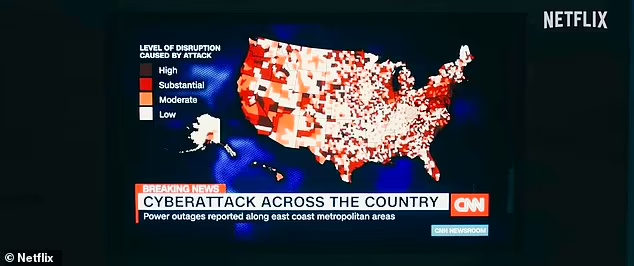
Perhaps viewers a couple of years ago were comfortable, while watching the 2023 American apocalyptic thriller ‘Leave the World Behind’, to think that they would be returning safely to reality when the credits finally rolled, because….

[Editor’s note: If you haven’t seen the movie, here comes a spoiler alert!]

cyber attack leave the world behind | Vox | Real Risks of Critical Infrastructure Cyber Attacks

…because a war was NOT actually being started outside the cinema by sinister forces who began by first destroying communication networks and critical infrastructure through a highly targeted cyber attack.

(If you haven’t seen the movie and want to know more, here’s a quick sneak peek at the trailer. The movie stars Julia Roberts, Mahershala Ali, Ethan Hawke and Kevin Bacon.)

Except that… attacks on infrastructure ARE becoming more commonplace in the real world, as Information Technology (IT) and Operational Technology (OT) systems become increasingly intertwined.

Let’s look at some real-life examples.


Why It’s real: IT and OT Convergence 

large Colonial Pipeline | Vox | Real Risks of Critical Infrastructure Cyber Attacks

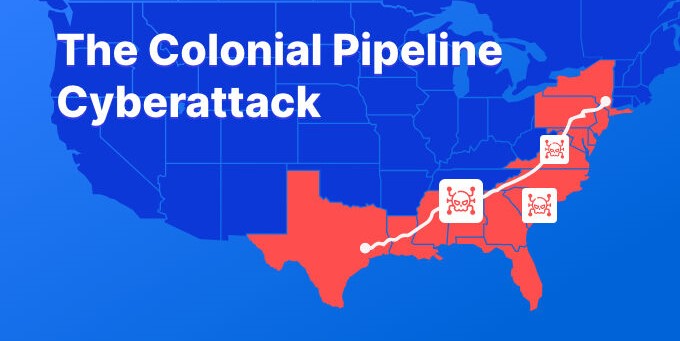
One of the largest oil pipelines in the United States, the Colonial Pipeline in the eastern USA, went down in May 2021 for a few days because of a massive cyber-attack. It caused fuel shortages, panic buying and a temporary spike in gasoline prices.

The attack, from a Ransomware-as-a-Service (RaaS) operation named DarkSide, caused a four-day shutdown of the pipeline, after DarkSide’s operators had accessed the company’s IT network, stolen 100 gigabytes of data and encrypted several critical systems. A significant section of the eastern part of the country was affected, and Colonial Pipeline paid the hackers nearly $5 million as a ransom to finally regain control of their systems.

The Colonial Pipeline ransomware attack is considered to be one of the most significant attacks on critical national infrastructure in history.

So perhaps the moral of this particular story is this: Taking down critical infrastructure is not so far-fetched after all!

digital 4683519 1920 Infrastructure threat resized | Vox | Real Risks of Critical Infrastructure Cyber Attacks

As for communications networks, cyber-attacks on telecommunications companies (telcos) can have far-reaching consequences. The nature of the information held on customers can put their personal safety at risk if it’s breached.

American telco giant AT&T has had its systems breached more than once. System breaches have also taken place on Tangerine in Australia, Kyivstar in Ukraine, Alphalink in France, Bharat Sanchar Nigam Limited in India… the list of international telcos that have been attacked just goes on.

Data breaches and service failures undermine customer trust and have a negative impact on reputations. The result is companies being hit with recovery expenses as well as a potential loss of future customer revenue.


Closer to Home: South African Incidents

South Africa has not gone unscathed as far as significant cyber attacks are concerned.

michael geiger JJPqavJBy k unsplash resized | Vox | Real Risks of Critical Infrastructure Cyber Attacks

  • Transnet Attack: In July 2021, South Africa’s state-owned logistics firm, Transet, suffered a major ransomware attack that disrupted operations at ports and significantly affected the supply chain, demonstrating how ransomware can affect national economic activities. You could perhaps regard this as being SA’s own version of the Colonial Pipeline major critical infrastructure attack, because the results were also severe and far-reaching – in fact, Transnet declared a ‘Force Majeure’, meaning an event that cannot be reasonably anticipated or controlled.
  • Experian South Africa: In August 2020, this renowned consumer, business and credit information services agency experienced a data breach where a fraudster gained unauthorised access to the personal information of approximately 24 million South Africans and almost 800,000 (793,749) businesses. The exposed data included contact information and employment details.
  • National Health Laboratory Service (NHLS): When the IT systems of the NHLS were targeted by ransomware in 2024, all files on the affected computers and servers became inaccessible, leading to a halt in NHLS operations. In addition, 1.2 terabytes of data was stolen during the attack, including the sensitive medical information of millions of patients.
  • South African Weather Service (SAWS): In January 2025, the SAWS disclosed that its ICT-base systems were disrupted by an attack led by ransomware-as-a-service group RansomHub.


These are just a few examples of local cyber breaches in South Africa. Knowing the cause, impact and response to past data breaches can help businesses protect their own data – and bottom-line – by ensuring that they avoid the same pitfalls and mistakes.


Practical, Non-technical Actions Organisations Can Take

You don’t need to be a security expert to take sensible steps that reduce risk. Recommended actions include:

  • Develop and exercise an incident response plan and communications strategy so you can act fast when an event occurs.
  • Classify and prioritise critical assets and data to focus protection and recovery efforts where they matter most.
  • Conduct regular tabletop exercises with leadership, legal and communications teams to test decision-making under pressure.
  • Strengthen supplier and vendor oversight — downstream vendors can introduce supply-chain risk.
  • Train staff to recognise phishing and social engineering, the most common initial vectors for ransomware attack.
  • Consider cyber insurance and ensure coverage aligns with your operational risk profile.


It’s important to understand that kidnapping today is no longer only the domain of Somali pirates operating off the coast of Northeast Africa, using speedboats and machine guns to take over lucrative international cargo ships. Cybercriminals – like the Colonial Oil attackers – now ‘kidnap’ data, holding systems and companies to ransom until significant sums of money are paid.

No organisation wants to be in the media spotlight for the wrong reasons. Being aware of cyber attacks suffered by other companies can help your business to learn from these pitfalls and stay safe moving forward. Let’s go back to the movies to ponder that one a bit more closely:

Leave the world behind | Vox | Real Risks of Critical Infrastructure Cyber Attacks

“In my line of work, you have to understand the patterns that govern the world. It can help you see your future. And I knew something was coming.” – George H Scott, ‘Leave the World Behind’

Any business can be a victim of cybercrime. If you need help with cyber protection for your organisation, please contact Vox to see how we can be of assistance.


FAQs

What are critical infrastructure cyberattacks?
Critical infrastructure cyberattacks target systems that support essential services — such as energy, transport, health and communications — and can disrupt services, harm the economy and endanger the public.

How can I tell if my organisation is being targeted?
Common signs include unexplained system slowdowns, unusual login patterns, unexpected file encryption, or ransom notes. Prompt investigation and containment are vital.

What’s the difference between a ransomware attack and a data breach?
A ransomware attack encrypts and locks systems to demand payment; a data breach involves unauthorised access and exfiltration of sensitive information. Both can occur together.

How can smaller businesses protect themselves against these threats?
Smaller businesses should focus on basics: backups, an incident response plan, staff training, and assessing third-party risks — these steps significantly reduce exposure.

Does cyber insurance replace preparedness?
No. Cyber insurance can help with financial recovery, but it does not replace proactive measures like planning, training and asset prioritisation.

Cyber Attacks on Small Businesses

Cyber attacks on small businesses are on the rise – why SMEs are more vulnerable to cyberattacks, and how to stay safe

When we think of cyberattacks, we often picture a giant corporation with hackers trying to break into a billion-dollar cyberdeck (we blame the movies). The truth, however, lies on the opposite end of the spectrum – cyberattacks on small businesses are rising.

Thi is mainly because many SMEs have limited budgets, outdated systems and minimal staff training. Put simply: attackers go where the doors are easiest to open.

Think of it like this: large corporates invest heavily in security teams and layers of protection. Smaller businesses are often leaner, making them attractive targets for opportunistic hackers. Below we explain why, and give practical, affordable steps you can implement right away.


business 3639565 1280 | Vox | Cyber Attacks on Small Businesses


Why small businesses are vulnerable to cyber attacks

Limited budget = limited defence: Large firms can afford dedicated security teams, regular audits and enterprise-grade tools. Most SMEs operate on tight margins, so security is often deferred. That can mean unpatched systems, basic antivirus only and no 24/7 monitoring — an invitation to attackers.

A false sense of security: Many small business owners assume they’re “too small to matter”. In reality, cyber criminals treat SMEs as low-effort, high-reward targets. Simple breaches multiplied across dozens of businesses still pay off.

Human error and lack of training: All it takes is a click. Yup. Just one innocent click from a person who doesn’t know better can take down an entire organisation. Employees without regular training often can’t spot scams, dangerous links, or social engineering tricks. Good habits are the frontline defence.

Weak Passwords  and Outdated Systems: Is your team still using the hand-me-down PC that needed replacing about 4 years ago? And when was the last time anyone – ANYONE – updated their software? Nothing screams entry point like an unpatched system. Combine this with weak or recycled passwords, and you’ve basically left the front door open. Attackers scan for known vulnerabilities — if your systems aren’t updated, you’re presenting an easy route in.


Practical Steps Every SME Can Take Today

You don’t need a military-grade budget to reduce risk. Adopt these practical measures and you’ll significantly lower your exposure to cyberattacks on small businesses.

data privacy 9611620 1280 | Vox | Cyber Attacks on Small Businesses

Maintain cyber hygiene

  • Keep operating systems and applications up to date.
  • Apply security patches promptly.
  • Use a password manager and enforce strong, unique passwords.
  • Enable multi-factor authentication (MFA) for all critical accounts.


Train your people regularly

  • Run short, frequent sessions on spotting phishing emails, suspicious links and safe browsing.
  • Make cybersecurity part of employee onboarding and monthly refreshers.


Backup and test backups

  • Use both cloud and offline backups for critical data.
  • Test restores regularly so you know your backups work when you need them.


Invest sensibly

  • Move beyond free antivirus. Affordable endpoint protection, email filtering and a good firewall make a big difference.
  • Consider managed security services if you don’t have in-house expertise — they can be cost-efficient for SMEs.


Have an incident response plan

  • Know who to call and what steps to take if you detect a breach.
  • Assign responsibilities, contact details and a communication plan to minimise disruption.


Quick Checklist — Low-Cost Steps to Reduce Risk Now

  • Update all systems and software this week
  • Enable MFA on business email and admin accounts
  • Start monthly phishing-awareness emails/trainings
  • Implement a password manager and roll out strong passwords
  • Schedule automatic daily backups and test restores monthly
  • Put an incident response contact list where staff can find it


It’s not that small businesses don’t face the same threats as larger ones, but rather they face them with far fewer defences – which is exactly what makes them such attractive targets. However, by combining the correct mindset with easy, practical steps, you can go a long way to reducing this vulnerability.

You don’t need to build Fort Knox – you just have to make sure your doors are locked in order to sleep at night.

Stay safe, stay secure, and stay cyber smart.

Vox has partnered with global cybersecurity experts Sophos for cybersecurity solutions and we are easily able to cater to the needs of SMEs – contact us to find out more.


Some Frequently Asked Questions

Are small businesses at greater risk of cyberattacks?
Yes. Many small businesses have fewer security resources and less training, making them easier targets. Attackers often target SMEs for the same reasons they target larger firms: for data, money or to use compromised systems as launch points.

What types of cyberattacks target SMEs?
Common attacks include phishing emails, ransomware, credential theft, business email compromise (BEC) and unpatched software exploits. Phishing and ransomware are particularly damaging for small businesses.

How much should an SME spend on cybersecurity?
There’s no one-size-fits-all number. Start with basic protections (patching, backups, MFA, endpoint security) and scale from there. Many affordable solutions and managed services are tailored to SME budgets.

How often should employees be trained?
Short, regular sessions (quarterly or monthly refreshers) are ideal. Frequent reminders, simulated phishing tests and clear reporting steps help keep awareness high.

What should I do immediately after a cyberattack?
Disconnect affected systems if safe to do so, preserve logs where possible, notify your IT/security provider and follow your incident response plan. Report significant breaches to relevant authorities and affected parties as required.

Are backups enough to protect my business?
Backups are essential but not sufficient on their own. They protect your data from loss and ransomware, but you also need preventive measures (patching, MFA, endpoint protection) and an incident response plan.

Simple Steps Customers Can Take to Stay Safe Online

Simple Steps Customers Can Take to Stay Safe Online

The internet makes life easier — banking, shopping, working and staying in touch are all simpler than ever. But online convenience comes with risk. Use these practical online safety tips to protect your money, identity and personal data. Follow a few sensible habits and you’ll drastically reduce your risk of fraud or account takeover.

What makes for good online safety?

There are a few key components required to maintain sufficient safety online. The fundamentals include:

  • Ensuring Account Security
  • Maintaining Privacy Protection
  • Being Aware of Phishing/Scams
  • Sufficient Device/Software Safety
  • Practicing Safe Browsing Practices
  • Correct Data Management & Backups

But let’s not get ahead of ourselves. Below, we’ll unpack some core principles, as well as a step-by-step guide to the ultimate online safety approach:

  1. Passwords Matter – Make Them Strong and Unique

The easiest way for cyber criminals to gain access to your data is through a weak password – which includes repeated ones. Either use a reputable password manager (which generates and stores these for you) or create your own using the magic formula (upper case + lower case + numbers + letters + symbols). The more complex, the safer your information. Never use the same one across multiple accounts; if one falls, the rest will follow like dominoes.

  • Multi-Factor Authentication Matters

Multi‑factor authentication (MFA) adds a second layer of protection — usually a one‑time code or push notification — when you log in. Even if a password is stolen, MFA makes unauthorised access far less likely. Enable MFA on email, banking, social media and any service that offers it.

Multi-Factor Authentication (MFA) acts as a second layer of protection. This is usually a one-time code, or authenticator request, when you login via a new device. Even if your entire password is compromised, MFA drastically reduces unauthorised access. Enable this on your email, banking, social media, and any service that offers it.

  • Update Your Software

Software updates often fix security vulnerabilities. Enable automatic updates for your operating system, browser and apps where possible. That small effort keeps security gaps patched and makes it harder for attackers to exploit your device.

Trust us – don’t. click. the. link.

Just don’t do it. Whether asking for passwords, card details, or banking info – don’t take the bait. Legitimate companies never seek information this way.

  • Be Careful Where You Connect (or use a VPN)

Yes, public Wi-Fi is convenient – but it’s very rarely safe. Don’t do your online banking on an open network. And be sure that the mall you’re connecting to is actually legit. Add a VPN for extra security, and half your battle is won anyway.

  • Your Personal Info is Yours to Protect

Scammers use overshared personal details to impersonate you or guess security answers. Keep birthdays, family names and location details off public profiles. Curate privacy settings on social media and limit who can see sensitive posts and photos.

  • Don’t Back Out of Backing Up

Ransomware and device failure are real risks. Back up important documents and photos to an external hard drive or a reputable cloud backup service. Regular backups mean you can recover quickly without paying criminals or losing irreplaceable files.

Quick Habits Which Make a World of Difference:

  • Always use a reputable security app or cyber protection service for additional protection on your mobile devices.
  • If using shared devices for accounts, log out where not necessary.
  • Review your bank and card statements regularly to identify suspicious transactions.
  • Use descriptive and unique recovery emails for all important accounts.

Staying safe online doesn’t mean living in fear – it just requires a bit of savviness. A few simple habits (strong passwords, MFA, updates, and careful sharing) give you far greater peace of mind. Think of online safety like wearing a seatbelt: a little effort now can save you a lot later.

Frequently Asked Questions:

  1. Q: What is the easiest way to stay safe online?
    A: Use strong, unique passwords, enable MFA and keep devices updated.
  2. Q: How do I spot a phishing email?
    A: Check the sender’s address, avoid unexpected attachments, don’t click unknown links and go directly to the provider’s website.
  3. Q: Is public Wi‑Fi safe for online banking?
    A: Avoid online banking on open Wi‑Fi. If necessary, use a trusted VPN to encrypt your connection.
  4. Q: How often should I back up my data?
    A: Back up important files at least weekly or enable continuous cloud backup for critical data.
  5. Q: What should I do if my account is compromised?
    A: Change passwords immediately, enable MFA, contact the service provider and report unauthorised transactions to your bank.

Want help securing your home devices or business connection? Find out more about Vox’s consumer security resources and 24/7 support via this link, or contact Consumer Support on 087 805 0530.

How To Manage Your Digital Footprint

Protect your personal data – how much key information are you really exposing?

Wherever there are people, there are those who decide to prey on them – this is true for the digital world just as much as the physical. And so, before you take the fun-looking quiz that popped up in your social media feed, think twice – and learn how to manage your digital footprint!

Do you really need to know what your ‘spooky Halloween’, ‘Harry Potter alter ego’ or ‘professional wrestler’ names are, based on a combination of – let’s say – your birth month, the first letter of your name, your street address details and the name of your pets / children?

It’s clear how easy it is to start building up personal information about you based on some of those details.

Most of us have had these seemingly innocent quizzes popping up on our social media feeds at some point. But the software program that’s going to send back the amusing ‘answer’ based on the personal information you shared… might just be a hacker.

Individual pieces of data may seem harmless, but when collected, they can tell a detailed story about your habits, preferences and even personal details like your birthday or location, which allows cybercriminals to go deeper into your online profile for their own personal gain.

Let’s look at ‘digital footprints’ and how much personal information you are actually exposing to the underworld.


Footprints Across the World Wide Web

Manage your digital footprint
Learn how to manage your digital footprint!

 A digital footprint means the trail of data you leave when using the Internet, and it can be used to track a person’s online activities and devices. Internet users create their digital footprint either actively or passively, through everyday activities that create it such as social media, browsing, shopping, apps and location services.

The types of data being exposed includes personally identifiable information (PII) such as a phone number or ID number, your financial data, browsing and shopping habits, location tracking, and metadata, including information about your device, your IP address and cookies. Your digital footprint can be used legitimately enough for targeted advertising, when companies use your data to categorise you and show you personalised ads; as well as for data analysis, when companies use technology to collect and analyse this data to build profiles about you – let’s say to offer you better service as a customer.

More sinisterly, though, a comprehensive footprint makes you an attractive target for hackers and scammers and puts you at risk of identity theft and scams. And everyone should be aware that your reputation and potential employment can also be affected, because your online activity can be seen by potential employers.

We look at how to reduce your online footprint.


Active Versus Passive

laptop 614213 1280 | Vox | How To Manage Your Digital Footprint

Active digital footprints take place when the Internet user has deliberately shared information about themselves. They include:

    • Social media posts, comments and messages;
    • Emails and newsletters you send and receive;
    • Online purchases and shopping history; and
    • Website content you upload or download.


Passive digital footprints are created when information is collected about the user without them being aware that this is happening. They include:

    • Internet browsing and search history;
    • Location data from your phone or devices;
    • Data collected by cookies on websites; and
    • Information from apps and wearable devices.

 

Online Privacy Tips to Protect Your Personal Data and Reduce Your Online Footprint

shield 9553555 1280 | Vox | How To Manage Your Digital Footprint

Here are some tips for protecting your personal data and help you to manage your digital footprint.

  • Double-check your privacy settings on social media to control who sees your posts.
  • Use search engines to check your digital footprint: You could contact the site administrator to see if information about you that you find can be removed. You could also set up Google alerts to keep an eye on your name.
  • Avoid oversharing on social media: Think twice before revealing your location or travel plans, or other personal information like your phone number or email address.
  • Avoid unsafe websites: Make sure you’re transacting with a secure website – the URL should start with https:// rather than http:// – the ‘s’ stands for ‘secure’ and indicates that the site has a security certificate. There should also be a padlock icon to the left of the address bar.
  • Don’t send personal information on public Wi-Fi: A public Wi-Fi network is less secure than your personal one.
  • Delete old accounts: This reduces your exposure to potential data breaches.
  • Create strong passwords and use a password manager: Using a password manager will help generate, store and manage all your passwords in one secure online account.
  • Don’t log in with Facebook: Every time you sign into a third-party website using your Facebook credentials, you give that company permission to mine your Facebook user data.
  • Keep software up to date: Cybercriminals can access a victim’s devices and data by exploiting vulnerabilities in software. You can help prevent this by keeping your software up to date.
  • Review your mobile use: Set a passcode for your mobile device, and when installing an app, read the user agreement. Is the app possibly going to mine personal data like your email, location and online activities?
  • Act fast after a breach: If a financial loss is involved, contact your bank or credit card provider. Change passwords that might have been exposed.
  • Use a VPN: Using a virtual private network, or VPN, can help safeguard your digital footprint. This is because VPNs mask your IP address which makes your online actions virtually untraceable.


Digital footprints matter because cybercriminals can exploit your digital footprint, for example using it for phishing for account access, or creating false identities based on your data. You can’t erase your digital footprint entirely, but you can control its visibility.

Why not use the steps outlined here to look at your online presence today and see how you can make your digital footprint more manageable, to better protect your online privacy and yourself?

Keeping your digital privacy in South Africa (and around the globe) safer and more secure will help to keep your banking and other details private and therefore safer, in turn bringing you increased peace of mind.

The message is clear: no more funny quizzes to find out your Harry Potter alter ego, because there’s nothing at all magical about being hacked.

Vox has teamed up with Norton to help individuals and also families to stay safe online – you can block hackers from accessing your devices, keep your online activity private and better protect your identity.


Frequently Asked Questions

What is a digital footprint?
A digital footprint is the trail of information you leave online from actions like social posts, searches, purchases and app use. It includes active data you deliberately share and passive data collected about your device, location and browsing habits.

Why does my digital footprint matter?
Your digital footprint can be used for personalised services and ads, but it also makes you a target for scams, identity theft and reputation risks — for example, employers or fraudsters may view or use that information.

How can I check what’s in my digital footprint?
Start by Googling your name, checking social profiles, and using Google Alerts for your name. Review privacy settings on social sites and request removal from sites or directories that publish your personal details.

What simple steps help manage your digital footprint?
Limit what you share on social media, tighten privacy settings, delete old accounts, use strong unique passwords with a password manager, and avoid logging into third‑party sites with Facebook or Google where possible.

Are online quizzes and personality apps safe?
Many quizzes ask for pieces of personal data that, when combined, can be exploited. Treat them sceptically — don’t give out real birthdates, ID numbers, addresses or your mother’s maiden name for a bit of fun.

How can I protect personal data on my mobile device and apps?
Set a passcode or biometric lock, check app permissions before installing (location, contacts, microphone), update apps and the OS regularly, and avoid using public Wi‑Fi for sensitive transactions unless you use a trusted VPN.

What should I do if my personal data is exposed in a breach?
Act quickly: change passwords, notify your bank or card provider if financial details were involved, enable two‑factor authentication, and monitor accounts for unauthorised activity or identity fraud.

Will a VPN and password manager improve my digital privacy?
Yes. A reputable VPN masks your IP and helps protect activity on public networks, while a password manager generates and stores strong unique passwords — together they significantly reduce your exposure when managing your digital footprint.


Costs of a Data Breach to Your South African Business

Money, reputation, customers: A cyberattack is costly in multiple ways

It’s estimated that cyberattacks will cost the South African economy R2.2 billion in 2025. That’s according to a recent Vodacom Business report, which revealed that 80% percent of South African businesses had experienced a cyberattack during 2024.

These are incredibly high numbers.

Firstly, the fact that 8 out of every 10 local businesses was attacked last year underscores the persistence and determination of cybercriminals as they attempt data breaches.

As for the resultant costs of a data breach – R2.2 billion – these add up in a number of different ways, both directly and indirectly.


cost 1174936 1280 | Vox | Costs of a Data Breach to Your South African Business

Firstly, there’s the ransomware that must be paid if the cybercriminals succeed in breaching an organisation and encrypting its data. The attackers then demand a ransom to provide the decryption key and restore access, sometimes threatening to leak stolen data if the payment isn’t made.

Even if the organisation pays the ransom, this is not always a guarantee that the decryption key will be handed over. It seems that there isn’t always ‘honour among thieves’.

In addition, there will be incident response and recovery costs to pay, with significant expenses for hiring in consultants to carry out recovery efforts, forensic investigations and system restoration.

But these direct costs aren’t the end of the story – indirect costs are also incurred as a result of a successful cyberattack.

This includes through operational downtime, leading to lost productivity and revenue; reputational damage, causing potential new customers choosing to go elsewhere; and legal and regulatory costs, with companies facing possible fines from regulatory agencies for failing to protect sensitive data (and there may even be lawsuits from affected parties).


Costs of a Data Breach in South Africa

cyber 3324202 640 | Vox | Costs of a Data Breach to Your South African Business 

Over the past two years, advancements in artificial intelligence and machine learning have equipped cybercriminals to orchestrate and successfully execute sophisticated cyberattacks. From phishing, malware, ransomware, identity theft, hacking, social media fraud to social engineering, cyber threats are no longer simply a technology problem but a business problem.

South Africa is no exception – we were recently ranked as being the number 1 target for cyberattacks in Africa. No matter its size, every business is a possible target for cyberattackers[1].

Other frightening statistics include the following:

  • 40% of ransomware attacks in Africa recently occurred in SA; and
  • We also claimed 35% of infostealer incidents across the continent.


Factors contributing to SA’s #1 position as most attacked country in Africa include:

  • A lack of cybercrime investment;
  • Ineffective law enforcement prosecution; and
  • Lack of awareness.


Cybersecurity incidents on government bodies, such as the South African Weather Service and the National Health Laboratory Service, and well-established brands like Dis-Chem, show how vulnerable local organisations can be in the face of these rising threat levels.


How to Reduce the Expected Cost of a Data Breach

Organisations that proactively reduce their attack surface and improve recovery capability materially lower the potential cost of a breach. Focus on four priority areas:

Prevent

  • Deploy layered defences (endpoint protection, firewall, email security and web filtering).
  • Train staff regularly on phishing, social engineering and secure practices.

  • Apply strong access controls and multi-factor authentication.


Detect

  • Implement continuous monitoring and logging to identify anomalous behaviour quickly.
  • Use managed threat detection services where in-house capability is limited.


Respond

  • Maintain a tested incident response plan with defined roles, communication templates and escalation paths.
  • Engage forensic and legal partners on retainer to reduce response time.


Recover

  • Ensure immutable, tested backups and documented recovery runbooks.
  • Use segmented network design and least-privilege policies to limit lateral movement.


Protecting Your Organisation from Cyberattacks

cyber security 1784985 1280 | Vox | Costs of a Data Breach to Your South African Business

firewall is your network’s first line of defence against the cybersecurity threats of the public internet. You could think of firewalls as the gatekeepers to the public internet for your network users, filtering out threats and enabling them to connect safely to the sites and applications where they need access to do their work.

Existing as both hardware and software, firewalls are designed to restrict access to your organisation’s sensitive data while helping you monitor your network for suspicious activity.

Too many organisations still see cyberattacks as an irrelevant global problem, not a high-risk local threat. It’s imperative to make sure that your company has the necessary defence mechanisms in place, starting with identifying the risks and implementing an incident response plan.

Contact Vox and Sophos to find out more about how we can assist you.


Frequently Asked Questions

What is the typical data breach cost for South African businesses?
Data breach cost varies widely, but South African firms face direct and indirect losses including ransom payments, recovery, legal fees and reputational damage, often totalling tens of thousands to millions of rand.

How does ransomware affect data breach cost?
Ransomware dramatically increases data breach cost through demanded payments, extended downtime, forensic investigations and possible double extortion, as well as the risk that paid ransoms do not yield reliable decryption.

Are small businesses in South Africa at risk of cyberattacks?
Yes, small businesses are frequent targets. This is because limited budgets, weak defences and lack of awareness make them vulnerable, increasing the likelihood of high data breach cost and reputational harm.

What are the most common cyber threats facing South African businesses?
Phishing, malware, ransomware, identity theft and social engineering are most common, driven by AI‑enhanced tactics and posing major challenges for cybersecurity South Africa across sectors.

How much does operational downtime add to the overall data breach cost?
Operational downtime can multiply losses through lost revenue, reduced productivity and contractual penalties, often matching or exceeding direct remediation costs in severe incidents.

Is paying a ransom a reliable way to restore data?
No. Paying a ransom is risky, because attackers may not provide decryption or may demand more, and paying can increase overall data breach cost and legal or ethical complications.

What indirect costs should businesses anticipate after a cyberattack?
Anticipate indirect costs like reputational damage, customer churn, regulatory fines, legal claims, increased insurance premiums and long‑term loss of market trust, all contributing substantially to data breach cost.

What practical steps reduce data breach cost and improve cybersecurity in South Africa?
Implement firewalls, regular backups, employee training, incident response plans and patch management; invest in monitoring and third‑party partnerships to lower data breach cost and strengthen cybersecurity South Africa defences.



[1] Source: Newzroom Afrika

Microsoft Family and Personal Licences Unlock the Power of Ai

The speed at which artificial intelligence (AI) has transformed from being a niche technology into a mainstream tool these past few years is astonishing. The key differentiator in the recent AI journey has arguably been the introduction of ‘generative AI’, meaning a type of AI that can create new content and ideas, including conversations, stories, images, videos and music.

Artificial intelligence is the broader concept of making machines more human-like. It includes everything from smart assistants like Alexa, chatbots and image generators to robotic vacuum cleaners and self-driving cars. Generative AI is a subset that generates new content meaningfully and intelligently.

Generative AI has been a major step-up from the relatively simple chatbots that we’ve been used to for a while now. For some people, it’s exhilarating and for others, a little intimidating.

In this article, we look at Microsoft Copilot – a generative AI chatbot developed by Microsoft – and how it can help people in their work and home lives with the Microsoft 365 Personal and Family plans.

But first, let’s take a quick glance at how we got to this point.

ai generated 8620394 1280 smaller | Vox | Microsoft Family and Personal Licences Unlock the Power of Ai


From ELIZA to LLMs

The history of generative AI dates back further than you might think, to the 1960s in fact. The first historical example of generative AI was called ELIZA, created in 1966 by Joseph Weizenbaum, a computer scientist and professor at the Massachusetts Institute of Technology (MIT). ELIZA was a talking computer program that would respond to a human, using a natural language and responses designed to sound empathic. We could say that ELIZA was the first chatbot!

weizenbaum at computer w eliza | Vox | Microsoft Family and Personal Licences Unlock the Power of Ai
Image courtesy https://www.cbc.ca/radio


The transition from basic chatbots to advanced platforms like Microsoft Copilot represents a shift from rule-based interactions to large language model (LLM)-powered conversational AI.

Microsoft explains that LLMs: ‘are advanced AI systems that understand and generate natural language, or human-like text, using the data they’ve been trained on through machine learning techniques.’

Traditional chatbots are limited by their predefined scripts, while today’s generative capabilities allow for context-aware and human-like responses, enabling more natural and flexible interactions.

Let’s fast-forward to the 21st century. In November 2022, OpenAI introduced ChatGPT, a generative AI combined with large language models. This was closely followed by Microsoft Copilot in 2023.

The combination of generative AI training with large language models has resulted in artificial intelligence that is able to think and reason. With today’s ‘smarter chatbots’, we’ve achieved a new level of artificial intelligence – they can perform research; support reasonably good writing; and generate realistic videos, audio and images.

So how can Microsoft Copilot help you and your family members?


Technology Working Smarter for the Whole Family

M365Copilot HeroBanner Apps BLOG FEATURE | Vox | Microsoft Family and Personal Licences Unlock the Power of Ai

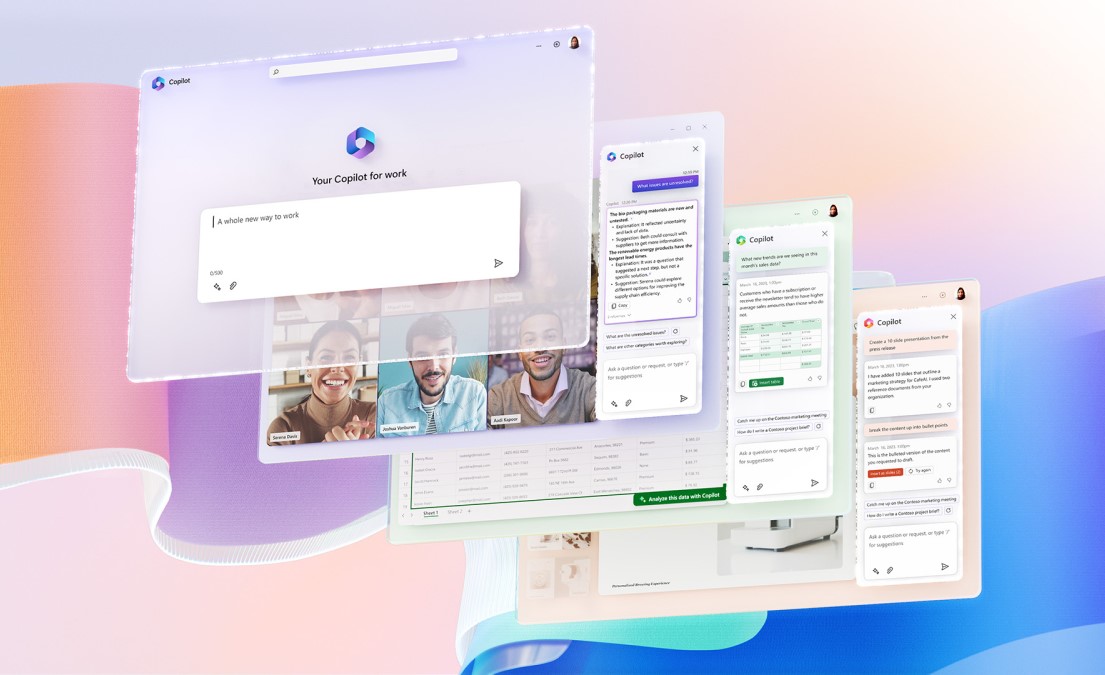
Microsoft 365 Copilot is now available in Microsoft 365 Personal and Family plans.

It’s an AI-powered assistant built right into the Microsoft 365 ecosystem – a digital assistant designed to help you with a range of tasks and activities. It’s not just a chatbot bolted onto Office but instead can interact with your content, understand context, and execute complex tasks using your data securely.

You could think of it as a digital co-worker that understands your documents, spreadsheets and conversations, and then helps you work faster with automated ideas.

Microsoft Copilot can create drafts of content, recommend different ways to reword something you’ve written, suggest and insert images or banners, create PowerPoint presentations from your Word documents, and many other helpful things.

With your licence, enjoy intelligent features like:

  • Smart suggestions for faster document creation and editing;
  • AI-driven insights to help you stay organised and make informed decisions;
  • Enhanced security with AI-powered threat detection for peace of mind; and
  • Personalised experiences tailored to your preferences and usage patterns.


From seamless collaboration to smarter everyday tools, Microsoft’s AI integration ensures that you get the most out of your Personal and Family plans.

Bring the future to your fingertips with cutting-edge AI features included in our Family and Personal licences. Whether you’re managing household tasks, boosting productivity, or exploring creative projects, our AI-powered tools are designed to simplify your life and elevate your experience.

Choose a Family or Personal licence today and step into a world where technology works smarter for you – and the whole family!

Enabling People Through Technology

People of Vox: Spotlight on Natalie van der Merwe

“Technology is best when it brings people together.” ~ Matt Mullenweg

As the Vox Head of Products: Telephony, Natalie van der Merwe is another long-serving Vox employee who embodies so much about what makes the company great. She’s smart as a whip, innovative in her thinking, excited about technology and how it can empower people’s lives, and an all-round ‘Just Plain Nice Person’ who is loyal to the core. As such, she embodies many of Vox’s values and is a great fit within our ‘work family’.

Natalie also played a significant role in facilitating remote and hybrid working arrangements for so many Vox customers when Covid struck the world in 2020 – more on this later!

Having joined in July 2008, she’s now clocked up 17 years at Vox and is surprised to find that the next big milestone – 20 years – isn’t that far off. Let’s dive into Natalie’s pathway at Vox.


The Journey to Date

“The great growling engine of change – technology.” ~ Alvin Toffler

“I feel like I’m part of the furniture at Vox now,” says Natalie with a smile when we talk about her recent 17-year work anniversary. “Actually, no – not part of the furniture, because the furniture’s come and gone more than I have!”

Natalie cropped2 | Vox | Enabling People Through Technology

She explains that “Telephony is just another word for PBX, really. So it’s always been PBXs since I started with Vox, with my role and the parameters changing over time.”

Natalie started at Orion Telecom, in 2008, which was then bought by Vox. Before that, she’d been in the PBX industry since 2000. “When I joined, I discovered that, while Orion was trying to get into the PBX industry, they were still very newly in this space, so I was able to put my experience to good use in helping to build up this new side of the business.”

Since then, says Natalie, Vox has probably offered its customers over 10 different types of PBX solutions while she’s been on board. Her passion and talent meant that she moved swiftly from starting out as a PBX Product Manager to becoming a Senior Product Manager, and then promoted to Head of Products: Telephony.


From Hardware to the Cloud

“Our business is about technology, yes. But it’s also about operations and customer relationships.” ~ Michael Dell

62bad55ed7d2e1904f805d38 phone | Vox | Enabling People Through Technology

“When I first started in this industry, even before my Vox days, telephony was very much a hardware business,” says Natalie. “A PBX was something that you sold – it got installed at the customer’s office and everybody could see, touch and feel it. And then we had an evolution!

“I remember that I was about two or three years in at Vox – around 2010 / 2011 – when we launched our first cloud PBX, which was challenging for me at the time – and no doubt for most of my industry peers – because I’d never been involved with cloud PBXs previously But, as technology marches continually forward, we made the shift.”

Natalie clarifies that from Vox first starting to sell cloud PBX systems, up until early 2020, there was still a significant amount of hardware being sold. “However,” she notes, “at the same time, there was also a serous chip shortage globally, which was a really big issue, because many of the components of the products that I sold needed these chips to function.

“Simultaneously, the word was starting to spread about the advantages of cloud telephony options, with its features that included video calls, remote working and mobility. And then, of course, Covid arrived, with the result that everything just speeded up – significantly!”

Before the first whispers of a frightening new global pandemic started doing the rounds in early 2020, Natalie and her team had already been looking into cloud PBX options, which was to prove highly fortuitous.


The Covid Pandemic Kicks Cloud PBX into Play…

“What new technology does is create new opportunities to do a job that customers want done.” ~ Tim O’Reilly

remotwork Covid 5071617 1280 | Vox | Enabling People Through Technology

“I’d started looking at a couple of cloud PBX competitors, and we’d done some testing. I’d even started out some research and development (R&D) projects before Covid loomed. And so, when it did arrive, we were able to move very quickly, launching around July / August 2020.

“When you think that we went into lockdown at the end of March that year, it was just four months later that we were able to launch and offer our customers fully tested and researched cloud PBX solutions to help South Africans continue working remotely, as efficiently as possible.”

Four months is an astonishingly short timeframe in which to launch a new product!

Natalie continues: “We sold our first PBX solutions as semi-cloud. After that, in just under a year, we went completely cloud-based, and we haven’t looked back! It provides all the functionality to facilitate ease of remote working, and everything a business needs for unified communications, with its core components of voice calling, messaging and video conferencing.

“Those phrases were such buzzwords just 10 years ago, but they really started coming into play in South Africa for us during Covid. At Vox, we were very proud to be able to help South African businesses and individuals carry on thriving during Covid and beyond. Having the right technology and tools really can make life better.”


On the Home Front

“Innovation is the outcome of a habit, not a random act.” ~ Sukant Ratnakar

Moving away from Natalie’s work persona, we find that she has an interesting heritage, with her father being South African ‘to the core’, and her mother born in Italy. Natalie herself was born in the small Karoo town of Beaufort West, where she lived with her parents for the first year of her life.

“My mom came over with her parents on a ship from Italy – as you did in those days – when she was about four or five. I’ve gone over to see where she originally came from, and where my grandparents lived, which was very special. “I’m also married – to my high school sweetheart – and we have a beautiful 15-year-old daughter who keeps us very busy, as all teenagers do.”

Besides doing some very worthy charity work in her spare time, Natalie relaxes and unwinds with a group of friends who all like to craft. “We get together every couple of months to do something creative. So far it’s involved a lot of painting, for example we’ve painted welcome mats, canvases, bags… We’ve also tried out lipstick making, a macrame class, making chocolate truffles and doing ‘zentangling’… It’s nice to just de-stress and have a good laugh with your friends.

20250826 174138 resized | Vox | Enabling People Through Technology

“I still do ‘zentangling’ in my spare time, which is so much fun! It’s actually just scribbling, but you get patterns and you create… Instead of scrolling on my phone at night, I grab a book and the zentangling is a great way to clear my mind a little bit.”

IMG 20250215 WA0009 resized | Vox | Enabling People Through Technology

Natalie works from home three days a week and is at Vox’s Johannesburg head office for the other two, an arrangement that suits her. “It’s great to have the option of really getting through my work while I’m at home,” she clarifies, “but those couple of days in the office also serve to re-connect with my colleagues, and experience the company’s energy and friendly vibe. I’m very fortunate to work with team members who are very hands-on and helpful, and always happy to learn new things.

“I think that Vox’s employees are one of the company’s greatest strengths – our culture is one of hard work, but also being prepared, always, to reach out a helping hand whenever anyone has a need.”

And of course, it’s partly thanks to Natalie and her team that Vox employees – and customers – have the option of being able to work from home in the first place, using Vox’s cloud-based telephony and unified communications solutions!


A Constantly Evolving Journey

“It’s not that we use technology, we live technology.” – Godfrey Reggio

As well as Vox’s friendliness and family vibe, Natalie appreciates the company’s culture of innovation, its agility and senior management’s open-door policies.

“In a way it never actually feels like I’ve worked for the same company all this time, because there have been mergers and acquisitions, new CRM systems, and of course an ever-evolving succession of new product offerings. Within our industry, technology changes so quickly that sometimes it’s challenging to keep up.

“It means that yes, you’re on your toes, but it also means that you’re always offering, or preparing to offer, something relevant. The next thing is always coming along, which is fun and enjoyable. And so that’s a great thing about my job – there’s never a dull moment, and my work is always interesting!”

Natalie believes that the world is at the next phase of a massive change with the advent of artificial intelligence (AI).

“This will affect the work of anybody who’s selling tech and services – it’s the next evolution! And in the technology world, if you’re not on the bandwagon with what’s happening, you’ll be left behind. If Vox had never launched that first cloud PBX, where would our telephony division be today?”

“Technology like art is a soaring exercise of the human imagination.” – Daniel Bell


Natalie art 1 | Vox | Enabling People Through Technology

Your Company’s Telephony Needs: the Right Choice

Considering the differences between traditional and hosted PBX

Even in today’s digital business world, Voice remains a key element in the overall communications offering, and so it’s important to make the right choice for your company’s telephony requirements. This includes whether to choose traditional on-premises PBX or hosted PBX (in other words, cloud solutions).

Being able to speak to a person – rather than engaging with a chatbot or following text-based or voice-activated instructions – allows both a customer and the organisation’s representative the chance to convey the right tone of voice, which sometimes means the difference between a successful sale or retained customer, or lost possibilities. Talking over the phone can also help to build good customer relationships.

In this article, we consider the differences between traditional PBX and hosted Voice. Both options can provide effective and reliable company phone systems that offer different benefits, and each have pros and cons for different business scenarios.

Before we go into more detail on the different telephony systems, let’s look at different factors to take into consideration.


Questions to Consider for your Business

Phone with hand resized | Vox | Your Company’s Telephony Needs: the Right Choice

When it comes to choosing your Voice communications platform, there are many things to factor in, such as the size of your business, existing infrastructure, budget constraints, the number of remote offices, the level of your technical expertise, your tolerance for being dependent on service providers, and more.

And so, when trying to decide between traditional PBX or hosted Voice, you could ask yourself the following questions:

  • Budget: How much money is available and what’s your preferred purchasing model?
  • Maintenance and upgrades: Does your business require full control of your business phone system or will a managed service model be workable?
  • Scalability: Do you foresee significant changes in your number of employees in the future?
  • Security and compliance: Are your IT staff capable of maintaining the system?
  • Features and futureproofing: Does the system of choice offer modern features, or can it adapt to emerging technologies to ensure long-term relevance?


Bearing these issues in mind, we next discuss on-site (traditional) PBX versus hosted PBX options.


On-site PBX: Where It All Began

Alcatel Lucent | Vox | Your Company’s Telephony Needs: the Right Choice

Private Branch Exchange (PBX) has been used for decades between employees and customers, with the PBX hardware installed on-site. The business purchases and owns the phone system hardware, networking and server equipment, and your IT staff take care of all the updates and maintenance regarding the system. The calls are routed through traditional phone lines as well as SIP trunking[1].

  • Budget: On-premises PBX systems usually require a higher initial investment in equipment and installation costs, and maintenance and upgrades will also need to have costs factored in.
  • Maintenance and upgrades: On-premises PBX systems require on-site technical support. This can lead to operational disruptions and additional labour and parts fees.
  • Scalability: Expanding an on-premises PBX can often require physical hardware or licensing additions, which could lead to incompatibility issues between the current PBX version and the latest software updates, resulting in costly, unplanned upgrades or system downtime.
  • Security and compliance: On-premises PBX systems allow companies to directly manage the security policies of their hardware but are more susceptible to data breaches if these policies are not managed correctly. This includes risks from outdated software and weak passwords. On-premises PBXs also require physical security measures to protect them from unauthorised access. This would include secure rooms, surveillance and restricted access, which in turn could be more costly and complex to manage.


Key takeaways: On-premises PBX systems can be more suitable for larger corporations with big budgets and space to host the physical hardware, as well as having the resources to manage and maintain the system. Housing the PBX system on-site brings an organisation maximum control over business communications, which might be a better fit for companies with complex and / or secure communication needs.


Hosted PBX

PBX Featured resized | Vox | Your Company’s Telephony Needs: the Right Choice

A Hosted PBX solution is a telephony solution where the PBX infrastructure is hosted in the service provider’s Cloud or network. Instead of using traditional phone lines, it relies on internet connectivity, more commonly known as VoIP (Voice Over Internet Protocol).

  • Budget: Cloud PBX generally involves a lower initial setup cost because it needs minimal physical infrastructure. Due to economies of scale, providers can offer Cloud PBX services at a nominal monthly fee, making it cost-effective for businesses with limited capital, and easy to budget for with a predictable monthly fee. A reliable Internet connection is a critical core cost factor.
  • Maintenance and upgrades: A cloud-based PBX system is maintained and upgraded by the service provider, and this remote management makes sure your cloud solution is always up to date with the latest features and security patches, with minimal downtime for the business.
  • Scalability: A hosted PBX solution allows businesses to add or remove services as needed, providing greater flexibility and cost savings without software compatibility issues or platform limitations.
  • Security and compliance: With cloud PBX solutions, it’s the responsibility of the vendor to ensure that the systems adhere to the latest security standards and compliance regulations, including the Protection of Personal Information (POPI) Act. Most cloud PBX providers implement advanced security measures to protect the data and prevent intrusions.
  • Redundancy: With the PBX in the cloud, a reputable vendor will implement multiple layers of redundancy, which are not available with on-site PBX systems. These include platform replication across geographically distributed data centres, redundant network paths between data centres, automatic failover mechanisms, and continuous system monitoring to aid in ensuring high availability and minimising the risk of service disruption.


Key takeaways: Due to ongoing advancements in Cloud technology, Cloud PBXs offer more advanced features than traditional PBXs, without the complexity of on-site installation and maintenance. They provide higher cost savings, minimal hardware requirements, and a wide range of useful functionalities. Cloud phone systems also allow your employees to work remotely, enabling employees to stay connected from anywhere they have internet access.


Your Business Communications and Vox

When it comes to the choice between traditional on-premises versus cloud PBX systems, there are many things to factor in, such as the size of your business, your organisation’s technical expertise levels, the number of remote offices, your preference for in-house or managed service providers, and more.

Whatever your preferences and requirements, Vox has a solution geared to assist your company, and its present and future needs. We look forward to hearing from you for more information on choosing the best PBX offering for your organisation.

[1] Session Initiation Protocol (SIP) trunking is a digital method of making and receiving phone calls and other digital communication over an Internet connection.

When Dynamite Comes in Small, Very Passionate Packages

Meet our Experts: Spotlight on Shirley Cross 

At Vox, we value, support and actively engage people with the levels of expertise that we require to keep us moving forward as a company. In this edition of ‘Meet our Experts’, we find out more about Shirley Cross, who works in the Project Management Office as the National Programme Manager. Her dedication as a Vox manager, and her passion for both the company and life itself, make her a force to be reckoned with!

Here is a multiple-choice question – please choose the correct answer from the following options below.

Vox National Programme Manager in the PMO Office, Shirley Cross, has been with the company for:

  1. 30 days
  2. 5 months (30 weeks)
  3. 5 years (30 months)
  4. 30 years.

Well, you guessed it: the correct answer is D – 30 years! – and Shirley’s anniversary date is today, 07 August 2025. Happy Work Anniversary, Shirley – huge congratulations!

johannes w qaIQk1TVon8 unsplash resized | Vox | When Dynamite Comes in Small, Very Passionate Packages

It’s a truly fantastic achievement and an awesome sign of your dedication towards Vox as an employer. We thought this magnificent milestone deserved a special mention here on our ‘People of Vox’ platform, and so we made sure to set aside time to find out more about this small lady (Shirley is very petite!) with the gigantic work ethic.

Shirley joined the company in 1995 as an office administrator, becoming one of only 15 staff members at that time. She’s since seen Vox grow to its current position as one of the country’s leading internet service providers (ISPs), with a mission to bring great connectivity at a fair price to all South Africans.

Today, Shirley is a vital, and very busy, cog in the well-oiled machine that is the Vox Project Management Office, which is an integral part of the company.


PMO: A ‘Perfectly Managed Operation’

Shirley clarifies that the PMO is responsible for ensuring that customer projects are delivered on time and with the highest level of care. She explains: “When I refer to a ‘project’, I’m specifically talking about a customer order that originates from a salesperson. Once the order is vetted, it’s assigned to a project manager, who becomes accountable for coordinating all parties involved to fulfil that order. In essence, we operate in a dynamic and fast-paced order fulfilment environment.”

She adds that the PMO is structured into various teams across the country and organised according to a tiered system.

“This tiered structure not only supports efficient service delivery but also creates clear growth opportunities for our project managers,” Shirley explains. “A project manager can progress from handling consumer-based orders or corporate single-site installations in a fast-turnaround environment, to managing complex, high-value enterprise-level or Tender projects. For example, someone may begin by supporting individual customers, then move on to SMEs, and eventually to large-scale enterprise clients.

“We invest heavily in training to develop our project managers, ensuring they uphold our Project Management Standards and are fully prepared at every stage of their career journey. At the same time, we place strong emphasis on delivering consistent service excellence, whether we’re serving an individual or a large enterprise. What’s important to me is that every project manager understands they have room to grow and is equipped with the right tools to succeed.”


Embracing Both Challenges and Family

And speaking of growth, Shirley is now the National Programme Manager.

“Amongst other things, my focus now includes ensuring that our project managers across the country are fully empowered to deliver such excellent service that Vox customers will never want to leave,” she shares enthusiastically.

“I started out in Durban, where I grew up. Back then, we were just a small team, and everyone pitched in wherever they could. I remember the late nights, sitting on the floor folding invoices by hand, franking them to post to customers. Those were also the times we’d share all the juicy stories! and I truly cherished those moments – it was such special times. I worked across several departments, from planning to debtors and creditors, until eventually I felt it was time for a new challenge. After a few conversations with our director at the time, he gave me the incredible opportunity to transfer to Johannesburg. And that’s when my real journey began.”

Shirley and Eugene resized | Vox | When Dynamite Comes in Small, Very Passionate Packages
Shirley and Eugene Smit

But the move wasn’t without its difficulties, as Shirley explains: “I found it challenging to be without my family at first, especially during the first six months, but after the first year of persevering, I was definitely happy to call Johannesburg my home. I have loved being part of this vibrant city ever since. The initial challenges in my move from Durban to Johannesburg have most definitely been worth it for me.”

Family is very important to Shirley, and with some of her family members now also in Gauteng, and others remaining in Durban, she takes time to stay in touch through regular visits. She’s one of five siblings and they remain close.

Shirley and her mum resized | Vox | When Dynamite Comes in Small, Very Passionate Packages
Shirley and her mum

“My family is my number one support,” she smiles. “I call them my cheerleaders! I wasn’t blessed with kids, myself, but within my family I adore my nieces and nephews – and their children in turn – to bits.”

And of course she has her ‘surrogate kids’ at work also.


The ‘Family at Work’

Shirley and colleagues resized | Vox | When Dynamite Comes in Small, Very Passionate Packages
Shirley and her colleagues in 2025

“I enjoy liaising with the different age ranges within the Vox PMO,” says Shirley. “I make a point of actively engaging with their mindsets, their thoughts and experience, including the younger members in our PMO management team. I believe that people from different generations can think very differently from each other, and it’s a strength when people in the same company can benefit from the knowledge and thought processes of different generations – it’s another form of diversity.

“I’m so happy to have different ages within my working environment, so that I learn from the younger generations as well as having the youngsters learning from me – they give me significant strengths and insights. It’s good to have that balance in your team and that’s what I have.”

Shirley says that it takes time for her to trust people but when she does, “Our friendship will then be for life! For example, Diana Prenner, who is the Vox Marketing Manager for PR and Events, has also been at Vox for a significant time frame, and we’ve been friends almost from her first day, which means we’ve now been friends for about 20 years!”

Shirley and Diana | Vox | When Dynamite Comes in Small, Very Passionate Packages
Shirley and Diana

It seems like Vox really does have ways in which the work environment is like a family… Away from work, my sources tell me that Shirley is an excellent cook, although she’s too modest to mention this herself. She is also a whizz at party-planning and loves making a celebratory occasion – for people of all ages! – even more special with beautiful decorations, matching balloons and giftbags, all set out according to a pretty décor theme.

Party planning resized | Vox | When Dynamite Comes in Small, Very Passionate Packages
Shirley’s party planning!

She does say that she takes pains to be active in mind as well as body: “I love word games – it’s always been my biggest hobby,” she says. “I used to play Scrabble and other board games with my family very regularly – we played at weekends. I still try to play board games as often as I can.

“I also go hiking, with my family and friends outside work. We find different places to go to, about twice a month, and I enjoy stretching my legs and getting out into nature. I’m sticking to the five kilometre routes for the moment but might start building up my distance over time. And I have relatively recently started playing padel on a more regular basis, which I was first introduced to by some of my work colleagues.”

Shirley and padel resized | Vox | When Dynamite Comes in Small, Very Passionate Packages
Getting into the social sport of padel

[Editor’s note:]

Hang on, so not so much ‘away from work’ then – the Vox PMO department is famous for working together and playing together! 😊]

Staying with the Vox ‘family’, Shirley is most appreciative of the Vox Executive team: “I’m so proud to be part of a company where the top management are always ready to show appreciation for their employees and for work well done. From Nathaniel Govender, Vox’s Executive Head of the Project Management Office, to Vox CEO Jacques du Toit and the entire executive team, they are always ready and willing to show us that they are involved with, and care deeply about, Vox employees.

Shirley and Nate | Vox | When Dynamite Comes in Small, Very Passionate Packages
With Nathaniel Govender

“Certainly it’s true that we get paid to do our jobs, but the gratitude and the respect that they give us as people is worth its weight in gold. I am passionate about my job and Vox, and it’s wonderful to know that in turn, the Vox Executive Team is passionate about looking after its employees. This knowledge means the world to me, and is one of the reasons why I have stayed at Vox for 30 years,” she concludes.

And so from Vox to Shirley, we say once again: Congratulations on this stunning achievement. Your long hours, patience, perseverance and leadership are a shining example of dedication, passion and commitment.

We close with a congratulatory message from Shirley’s manager, Nathaniel Govender, who says: “Congratulations on your 30th work anniversary, Shirls! Witnessing your remarkable growth and unwavering maturity as a leader has been truly inspiring. Seeing your transformation over the years has been a genuine pleasure, and your journey continues to motivate and uplift everyone around you. Your dedication is a testament to the incredible professional and person you are. It sets a great standard for those following and leaves a legacy you can be exceptionally proud of. Here’s to many more years of success and positive impact!”