Are you listening to your earphones or the conversation?

With the prolonged lockdown period most of, if not all, your conversations have been over some digital medium – be it your mobile phone or a video conference call on your PC or mobile device.

What you may have noticed by now is that the audio experience has started taking its toll on you.  You tire quickly during meetings and by the end of the day you feel exhausted and your ears are hurting.

We have all been on group calls where some participants are softly spoken, the microphone someone is using is of poor quality, or some participants’ connections are poor and you struggle to hear everyone clearly.

This is exacerbated by you either using a set of earphones, that you had to dig out of a drawer at the beginning of the lockdown, or you are using your laptop’s speakers – neither of which provide you with a comfortable listening experience. So you find yourself turning up the volume in an attempt to hear more clearly.

Besides the obvious strain this places on your ears, there are several other reasons that are causing you to fatigue:

  • Your brain trying to translate something it knows is not real – digital audio – into something that sounds real. The harder this is for your brain, the harder this is on you.
  • There is a lot of other noise on the calls you are having, and besides being distracting, it also makes following the conversation more difficult.

To minimise audio fatigue, you need a better quality microphone and speaker – one that has full duplex audio with echo cancellation and that delivers a more natural reproduction of the audio stream.

One such device is the Yealink CP700 portable speaker phone.  It is cost effective and allows for USB connection to your PC, laptop or Macbook and a Bluetooth connection to your mobile devices. The CP700 is certified for use with Microsoft Teams, enables quality audio pickup up to 2-meters and has a high-quality speaker.

Another reason that I love this device is that it has intuitive LED indicators that simplify collaboration while connecting to your call and during the conversation.

With this quality audio device, you will find yourself participating in the conversation instead of trying to hear those on the call or trying to make yourself heard.

Hating Your Home Wi-Fi Network? Let’s Fix It.

Whether you have slow speeds, dropped connections or dead zones, diagnosing your home network’s problems is one of the greatest tech frustrations. 

You’re now working remotely. It’s Monday morning and you have an important meeting that you have been preparing for over the weekend. You log on and within seconds your worst nightmare is realised – your “superfast” Wi-Fi connection has failed you and you have six other people waiting on the other side. Panic!

Now that more of us are working from home, it’s important to have a basic understanding of how to diagnose and fix your network problems – and the good news is that you’ll be surprised at just how simple it is.

Problem 1: No connection

Make sure the device is not the problem

Check to see whether the issue may be with your specific device or whether the issue is from your service provider’s side. The simplest way to check this is to try and check your Internet connection from a different device, such as your phone.

If the second device connects, then your problem is with the original device and not the service in which case you can follow some easy troubleshooting steps as follows:

  • Check that the Wi-Fi is turned on
  • Ensure that the device is not in “airplane mode”
  • Restart the device to establish whether it resets
  • Check that there are no passwords preventing you from connecting.

If none of these solve the problem, then the problem may be on your Internet connection.

Reset your modem and router

To check if the connection issue is coming from the router, plug your device, such as your laptop, into the router using an Ethernet cable. If you are able to connect, then the Wi-Fi issue is related to your router.

Troubleshoot by unplugging the router, wait 30-60 seconds and plug it back in again. The router has now reset, and you should have overcome your connection issues.

If that doesn’t work, try plugging your device directly into the router using an Ethernet cable and again follow the previous steps by unplugging, waiting and plugging in again.

If all this fails, your Internet may be down altogether, in which case you will need to contact your ISP.

Problem 2: Slow speeds

Check your device

Do you have multiple tabs open? Perhaps you have other programmes running in the background?  And maybe you’re also trying to stream while you’re working?

These will all contribute towards slowing down your connection. Your first bet is to run a speed test, which tells you what your upload and download speeds are. After doing this exercise, compare it to what you are getting on other devices such as your phone, and if these speeds are not the same, then the issue could be with your device. It might be time to consider upgrading to a newer model.

Related: Vox adds Wi-Fi router options to FTTH

Move around – get closer to your router

Wi-Fi signals get weaker the further away you are from the router and can also be deteriorated by barriers such as thick walls. Try moving closer to the router to see if you can get a better connection.

If you get slow or no connection in specific areas or rooms in the house, try moving to an area where your device can directly communicate with the router and run another speed test.

If it’s going faster, it’s because you are not getting a strong enough signal from where you normally connect.

If possible, the best option is to move your router to a more centralised location – the closer your router is to the centre of your coverage area, the better your reception will be throughout the house.

Alternatively, a range extender or booster is an option. A range extender is used to expand the reach of your existing wireless network but can cause other issues in the process.

If your home or work area is substantially large and requires consistent network speeds, then it might be a better option to consider getting a mesh Wi-Fi system which, unlike a Wi-Fi extender, is designed to create larger coverage with more bandwidth.

Problem 3: Connection drops at random times

Have you noticed a pattern of some sort? Perhaps your connection drops when you use the microwave or other household devices such as baby monitors and Bluetooth speakers. As crazy as it sounds, some routers do experience interference with certain devices or networks.

It could be that someone else, such as a neighbor, is Wi-Fi heavy at a particular time of the day, thus causing you to slow down. Consider changing your router’s channels by logging into the router’s management console and editing the Wi-Fi settings.

Prevention is better than cure. Here are some additional troubleshooting tips:

Stay on top of security

Change default passwords on your home Wi-Fi router to prevent hackers from accessing your network. Practice regularly changing your router password if it has previously been shared with others. Use strong and unique passwords (at least 10 characters including special characters such as @#$&).

Update your router’s firmware

Like any other device’s operating system, this is software that should be updated regularly to ensure that you are equipped with the latest versions and features as well as security updates. The exact steps in which to run this depend on your router’s make and model, so check the router manufacturer’s support site for detailed directions.

Update your technology

Perhaps your router is several years old and its time to upgrade. Older and cheaper routers usually only have 2,4GHz Wi-Fi radios configured with older Wi-Fi standards. Newer and more expensive routers are equipped with dual band radios, working on both 2,4 and 5 GHz and with the most up to date Wi-Fi standards.

Understand your router

Most routers have similar icons which include three primary status gauges:

  • Globe: normally green and solid when the modem is connected
  • Wi-Fi: solid when Wi-Fi is being broadcast without any issues
  • Ethernet: solid when Ethernet cables are connected and functioning properly

When everything is working properly, icons are solid or have blinking blue or green lights. When there is a connection issue, icons are red or orange.

Separate guests and children onto different networks

With kids being home and continuously online over lockdown, you may want to put them on a separate network and create special rules and settings, thereby blocking inappropriate sites and content and easing the burden on your bandwidth.

Some Wi-Fi routers offer advanced features allowing you to create a “Guest Network” for visitors, ensuring that your shared files and content remains private.

If all else fails, it’s time to contact your service provider. And in case of emergency, you can always try your mobile cellular network by using the phone’s hotspot feature to connect.

But remember: data costs are pricey and this will not be a viable permanent solution.

10 Video Conferencing Etiquette Tips

We may not be in the office, but it’s still absolutely essential to be prepared and ensure that meetings continue to be conducted in a professional manner, especially now that we can’t unsee that recording!

Even after global lockdowns end, it is very likely that a lot of business meetings will continue taking place via video conferencing – be it Teams, Skype, Zoom or Vox Air.

We have all seen the videos of video conferences where participants’ children are running in and speaking to the parent, or their pets keep interrupting. Even worse is unknowingly ending up in a situation like Ben. Yes, that Ben.

While these video clips bring smiles or even laughter to millions, these incidents can be quite disruptive for other participants during the actual call, and can take away valuable time from getting actual work done.

Here are a few tips to ensuring that you have a professional and productive video conferencing meeting at home:

1. Create your own workspace

In this new way of working, we have to educate housemates, spouses or kids to be respectful of our workspace, and be more attentive when it comes to noise and interruptions. If need be, get a “do not disturb” sign or stick a note on your door.

2. Be prepared

Just because you are working from a more casual environment, it doesn’t mean that meeting preparation should be any different – besides, it’s disrespectful towards other participants if you are not prepared. Make notes ahead of time – perhaps even provide an agenda before the meeting – and bookmark anything that you may need for reference during the meeting.

3. Dress appropriately

Wear something that would be appropriate for a face-to-face meeting.  As tempting as it might be to stay in your pyjamas or sweats all day, remember that you still need to look professional for video conferences you may be attending.

4. Tidy up

Create a neat and tidy work environment, steer away from clutter and ensure that your wall art, for example, is work appropriate. Some applications allow for virtual backgrounds or the ability to blur the background, so make use of them.

5. Check your equipment

Don’t be that person that delays the entire meeting because your tech is not working correctly.  Test your equipment ahead of time, e.g. WiFi connection, microphone, camera and speakers, and if necessary, do a couple of test runs ahead of time. If you use a Bluetooth headset or earbuds, ensure that they are paired and switched on.

6. Be on time

Better to be early than late! And while it’s easy to sneak into a physical meeting late, on a video conference, everything is a lot more visible.  When in a group call, remember to introduce yourself before you talk. And if you are running late or unable to make the meeting, ensure that you communicate this timeously to the person leading the meeting.

7. Maintain eye contact

Even though it’s natural to want to look at other participants on the screen to gauge interest in what you are saying – one of the reasons why you’re having a video conference and not conference phone call – you should look at your camera, especially when speaking. Looking directly at the lens is the same as looking into someone’s eyes, which helps you come across as more professional and engaging.

8. Mute yourself

If you are not speaking, mute your microphone. Background noise can be very distracting. By the same token, also remember to disable notifications during meetings – no one wants to hear your rings and dings!

9. Stay focused

Another temptation is to check email or surf the Internet whilst on video calls.  It’s very easy for other participants to pick up on whether or not you are focused and it’s simply rude. The same goes for “sneaking out” for a snack or letting the dog out – just don’t do it!  If you have a conflicting appointment, rather let everyone know at the beginning of the meeting.

10. Bring your old tech to life

You can improve your home office setup by reviving some old equipment you may have lying around. For example, turn an old tablet into a video chat piece or a second monitor for your PC.

Remember, it’s not only about appearance but preparedness. No one can predict how long the effects of the lockdown are going to continue and as such, remote working should be treated the same as if you were going into the office. Keep it clean. Keep it professional. Don’t be like Ben.

How we’re using the Internet in the time of COVID-19

Besides asking Google how to brew homemade alcohol, South Africans are using the Internet now more than ever.

For many, this year was their first Easter without the entire family seated around an indulgent lunch at the dining room table.

Adjusting to staying indoors and swapping boardrooms for Microsoft Teams meetings, and the classroom for online lessons in the living room was already a challenge – the lack in physical contact leaves a void only seeing and hearing people (the closest you can get to actually being with them) can fill.

Related: What is Microsoft Teams and why your organisation needs it

The craving for connection has seen an increase in collaborative playlists during this time frame, allowing people to connect over shared music and have virtual jam sessions together, according to Spotify. Self-improvement podcasts are also proving to be popular.

Uncontended with unlimited capacity

If you’re spending the next few weeks of lockdown alone, remote working by day and Netflix by night may not be enough. And to make those Skype calls to family – both near and far – requires a stable and reliable Internet connection.

Related: Getting things done remotely? It’s easier with Fibre to the Home

According to Forbes, COVID-19 has pushed Internet usage by 70%. Such high numbers indicate the need for fast Fibre connection, especially over the next few months, and beyond.

Fibre is 250 times faster than traditional fixed-line broadband and unlike with mobile, Fibre is uncontended with unlimited capacity and speeds can be increased as required.

“As South Africans are restricted to working/studying from home, the impact of the novel coronavirus pandemic underlines the importance of information communication technologies (ICT) in South Africa now more than ever,” says Shamira Ahmed, Research ICT Africa’s Principal Researcher, Economist.

Related: COVID-19 puts focus on digital engagement

So, whether you’re streaming mediations after a tough day at ‘the office’, or watching a virtual concert by your favourite artist, you’re going to want the experience to be uninterrupted.

Check Fibre availability in your area and choose from our many options. Self-installation is available.

Visit vox.co.za or call 087 805 0990 to sign up today!

Enhancing education

Coronavirus is changing the way we work, and now, even the way we educate.

Adjusting to e-learning

Parents and guardians all over the country have a newfound respect for the teachers, caretakers, and tutors who take care of and educate their children every day. After a few days of spending an entire lunch-hour from your remote working schedule to answer little Palesa’s questions about why penguins can’t fly – you’re probably ready to send her back to school with trained professionals who know how to handle these questions with patience!

Coronavirus is changing the way we work, and now, even the way we educate. Our country is faced with serious challenges – electricity and access to adequate healthcare and food being the most pressing lately – and families are feeling the strain. At this time, support networks, support structures, and safety are needed more than ever. We believe in all of that, so we have put together a little list to ease your life in quarantine.

Education under quarantine

  1. You can keep your friends close

Social distancing is not easy for everyone. At the best of times, most of us need to be near those we love for support and love. In times of uncertainty, those needs increase by several levels. Don’t panic! There are several ways to keep in touch and ease the load on you. Whether you need encouragement, a 30-minute session to rant to your friend, or to set up a virtual class with your son’s teachers, the contact you need is as easy as setting up a call on Skype or Teams.

  1. Information and organisation are twins

There are numerous resources available for you, from YouTube links to website downloads – the opportunities for information are huge. But they can also be overwhelming! This is where organisation is instrumental. Your children need help organising all the information coming in from school and from research. This is where Office 365 comes in! It gives you the ability to sort files under categories, keep track of their progress, and have all your information in one place.

  1. Collaboration across families

Being at home for extended periods of time can be suffocating, and children often need creativity and a change of routine to keep them interested. The “calendar” feature allows parents to team together and take turns hosting interactive classes or sessions. It’s also a good way to keep track of your children’s deadlines and upcoming tests and quizzes.

Hang in there! While we wait for things to return to normal, we have the advantage of learning the new normal. New ways of connecting, new rhythms – and better ways of working.

Now is the time to go the Cloud-based PBX route

From a practical perspective, the lockdown has highlighted the importance of adopting a Cloud-first mindset when it comes to business operations.

Nowhere is this more evident than with the PBX of an organisation, its most fundamental customer engagement platform. With employees having to work from home until the end of April, the on-premise PBX becomes a wasted resource.

Businesses with advanced, expensive on-premise PBXs may potentially have the opportunity to implement some sort of mobile calling application for their users – but this may involve purchasing licenses or upgrading their PBX to cater for this new function.

So, unless the business has loaded a recorded message directing customers to a mobile number, the office number becomes null and void. Furthermore, whoever is responsible for fielding calls on that number will have to redirect customers again to phone the relevant employee on their mobile phones.

Not only is this a time-consuming and frustrating process for a customer, but an expensive one as well. Instead of phoning once, they need to make three separate calls.

Additionally, if the employee needs to phone customers, they are reliant on using their personal devices and claiming those funds back from the company once the lockdown ends.

Unfortunately, given the high cost of mobile voice and data, this will inevitably result in bill shock for both the employee and the business owner.

Furthermore, during lock-down, if there is a problem on the PBX, technicians are limited and if any hardware or software is required, you may be paying through the roof fees for imported parts that are affected by the volatile Rate Of Exchange (ROE).

All of this can be avoided by using a PBX in the Cloud.

Optimise resources

For one, a Cloud-based PBX can be managed from anywhere in the world. This means that if there is a problem, the service provider can easily fix it with minimal impact on the company’s business. It becomes as easy as logging a support ticket and carrying on as normal.

The past few weeks have driven home the importance of going the Cloud route. If a company is to maintain operations, it needs to use solutions that are more dynamic than what an on-premise system can deliver. This also means that expensive software updates or system upgrades are a thing of the past.

Take a call centre for example. Using a Cloud-based offering means agents can remain fully operational during the next several weeks. Not only does a voice app give them the ability to separate business calls from personal ones, but a Cloud environment means their laptops provide them with the same dashboard they would ordinarily have when sitting at the call centre.

Of course, the biggest issue around this will remain having reliable (and affordable) connectivity. This is where Fibre access becomes instrumental. Mobile voice and data must always be a last resort given its cost, high contention rates, and quality.

Hybrid world

Those businesses still reliant on on-premise PBX offerings might have very valid reasons for doing so. It might be that they are in an area where it is not possible to have Fibre, they might be coming to the end of their existing PBX contracts, or they might just be sweating off some old infrastructure and assets.

For those companies, there is an urgency around migrating at least some components to a Cloud environment.

The lockdown can even provide them with the opportune time to experiment with what a Cloud-based PBX would entail.

This could be through a softphone app such as Vox Vobi. This sees on-premise PBX calls get forwarded to employees at home. The app provides a secure and effective way to receive and make business calls during the lockdown at a fraction of the cost of more traditional cellphone calls.

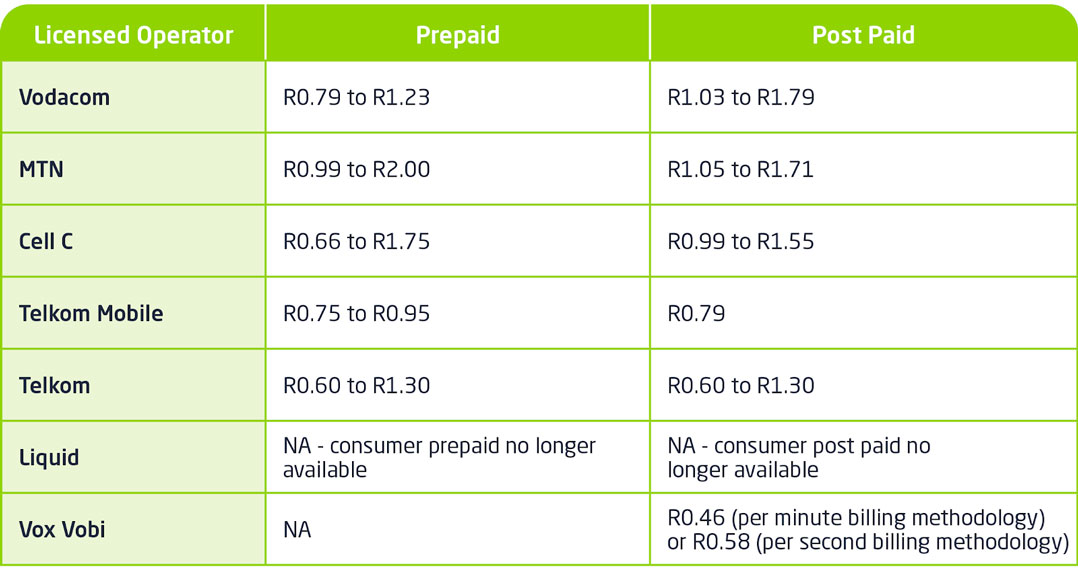
See the table below for the current consumer call rates across the various networks in the country. Pricing is VAT inclusive and shown per minute:

vox rates 1078 | Vox | Now is the time to go the Cloud-based PBX route

It is all about thinking differently and identifying innovative ways of leveraging technology to empower employees to remain productive. Initially, a hybrid approach could assuage any concerns decision-makers might have about fully embracing the cloud.

But if the past few weeks has shown us anything, then it is the need to move away from a ‘business as usual’ approach into one more reflective of the digital age.

For more information click here.

Video conferencing is easy with Vox Air

Before you subscribe to a video platform, you may want to consider what your medium to long-term requirements are.

Over the past couple of weeks, we have witnessed some frenetic activity surrounding the selection of an appropriate video platform to facilitate working from home (WFH) requirements.

In every conversation we have had with customers, there has been an immediate need for a video platform to facilitate WFH for the next few weeks. Most have taken advantage of the free services offered by some providers, but there is also a longer-term consideration associated with the chosen platform.

Here are some points to consider when you are deciding.

Which is the right platform for your business?

The best video technology platform available to you or your business for the next few weeks, or months, (which is predominantly a desktop-to-desktop requirement) may differ from the right one you will need when you start resuming normal operations again (which will include standards-based meeting room systems that need to connect you with people on disparate end points and devices, both fixed and mobile), at the best price.

You will need to consider the following when making your choice:

1. Resilience

Vox has scanned the market and considered all available video platforms over the past five years so that you don’t have to wade through the myriad of options yourself.

We have successfully provided our customers with a world-class video and voice conferencing platform that is locally hosted and built on the platform that is widely considered to be the leading provider of video interoperability – Pexip. We call this solution Vox Air.

Local hosting means reduced latency, and perhaps most importantly, significantly reduced bandwidth consumption and added resilience. Vox Air provides you with a reliable, high-performing video experience for you and your guests.

2. Interoperability

Vox Air provides complete interoperability, connecting all your video conferencing technology with a single solution.

You are also able to conduct video and voice conferencing, in the same workflow, between:

  • Standards-based meeting room systems (from vendors such as Yealink, Poly, Lifesize and many others)
  • Windows PCs and MacBooks
  • Mobile devices
  • Standard telephones
  • Microsoft Skype for Business

Standards-based meeting room systems can be bridged into Microsoft Teams and Google Hangouts calls as well, but this will be via a separate workflow that we can assist you with.

Your business, like many others today, may have a variety of existing standards-based video conferencing devices deployed in different parts of your business. These technologies were most likely selected because they supported the specific collaboration requirements of a particular division or team of people at the time – and these needs are likely to remain unchanged today.

For this reason, one of the best features of Vox Air is that you do not need to change any of the technology you currently use.

We will simply connect your current devices to the Vox Air platform, so that you are operational within hours.

Using existing devices will not cost you additional licensing fees as may be the case with other platforms.

3. Security

On Vox Air, all video calls and shared media are fully encrypted to keep your meetings and content confidential. All call participants are always displayed, no matter the device or medium used to connect, so hosts can identify and terminate unwanted participants.

Vox Air supports PIN-protected virtual meeting rooms (VMR) for an additional layer of security and allows all meeting hosts to lock the VMR once invited participants have joined the call.

Additional participants are then allowed to enter only through a lobby that is controlled by the host.

4. Efficiency and ease of use

Vox Air includes the latest artificial intelligence (AI) addition to video meetings – Adaptive Composition. No matter what device you connect to Vox Air with, whether you use brand new or 10-year-old room system, you can improve your meeting experience.

With Adaptive Composition, your users and hardware don’t have to change; instead, the meeting experience adapts to your users and hardware.

Adaptive Composition has the following benefits:

  • Mimics natural conversation flow by automated framing, panning, and zooming
  • Helps to maintain more natural eye contact
  • Supports more realistic visual flows with smooth, seamless updates to images
  • Fewer visual distractions such as manual camera control
  • Reduces user complexity and works with any device.

Rated No. 1 by video conferencing users worldwide

In the latest Wainhouse Research, Pexip ranked:

  • #1 with large companies
  • #1 with frequent video users
  • #1 with IT purchase authorities
  • #1 with non-IT users
  • #1 with users under 40 years old
  • #1 with users for brand perception

Wainhouse NPS Report 2018 | Pexip


Experience the power of Vox Air first-hand to see for yourself why users rate Pexip number one.  For more information and subscription options, connect with Andrew King at andrew.king@voxtelecom.co.za or 083 302 6166, or Gareth Edwards at Gareth.Edwards@voxtelecom.co.za or 066 253 9253.

Microsoft offers FREE 6-month trial license on Teams

As the world looks for ways to survive the current climate, and businesses look for a way to stay afloat; Microsoft Teams gives a little relief with a free six-month trial license on Teams. 

Effective remote working tool

Teams is a comprehensive collaboration hub that enables shared files and calendars, collaborative editing, and easy switching between voice, video and text chat – a combination that facilitates remote working at maximum efficiency. Read more about working with Teams here.

Microsoft recently announced a 6-month trial license, making Teams available to as many people as possible. Employees can remain connected while they work apart.

Vox can assist customers with the partner-initiated 6-month trial of Microsoft Teams. Customers can enjoy the full online Teams experience with the trial licenses which expire after six months. There is no automatic migration to a paid-for service and no obligation to upgrade.

Remember that Office and Microsoft 365 – Business Essential, Business Premium, Exchange Online Plan 1, Exchange Online Plan 3 and Exchange Online Plan 5 – all have Teams already.

For more information on the free 6-month trial license or help with using Teams, please contact your Account Manager.

Fibre helps drive SA economy during COVID-19 pandemic

If the lockdown South Africa is currently experiencing is highlighting anything then it is to show that access to Fibre has become as much a human right as electricity and running water. With many employees now having to work from home and others placed on enforced leave, high-speed, reliable, and affordable internet access becomes critical.

“Even if the country is still very much in a Fibre deployment phase, the competitive landscape in South Africa has enabled Fibre providers to roll out at aggressive rates. This has resulted in the growth of demand for Fibre at homes with people discovering increasingly innovative ways to benefit from its use,” says Shane Chorley, head of sales and marketing at Frogfoot Networks, a wholly owned subsidiary of Vox.

Going faster

While installing a Fibre connection inside a house can be disruptive, it provides a far more consistent experience than what is available from wireless technologies such as 4G, LTE, and 3G. As more home users are accessing a range of bandwidth-intensive applications such as video streaming services and video conferencing solutions, the wireless networks have struggled to maintain service levels.

“But once Fibre is installed, the ability to upgrade it is relatively simple because it is a fixed-line connection. This also means that even if the home user is unsure about what line speed to get, the internet service provider can upgrade it in real-time to more accurately reflect their needs.”

This means that unlike 4G which has a theoretical maximum download speed of 100Mbps (assuming there are no other users on the network), a Fibre line can be upgraded to 1Gbps with no contention (meaning the line speed is not impacted by the amount of users on your home network). To put this into context, a high definition movie might take 15 minutes to download over a 100Mbps 4G line when nobody else is using it. That same movie will take less than 30 seconds to download on the 1Gbps Fibre connection even if other members of the household are using the line.

“Given the current COVID-19 crisis the country is experiencing, we have made the strategic decision to move customers to higher line speeds free of charge from 1 April to 30 June. This Double Up promotion is vital to mitigate against some of the economic impact the lock down will have on South Africans. With more people accessing Fibre from home during this period, we anticipate some will use connectivity more excessively, whilst others might still maintain their usual behaviour. But given the increased demand for video streaming services and work from home solutions, this promotion will ensure a consistent user experience.”

Essential service

Chorley says that Fibre providers such as Frogfoot are classified as an essential service, forming part of the telecommunication basket of providers. This means that it can continue running and maintaining its network.

While we will be able to continue with home installations, some of the practical aspects around this will still need to be understood. There is a balance to what we want to do versus what is possible. So, even though we can certify our contractors and suppliers to work during this lock down period, the entire supply chain must be operational. For example, how will our contractors get access to what has been labelled as non-essential materials during this time?”

He says that the highest priority for the business will always be the safety of its employees and its customers.

“There has been a massive spike in demand for fibre over the past several days. We will put all the necessary health and safety checks in place for our contractors performing installations and we will never force ourselves into people’s homes. Customers must request an installation to take place and we will manage the process as safely as possible.”

Focus on infrastructure

Adding complexity to this is the confusion that still exists between what Fibre providers like Frogfoot are responsible for and how internet service providers (ISPs) come into the process.

“People should think of us as the ones supplying the highway. The ISP manages the traffic on the highway. We rarely deal with end users as the ISP is the customer-facing part of the Fibre journey. Fibre providers enable ISPs to do what they do and inject the infrastructure with different value adds. More user education is required in this regard, but we anticipate that the coming weeks will see people start realising and fully understanding the benefits of having a connected home and even a remote working environment,” he concludes.

Protect your business with this cybersecurity toolbox

Comprehensive IT protection for a fraction of the cost.

A well-known fact is that cyberattacks present a high impact, high likelihood risk to businesses throughout the world.

A lesser known fact is that more than 50% of cyber-attacks are perpetrated on small/medium sized businesses, and that South Africa has the third highest number of cybercrime victims worldwide.

The effects of such a debilitating attack range from financial to reputational loss, and as targeted security attacks grow exponentially, combating this criminal activity is becoming a critical element of every business strategy.

Cybersecurity is good for the economy

Small business, the driver of economic growth in our country, faces two challenges in effectively protecting against cyberattacks, namely:

    • Navigating this specialist field; and ultimately selecting all the required cybersecurity building blocks to ensure comprehensive protection.
    • Being able to afford this – sometimes costly, but crucial – cyber-security ecosystem.
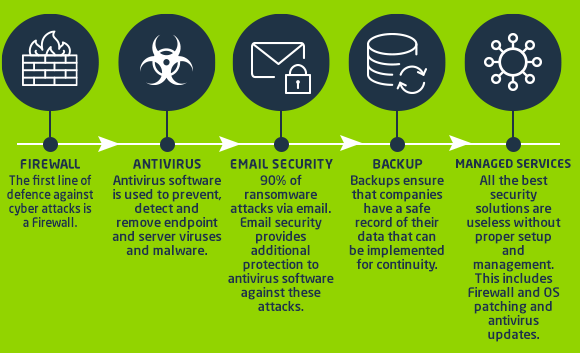
A reliable cybersecurity umbrella has the following 5 essential and interdependent elements:

3126 CyberSecurityToolbox MS Infographic01 30032020 V3 | Vox | Protect your business with this cybersecurity toolbox

Affordable cybersecurity solutions made accessible

For most small businesses, implementing all these components can be prohibitively expensive.

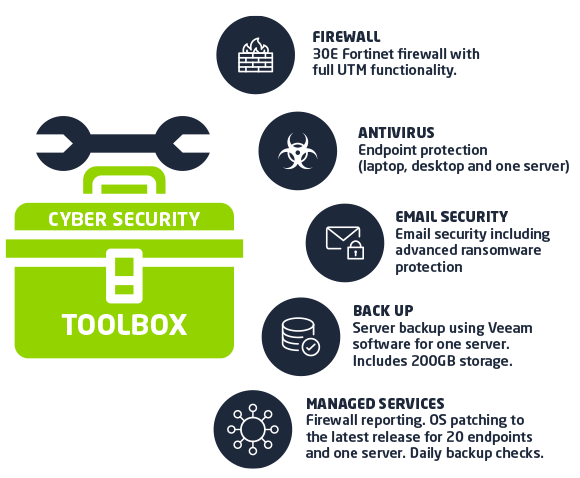
Because of this, we have designed the Cybersecurity Toolbox specifically for customers with 20 IT users and less – that reduces the equivalent monthly cost by 40% and provides comprehensive IT protection with best-of-breed technology, for R1 975 p/m.

Cybersecurity toolbox | Vox Blog

In partnership with specialists in the cybersecurity industry, we look forward to sharing valuable information and insights with you during the coming weeks.

In the interim; please contact your Account Manager, or email salesenterprise@voxtelecom.co.za .