Backing up is as easy as 1,2,3

Company data is the lifeblood of all businesses and loss of that data can have serious implications for a business. With the increase in ransomware attacks and encryption Trojans, the need for a reliable backup is an essential part of any business security strategy.

The question is, is it part of your strategy? If a problem should arise in your datacentre that will impact on your business performance, are you able to restore operations to where they were before the problem occurred? And if you have a backup strategy, or recovery plans in place, are you confident that your last backup can be successfully restored?

One backup is a good start, but not nearly enough for a comprehensive data protection plan. More often than not, the first, or only backup is stored in the same physical location as the primary data. Consider a crisis in your datacentre, such as a fire or power failure. If all your data is onsite, your business would be unable to restore and continue business as usual.

Ensure your data is kept safe in almost any failure scenario with the 3-2-1 Backup Rule.

Your 3-2-1 Backup Checklist:

  1. Keep 3 copies of your data (1 primary copy and 2 backup copies).
  2. Store 2 backup copies on different storage media, like a Network Attached Storage (NAS) device, tape drive or local drive, etc.
  3. Store 1 one copy offsite, for example in the Cloud.

Vox offers extensive audits to assist with a solution tailormade for your business. Should you require an investigation into whether your backup strategy supports your business requirements, contact assessments@voxtelecom.co.za.

Next Generation Video Conferencing as it should be

If your organisation is like most across the globe, you have clients, partners and employees that want to connect with you on different video conference platforms. But with so many options available, you may be grappling with which one to deploy.

Vox has the cost effective and easy to deploy solution that you have been looking for – Vox Air.

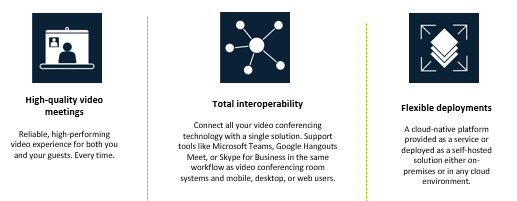
Vox Air, powered by Pexip – rated number 1 by video conferencing users worldwide – simplifies video communication across borders, businesses and platforms. The conferencing tool provides any business, regardless of its size, with a flexible and scalable video conference platform that enables interoperability between multiple disparate video conference systems.

It eliminates the need for costly and complex bridge equipment, allowing you to video conference with anyone in the world, on any device, at any time.

Your subscription to Vox Air will provide you with:

  1. A smarter way to communicate with external organisations that may use different tools.
  2. A transparent bridge between existing systems so your users do not have to learn new software or workflows.
  3. A Vox hosted and administered cloud bridge to help you simply use and extend the life of the end points you currently have.
  4. A future-proofed solution that protects your current investments.

This Platform is always-on 365 days a year – so your employees can video conference as and when they need to.

Vox Air Image
Designed for interoperability, engineered for reliability, optimised for resource efficiency and perfected by Vox for cost efficiency.


Before you consider purchasing or upgrading your video conferencing solution or platform, speak to your Vox account manager or our video solution experts about Vox Air.

You can contact us at Gareth.Edwards@voxtelecom.co.za or Andrew.King@voxtelecom.co.za.

Take control of your meeting rooms!

Don’t you hate it when you’ve booked a meeting room, you’ve got clients waiting with you, and someone else is in your room – claiming they also booked it?

Frustrations continue to soar when someone books a 10-person meeting room for two people while you’re left to squash your 10-person team in a four-person room.

Introducing your room booking solution – Reserva

Reserva is an intuitive meeting room booking solution that integrates with your company’s calendar software so that everyone knows when a meeting room is booked, and which meeting room is booked.

Your Reserva room booking solution is a cost-effective solution regardless of whether you have one, two or 200 meeting rooms.  It has no central server or high cost maintenance and licensing agreements. To be up and running, Reserva simply needs the door-side display, and a connection to your network.

Related: Two meeting rooms for the price of one

How Reserva helps you take control over meeting spaces:

  • A user-friendly solution to help employees find space to meet and collaborate.
  • Integrates with Microsoft Exchange, Microsoft Office 365, Google Calendar, Google Apps and Scientia so that your conference rooms are dynamically linked to your calendaring system.
  • Books a meeting in two clicks, extends a meeting, shortens a meeting and cancels a meeting directly on the room sign or in your calendaring system.
  • Manages ‘no shows’ with automated removal of a meeting if the organiser does not attend after the no-show time limit (set to your custom specification).
  • Prevents double bookings.
  • Eliminates the distraction, confusion and frustration caused when two meetings are scheduled in the same room at the same time.
  • Finds your meeting venue easily.
  • Shows all employees and guests which meetings are about to start and where they are being held.
  • Has the best in class security framework based on ONELAN’s proprietary NTB Linux operating system.

Optimising your meeting room bookings does not need to ‘break the bank’ with Vox’s expertise and the award-winning Reserva Edge system.

Call Vox today for a free assessment of your meeting room environment and we will advise you on the best solution for your requirements. Alternatively, contact Gareth.Edwards@voxtelecom.co.za or Andrew.King@voxtelecom.co.za

Q&A with Hendrik Meyburgh, Technical Head of Cloud at Vox

Hendrik Meyburgh is the Technical Head of Cloud at Vox. He keeps the light on for Cloud and is one of the creators of Vox Cloud, a local Cloud provider. We chatted to him about Multicloud strategies, Cloud Computing and the rise of mega Cloud companies in Africa and South Africa.


Cloud computing, while formerly uncommon in South Africa, is fast becoming a necessity for business. Do you believe this?

I believe a Multicloud strategy is a company necessity. Every Cloud provider has its own unique set of offerings. A Multicloud strategy allows companies to select the right infrastructure for the right reasons.


Because of the necessity of Multicloud, do you see the rise of many mega Cloud companies?

Definitely. Microsoft Azure is already here and AWS is on its way. I can’t say for sure if all the other mega Cloud companies will come, because there are a couple of regulations they would need to work through, but I think they will come to Africa. There’s a big market for Cloud on our continent.


What industry trends are these mega Cloud companies pushing?

They are pushing cost effectiveness and creating demand by show casing the tech they have available through use cases. For example, (Internet of Things) IoT and (Artificial Intelligence) AI.


Why would you say these companies are pushing these trends?

Quite simply, they love tech and want to capitalise on the available market.


What are the difficulties people are finding with Cloud Computing?

Multicloud creates so many options! It’s quite difficult and complex for companies to understand what they need when it comes to Cloud Computing. Once they understand what they need, they then need to know when to use what technology. When all their questions have been solved, they have to drill down on which Cloud provider will be able to provide all these needs.


We have heard about several mega Cloud companies coming and that have come to South Africa. What do you think the impact of these international companies coming into SA will be?

I think it will be a positive impact. It will give Africa and South Africa the same opportunities that historically were only available to some regions because of physical and regulatory constraints. These opportunities will empower more entrepreneurs to launch new businesses, creating more work opportunities and a positive economy.


Are there any threats on local Cloud companies with the arrival of these mega companies? Or is it mostly seen as a positive?

It’s definitely a positive. It creates competition, giving local companies the drive to create a wider product set. Local companies can also run additional product sets alongside these mega Cloud companies, allowing for Intercloud Connectivity.


How does Multicloud fit into the mix?

Different Cloud providers (local and international) have different strong suits. Multicloud allows you to choose the best Cloud providers for different use cases.


Why should anyone be interested in Multicloud and not rather just use one Cloud service?

Not having a Multicloud strategy is like cutting off your own hands. You’re limiting your company and taking opportunities away from yourself.


Migration of Multicloud sounds tedious. Is it? Or is that the perception?

It depends on the use case. If you are migrating from your own infrastructure to the Cloud or refactoring your application to be Cloud native, it could be a quick job, but on the other hand it may be extremely resource intensive. The best is to get a professional Cloud migration team to assess your IT environment and potentially do the migration on your behalf.

Visit vox.co.za to learn more about Cloud computing and Cloud migration IT advisory.

What is the difference between Office 365 and G Suite?

Microsoft Office 365 is a monthly subscription service that, along with other services, includes Microsoft Premium Apps like Outlook, Word, Excel and PowerPoint. G Suite is also a monthly subscription service collection of Google products like Gmail, Drive, Docs and Sheets.

They are similar, so what is the difference? We’ve compiled a table to compare the two productivity and collaboration services and see where they differ.

Why you should upgrade to Windows 10

According to w3schools 14.2% of computer users are still using Windows 7.

Come January 2020, Windows 7 will meet its end. In other words, if you’re currently using Windows 7, you will no longer have access to any updates – including security updates, or Microsoft support.

No security updates mean that any vulnerabilities discovered on the platform, will not be attended to, putting you and your business in the line of fire.

What does this mean?

To put it simply, if you don’t upgrade from Windows 7, you are not only vulnerable to normal viruses, but to ransomware and data theft, which can have dire consequences.

Companies targeted by ransomware have to pay between R50 000 and R150 000, and most small businesses choose to pay up rather than lose all their information – be it financial data, customer data, billing records and more.

But why Windows 10?

Apart from securing your IT, Windows 10 has more advanced security features including features that do not exist on Windows 7 like Device Guard and Bitlocker.

Windows 10 is one of the fastest operating systems out, and with a few tweaks, Windows 10’s speed can be boosted further. While it’s always better to get a new computer, Windows 10 can still run on old machines. This will increase efficiency and boost productivity.

To find out more about upgrading to Windows 10, mail MITsales@Voxtelecom.co.za or sign for Hardware as a Service, a Hardware rental option that comes with Windows 10.

Are you ready to migrate to the Cloud?

Cloud vendors are pressurising you to move to the cloud. What they’ve failed to mention is that 60% of the South African market will retain all, or a portion of their infrastructure onsite.

No Cloud migration should be a quick move. A smooth migration to the Cloud requires detailed planning and a careful analysis of your current environment. Critical to this process is ensuring that Service Level Agreements (SLAs) and Managed Service deliverables are aligned whether your infrastructure is onsite or in a third-party data centre.

Then there’s understanding what the ROI is when migrating to the Cloud. With a number of cloud vendors offering capacity on demand, the risk of costs spiraling out of . For instance, a developer can spin up a test server and forget to turn it off once he/she is finished. This will result in a continuation of instant billing.

The Vox starting point to every Cloud engagement is a full Cloud assessment. This 4-step process entails:

  1. Mapping infrastructure footprint, applications, network topology and analysing all workloads & performance stats in a customer’s IT environment. This will give insight into the total IT infrastructure of the customer.
  2. Recommendations on optimising paths for workloads and determining the best Cloud service model.
  3. A complete cost comparison between on-premises, Cloud and hybrid solutions.
  4. A Cloud migration strategy and plan, including ongoing management of that Cloud solution with a single set of deliverables irrespective of whether infrastructure is onsite or in the Cloud.

To truly understand how to start and manage your Cloud journey, mail assessments@voxtelecom.co.za to book an IT assessment today.

How do I get the best speeds from my Fibre connectivity?

Have you ever wondered why your Netflix still buffers on occasion, or why you can get no WiFi signal in some parts of the house when you’re meant to have super fast Fibre? Maybe you have experienced these frustrations and your initial reaction is to swear a little at your Fibre provider. However, what you are experiencing is most likely a lack of WiFi coverage in your home or small office and has nothing to do with your Fibre connectivity.


Why do I have poor WiFi coverage?

Home conditions vary significantly from one home to another. The size of the home, the makeup of the walls, the number of floors, and the level of interference are among numerous factors that cause poor WiFi coverage across the entire home. One WiFi access point in your home only extends to a confined coverage area and has a limited throughput available. This means one access point only reaches to a small area in your home or office and can only connect a limited number of devices at the same time.

If you have one router in your home, then you only have one WiFi access point. Medium sized homes require more than one access point to cover every room in the house. This is where your WiFi signal drops off. Most people are utilising their Fibre connectivity over a large area with multiple users connecting to the same access point.


How do I get better WiFi coverage?

To get the best WiFi signal from your Fibre connectivity, you need more access points. Getting a booster or extender access point can provide better coverage in the house. You can get multiple boosters or one booster, depending on the size of your home and the amount of people sharing your Internet connection. With a WiFi Mesh kit, you can get 100% coverage throughout your home with multiple users on multiple devices. WiFi boosters and WiFi Mesh kits require no installation.

The Vox AirTies Mesh is a good solution to boost your WiFi signal and extend your coverage throughout your home. Order yours today.

What’s the difference? ADSL, Fixed LTE and Fibre

ADSL, Fixed LTE and Fibre are all great connectivity solutions, but the pros and cons are dependent on your individual needs.

While Fibre is the fastest solution with reasonably priced options to choose from, it is not readily available everywhere. ADSL may be budget friendly and available in just about any residential area, but it is limited by speed and external factors like copper theft and corrosion. Fixed LTE on the other hand is great for mobility and can be installed instantly. If you don’t need a lot of data, this option is the best bang for your buck. However, Fixed LTE speed is dependent on network congestion.

To help you make the best decision for your individual needs, we compiled a table to compare the three options:

How to Secure Your Home the Smart Way – The Vox Wi-Fi Camera

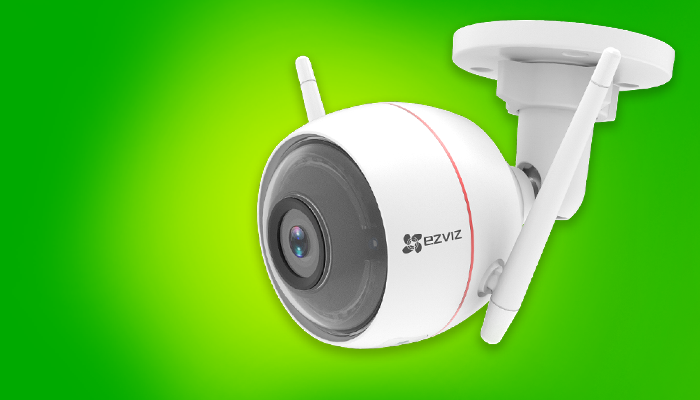
Crime is unfortunately a reality in today’s world, making home security is an important investment. That being said, many homes do not need a full multi-channel CCTV system. A simple easy-to-install smart security camera controlled via smartphone, aka the Vox Guardian Eye Wi-Fi Camera, can do more than the trick.


Four things you need to know about the Vox Guardian Eye Wi-Fi Camera

Power and installation:

The Vox Guardian Eye Wi-Fi Camera is easy to install. In fact, you can install it yourself. The camera does need electricity to be powered up but can also function perfectly off an Uninterruptible Power Supply (UPS) if the electricity goes down.

Internet usage and storage:

To enable live view functionality from your camera to your phone, receive push notifications and store footage to the cloud, you will need to have a fixed or wireless Internet connection. The camera only uses 2Mbps when live streaming which is less than streaming TV or downloading files.

If you do not have Internet connectivity, the Vox Guardian Eye Wi-Fi Camera can still record locally on an SD card, but much of the smart functionality will be lost.

Added functionality:

The Vox Guardian Eye Wi-Fi Camera is more than just a camera, it’s a robotic security guard. Features include motion detection, a built-in siren and strobe light, two-way audio, nighttime infra-red, push notifications and alerts, as well as built in analytics.

Another great feature of the Vox Guardian Eye Wi-Fi Camera is that it integrates into most home automation systems like Amazon Alexa and Google Home Assist. It also supports functionality of If This Then That (ITTT), a service that allows you to connect apps, devices and services and create conditions for your smart home.

Cost:

The Vox Guardian Eye Wi-Fi Camera is a reasonable deal at R161* per month over 12 months rental or R90* per month over 24 months.