Women of Vox: Fagmidah Eksteen

This National Women’s Month, we’re shining a light on the fabulous females at Vox who have worked their way up in the company, despite still being a minority in corporate South Africa.

“My motto is that if you enjoy what you do, you will always do your best. I have been with Vox for 19 years and during that time I have learned a lot and gained a lot of experiences in the different roles that I played. This industry that we are in are ever changing, you learn something new every day and because of that I really enjoy what I do as well as be part of a company that is growing tremendously and that move with time.” – Fagmidah Eksteen, Sales Administrator, Vox.

I guess if I think back my actual dream and aspiration was to become a physiotherapist. To help athletes with any injuries etc., says Fagmidah, who is a former athlete herself. 

 During my school days, I was an athlete who specialised in 100m, 200m and long jump and received both Western Province and South African colours for this. 

Her other passion is what she does at Vox, which all started with the Business Administration course she enrolled in at Cape Peninsular University of Technology. “I think that is where I got my passion for doing administration work.”

I think my career chose me.

Fagmidah joined Vox in 2001 as a Registrations clerk and swiftly moved up the ranks within the department to Special Projects team leader and eventually the Registrations Team Leader.   

In 2017 I decided to join the KAM sales team as a Sales Administrator and use my knowledge that I gained in the Registrations team to assist the KAMs with their clients regarding billing queries, contract queries etc. 

I am a fun-loving person, who loves spending time with family and friends. I enjoy spending time outdoors like hiking and to keep fit by running. As much as I enjoy being outdoors, I also enjoy some me time indoors, like being at home either watching Netflix or just enjoying a good book. 

#HumansofVox #WomenofVox

Vox introduces Microsoft TeamsVOICE for complete unified communication

 In a move designed to deliver a completely integrated unified communication solution, Vox, through its Braintree consulting and integration division, has introduced Microsoft TeamsVOICE, bringing phone calling to the Microsoft Teams platform.

“With this new feature, Microsoft 365 will become the unified communication environment of choice for organisations, irrespective of size or industry sector. It completes the digital telephony value chain delivered by Vox that includes connectivity, break-out access, and software licensing across a range of innovative cloud services,” says Heath Huxtable, Executive Head of Braintree by Vox.

According to a study done by Forrester by 2023, 40% of new enterprise telephony purchases will be based on a cloud office suite. Furthermore, the Teams Calling environment provided through the Microsoft 365 value proposition is predicted to result in a return on investment of 261% over a three-year period.

A rapidly evolving market

“The recent focus on remote working will only accelerate this as more companies realise the importance of empowering their employees with the solutions required to become digitally-led in a rapidly evolving market. Prior to this, people might have felt obliged to spend time in the office just to have access to their business landline.

However, with TeamsVOICE it is now a matter of simply connecting your Bluetooth headset or handset into a computer or installing an app on a smartphone and having all the basic functionality of a PBX. You can receive a call, make a call, put a call on hold, qualify a call, transfer a call, record a message and play music when a call is put on hold”, adds Huxtable.

Such has the impact of the pandemic been on remote working, that Microsoft Teams grew from 32 million users to more than 75 million in a three-month period.

Microsoft continues to add new features in Teams that make virtual interactions more natural, more engaging, and ultimately, more human.

“This reflects the importance of unified communication in business today. But TeamsVOICE does not only cater to phone calls, but it also supports the receiving of faxes (that are automatically converted to PDF documents within Teams). Companies can easily integrate TeamsVOICE into their contact centres and still use their existing telephony investments,” says  Huxtable.

Digitally-enhanced engagement

TeamsVOICE facilitates making calls from anywhere in the world using any smart device. It breaks the shackles of on-premise PBX solutions and enables companies to engage with customers in a more digitally-enhanced way.

Being built on Microsoft technology ensures that security remains a critical component to meet all compliance requirements, essential at a time when the Protection of Personal Information Act (Popi) has come into effect.

“Vox provides organisations with a number of cost-effective call rates that scale according to the number of licences. Using Teams Voice, companies can save up to 20% on their monthly telephone bills, a significant cost during these uncertain economic times. We have now put in place the final piece of the unified communication puzzle to realise a technology vision that has been promised to the world more than two decades ago,” concludes Huxtable.

Individual remote working solutions? We’ve got you

Stay productive, stay safe, stay connected with the complete Work From Home Solution from Vox.

If working from home (WFH) has been challenging, don’t let it be because of a lack of the right tools to make it a success.

It takes more than your swivel office chair, your desk telephone and canteen lunches with colleagues to get work done. You know that now.

Related: Remote Working: It’s not that bad

With the right resources, you can engage with your team like you never left the office. All you need is a superfast connection that enables you to show off your presentation skills, share your ideas in a live brainstorm, or call clients and continue to offer the best service they’ve come to expect from you.

WFH made easy

Choose your connection, chase those deadlines and stay online, all from your home office, and be more productive than ever.

 Connect your world with home WiFi

How does high-speed WiFi in every corner of your home sound? Vox WiFi is designed to optimise your coverage, range and networking possibilities in the least invasive and most power efficient way.

Get things done quicker with ultra-reliable, stable and manageable 100% coverage where you need it most.

Standard Home

Get the most out of your Fibre with proper Home WiFi for any budget and need. Our entry level WiFi offering is a cost effective, yet powerful connectivity solution for your home.

Related: Hating Your Home WiFi Network? Let’s Fix It

With five high-speed network ports available you connect non-WiFi devices easily or even extra WiFi Access points to increase coverage in your home. Now you can stay connected to your Teams meeting while an online teaching lesson is in session in the next room.

Home Mesh

Eliminate weak signal areas once and for all! Vox Home WiFi Meshing with TP-Link Deco provides the

simplest way to quickly and easily get good reliable WiFi signal into every corner of your home.

By stringing together a series of small, low-power and smart access points, meshing ensures

100% wireless coverage in any home, providing even faster network speeds and seamless coverage.

Executive Home

Here’s your answer to ultra-reliable, predictable bandwidth and unprecedented high-speed performance for real-time video distribution and data transmission in the home.

Our Executive offering is based a centralised controller managing all of your WiFi Access Points. This managed WiFi solution ensures worry-free connectivity for all your wireless devices, optimised connection speeds and better WiFi coverage throughout your home.

Here is a guideline to possible connectivity options for working remotely, in addition to home WiFi:

Table3 | Vox | Individual remote working solutions? We’ve got you

Create and collaborate with Microsoft 365 Personal

With Microsoft 365, every day is an opportunity to achieve something that matters to you. Create, edit, and share from multiple devices with anyone, wherever you are.

Choose the package that suits you and your WFH needs: Get the Home package for up to six users or the Personal package for just yourself.

Microsoft 365 can be installed for use on multiple PCs, Macs, tablets, and phones (including Windows, iOS, and Android) and offers:

  • Premium versions of Word, Excel, PowerPoint and Outlook, plus Publisher (access for PC only).
  • 1TB OneDrive Cloud storage with advanced security.
  • 60 Skype calling minutes per month.
  • Exclusive monthly upgrades and new features included for Microsoft 365 subscribers only.

Power up with the Vox UPS

With the Vox UPS, you can keep your Fibre or LTE router connected for up to three hours whilst the power is down. This allows you to stay connected so you can continue researching, brainstorming and getting work done, uninterrupted, during rolling blackouts.

The small UPS features:

  • Three hours uptime
  • Automatic activation
  • Small and compact design
  • Plug and play installation
  • 24/7 support

Related: Addressing the power challenge for remote workers

Need to connect to your team and colleagues? Vox has you covered. From Fibre to LTE, ADSL to Satellite and a whole host of other options to suit your remote working needs. Enquire now by clicking below.

Vox introduces Small UPS to keep users connected

South African Fibre users who have to make do without access to the service during loadshedding or other power outages now have a solution at hand, in the form of the newly launched Vox UPS from Vox.

The Vox UPS uses a splitter to connect to both the optical network terminal (ONT) – the consumer premise equipment installed by service providers – and your WiFi router and can power both to ensure uninterrupted connectivity.

The unit is ‘plug and play’ and can be installed by anyone, so there is no need for a professional technician to help you out.

While people can use a conventional UPS as well, this is a far neater, lighter and cost-effective solution.

“The device ensures Fibre users still have access to the Internet via their WiFi network during a power outage,” says Jurgen Sorton, Head of Managed IT at Vox.

The UPS comes with three power cable adapters, to ensure that it is compatible with most ONTs and routers used by infrastructure providers in the country. It also comes with an extension cable that can be used in case the user’s ONT and router are far apart.

Sorton adds that the Vox UPS has a battery with a 5200mAh storage capacity, which is much larger than other similar offerings available on the local market today and is capable of providing users with up to four hours of uptime. It also comes with a one-year guarantee.

“Customers can order it together with their Fibre connectivity, or as a stand-alone product through the Vox website. In addition, Vox installers will carry stock of the Vox UPS in their vehicles, and users will be able to purchase them on the spot,” says Sorton

The Vox UPS is available at R79 per month over a 24-month contract period, and is available on the Vox website.

Total Security to keep your family protected

Integrated ICT and infrastructure provider, Vox, has announced the launch of Kaspersky Total Security, a cost-effective solution that blocks viruses, secures your passwords, and helps manage Internet access for children, providing the ultimate level of protection for families in the digital age.

“Kaspersky Total Security provides a premium level of protection to maintain privacy of families online, as well as corporate networks and data, while employees are working from home. There are several cost-effective monthly packages on offer, including ones that are designed to protect multiple users or devices, regardless of whether they are using a Windows PC, a Mac, or a mobile,” says Ryan McGee, Head of Security Solutions at Vox.

While the lockdown has been reduced to level 3, social distancing guidelines mean that companies still can’t have all their employees back at work, and are having to juggle between either creating rosters so employees can take turns coming into the office, or by letting employees continue to work from home.

Maintain security on your home network

These changes have been a boon for cyber criminals too, who have been targeting remote workers. While some companies have their own IT department to maintain the security of their data and networks, the situation isn’t the same when employees are working from home.

While their work laptop might be secure, what about all their other devices, all of which are connected to the same home network?

“Kaspersky Total Security is simple to set up and use, and goes about its tasks while having a minimal impact on your device’s performance. Its features include an award-winning antivirus to block viruses, malware and ransomware; privacy protection, to stop phishing attacks or webcam hijacks; a smart VPN, which is automatically activated when you connect to unsafe/public WiFi; and an encrypted web browser to protect your online transactions on PC or Mac,” says McGee.

Protect and manage your family’s online activity

Other handy features include a password manager to keep track of all your logins and synchronise them across your devices; file protection to backup your valuable data locally and online; and advanced parental controls that help block certain content across children’s devices, and even includes a GPS tracker.

There are currently three packages, developed around the number of devices covered – that are available on a 12-month contract. This includes protection for one device, at R37 per month, for three devices at R54 per month, and for five devices at R64 per month. Note that all devices that you want to protect and manage need to have their own license.


Toolkit to run your business remotely

Equip your staff with the right tools to productively meet their targets and company goals.

Effective work from home (WFH) strategies start with the right resources. Your staff can productively meet deadlines, sow new ideas with fruitful outcomes and communicate with each other quickly, clearly and securely whether via voice, video or email. All from the comfort of their homes. But only with the right tools.

“The quick shift in the workspace has been tricky to navigate but, with a continually growing list of available resources, employees and businesses are finding ways to make it work,” says John Rampton founder of the productivity tool, Calendar.

Here are some of the key factors to consider when gearing your workforce up to work remotely.

Security

In 2019, 94% of businesses experienced phishing attacks, according to Mimecast. And it isn’t just the big enterprises at risk – 70% of SMEs who give into ransomware demands close their doors within six months of a breach.

Security risks increase when instead of everyone accessing company information form one secure location, employees have access from their various locations. WFH means a possible dramatic increase in unsecured remote device usage, phishing and malware attacks, along with and the threat of internal data leaks.

A fully managed solution

There’s never been a more critical time to have a holistic and 360-degree IT security plan in place.

Regardless of your IT budget or the complexity of your IT environment, Vox has the solution set, and the skilled and experienced teams to assist in securing your business from cyber criminals.

We provide our customers all the essential components of effective IT security, either as part of an affordable comprehensive bundle or standalone critical element or as part of a fully managed solution:

  • Firewall as a first line of defence against cyberattacks
  • Anti-virus software to detect and remove virus/malware from endpoints and servers
  • Email security which provides an essential layer of protection against cyberattacks
  • Managed Services to ensure remote workers VPN connections are secure
  • Vox managed Backup for safe record of your data that can be implemented for continuity.

Related: Protect your business with this cybersecurity toolbox

Communication

Virtual collaboration tools are essential to make remote working and virtual teams a reality, according to Tahira Nagdee, Manager at PwC Research Services South Africa.

In addition to compromised security, some of the greatest challenges of working remotely include the inability to collaborate face-to-face and not having immediate access to documents requiring co-working.

Choosing the right channel is especially vital in a fully remote working environment. While your employees may be accustomed to switching between digital non-digital communications at the office, WFH calls for a new set of rules, says Ryan Jenkins speaker, author, co-founder of SyncLX.com.

“When communicating with remote workers, ensure your intended message aligns with the appropriate channel,” he explains.

Phone and video calls are best suited for long, detailed, difficult, feedback-rich or emotional conversations, while chat works better when making general announcements, brainstorming and socialising.

Collaboration is key

Vox has a dedicated Microsoft consulting division which assists our customers with licensing, implementation and training for MS Teams so your staff can benefit from presence, chat, video and audio conferencing, document sharing and meeting recording, among other market leading features.

For customers whose requirements are limited to bringing people together via video and or audio-conferencing Vox Air cost effectively enables multi-point conferencing and eliminates software/hardware compatibility/interoperability restrictions without expensive infrastructure requirements

Microsoft Teams and Vox Air assist in overcoming the challenges of WFH for your newly remote workforce.

Related: Video conferencing is easy with Vox Air

Connectivity

From a practical perspective, the lockdown has highlighted the importance of adopting a Cloud-first mindset when it comes to business operations.

Uncapped voice options and continuous Internet access are the future of remote working. Vox is uniquely positioned to integrate your business connectivity infrastructure with your employees working from home.

Voice of the future, today

Keep your costs under control, while experiencing seamless integration between your business PBX and remote workers’ mobile handsets with Vox’s Cloud hosted PBX. Employees’ mobile handsets become their extension when they are working remotely, like your remote workforce is still at the office!

Here’s how it works: inbound calls are received as if in-office, using data connectivity, and outbound calls incur your Vox VoIP charges rather than significantly higher GSM mobile rates. You have the option of metering, recording and monitoring calls for phone management reports or to gauge employee productivity, where applicable.

Related: Now is the time to go the Cloud-based PBX route

“It is all about thinking differently and identifying innovative ways of leveraging technology to empower employees to remain productive,” says Natalie van der Merwe, Senior product manager for PBX at Vox.

But if the past few weeks has shown us anything, then it is the need to move away from a ‘business as usual’ approach into one more reflective of the digital age.”
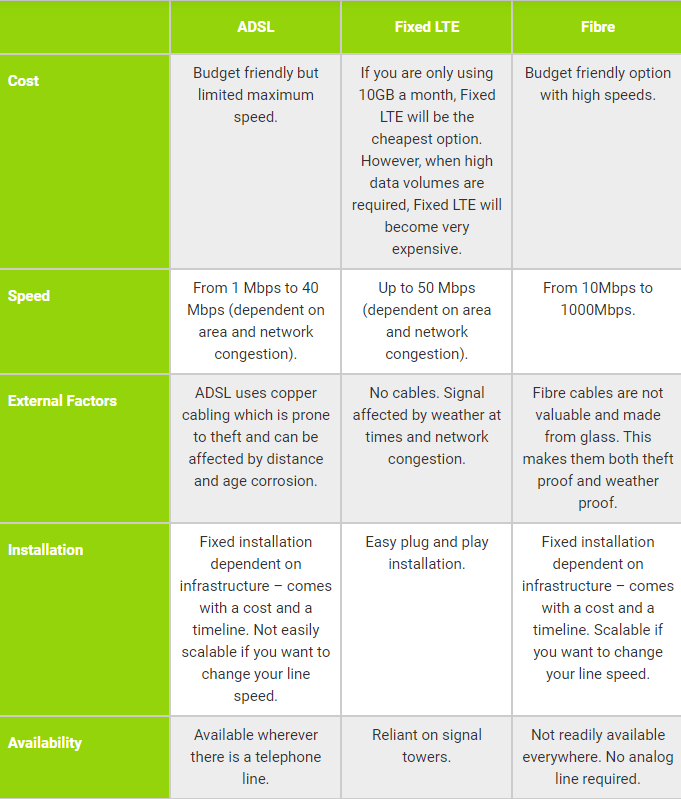

The death of local ADSL: What’s the best alternative?

The discontinuation of copper lines in several areas countrywide is set to begin in less than two months.

While ADSL has long been a staple for South Africans wanting to connect to the Internet – especially the early adopters – they will have to start thinking about alternatives.

In an announcement sent out to its IPS customers, Openserve says that it will discontinue ADSL services in areas that are covered by the company’s Fibre network on 1 September 2020, with affected customers across all provinces.

It further calls on ISPs to ensure that affected customers are migrated to other forms of connectivity before the cut-off date.

While the shutting down of copper lines that carry traditional voice and ADSL connectivity was first mentioned over a year ago, this decision now makes it a reality.

It is old technology that is difficult to maintain, is not as reliable, and is no longer suited to meeting the Internet bandwidth requirements of users in a digital age.

This is especially true under the current circumstances, with many employees having to work from home as a result of the lockdown restrictions, and discovering the limitations of using ADSL or even mobile/fixed-mobile as their primary means of connecting to the Internet – the former not being fast enough, and the latter not being affordable or stable enough.

Why Fibre is the better technology

Remote working has seen an explosion in the use of online productivity tools and applications, as well as video conferencing, all of which require a quality broadband connection. More importantly, unlike just consuming media – such as streaming a TV series or movies – working from home also requires that users upload huge volumes of data.

With Fibre, they can not only choose whether their line speed and whether their package is capped or uncapped, but they can also select if they want a service that is symmetric – with the bandwidth equally shared between uploads and downloads – or asymmetric – with more bandwidth set aside for data traffic in one direction, usually for downloads.

In addition, Fibre offers line speeds that far exceed what was available on ADSL, with some network operators offering up to 1Gbps – or up to 100 times faster than the standard 10Mbps copper line.

As for mobile or fixed-mobile connectivity options, they simply cannot match Fibre when it comes to the cost-effectiveness of uncapped packages, the per-gigabyte cost of data, or even in terms of offering lower latency.

Then, there is the issue of contention – the more people that connect to a cellular base station, the slower the network speed becomes.

Beyond helping those working from home, switching to Fibre is ideal for the modern household, with family members having multiple devices, streaming on-demand video content, and making personal voice and video calls.

Furthermore, online gamers will know that one of the biggest issues affecting their gameplay is latency, which is especially noticeable when using ADSL or mobile connections – making Fibre the only effective option.

Switching made easy

Some of the reasons why people have been hesitant to move away from their traditional ADSL lines include a lack of familiarity with new technology, a perceived inconvenience resulting from having to switch, as well as not wanting to lose their existing telephone line and number.

To make things easier for consumers, some ISPs are beyond just simple providers of internet connectivity, and can easily provide these customers with a voice over Internet Protocol (VoIP) line, with number portability making it fully possible for them to retain their existing telephone number.

Switching to VoIP further allows them to make calls, locally and internationally, at lower rates than their existing landline connection.

As user behaviour shifts toward a more digital lifestyle, including working from home, consuming more online services, watching video content in higher quality, and adding more Internet of Things devices – think of connected security cameras, or smart lighting and smart locks that allow for keyless entry – Fibre will be critical to connecting all of these different elements.

Fibre providers have recognised this demand for high-quality broadband, and some have made it a strategy to extend their networks beyond the main urban centres in South Africa. But for the rest of us, the decision around Internet connectivity should be fairly straightforward: if you live in a neighbourhood that has Fibre coverage, you should switch to Fibre as soon as possible.

An SLA is for when you need it most

Service Level Agreements are effectively a warranty on the level of service quality delivered by the service provider, while managing expectations and defining responsibilities.

This drives the framework for handling timely customer support and repairs when failures occur.

Mission critical business operations depend on the reliability of these services and whether it’s the IT Infrastructure, PABX or Communications, a higher level of SLA becomes increasingly non-negotiable.

An SLA will ensure that there is some pressure for the provider to get the service up and running again as soon as possible.

A wide selection of smart solutions

Similar to choosing your household insurance, the highest plan will give you the most extensive cover when the unexpected arises. You should have the peace of mind that your business, much like your home is covered.

Ensuring the best level of service

If you are outsourcing your IT Operations, this will give you leverage you need in the event that the service is underperforming. You are then safe guarded by the SLA and, in some cases, reimbursed for the downtime experienced. In this respect you can think of it as an insurance policy for that service.

Proactive protection of what matter most

You may feel that the premium or top of the range SLA is unnecessary but when failures do occur, you will realise just how valuable it is. This rings especially true for mature organisations that cannot afford major disruptions in their operations that will ultimately result in lost productivity, eroded confidence and lost opportunities with their customers.

If you want to know more or to sign up for the Advanced SLAs, please contact your Account Manager or email us at  salesenterprise@voxtelecom.co.za and our team will respond promptly.


A Total Approach Needed for Home Cybersecurity

Capitalising on the anxieties and fears caused by the COVID-19 pandemic, the past several months have seen cybercriminals increasingly target home networks to steal personal data.

International research shows that there has been a 350% increase in the number of phishing attacks from January to March, the period most countries started entering lockdown conditions.

Prior to the COVID-19 pandemic, it was predicted that cybercrime would cost the world more than $6 trillion annually by 2021. Given recent developments, this is likely to increase even further. Parents have been working from home and their children attended online classes with many schools embracing e-learning offerings.

But with all family members now relying on connectivity from home to do everything from working, online shopping, gaming, watching movies, going to virtual classes, and so on, they are also opening themselves up to more sophisticated cyberattacks that can significantly compromise their personal information.

Even Microsoft has warned that ransomware attacks have started becoming more widespread as hackers look to monetise their attacks at a time when they can make the most financial gain.

No industry has been immune, but it has been especially home users who have suffered the most.

This should hardly come as a surprise as many people think that their antivirus provides equally effective protection.

The reality is quite different. With so many connected devices (just think how many devices you have connecting to your home network), each one signifies a potential weak point in the chain. It only takes one compromise to impact the entire environment.

This enables hackers to install malware on any of the devices at home. And when a laptop or smartphone is used to access the corporate network, the malicious users can more easily steal usernames and passwords to breach business systems.

Integrating security

This is where a total approach to cybersecurity for the home environment becomes critical. It is no longer good enough just to safeguard the work laptop. Today, every single home device needs to be protected whether it is the smart TV in the living room all the way through to the tablets and other devices children use to go online.

A solution such as the Kaspersky Total Security suite becomes critical to deliver multi-device family security. An effective cybersecurity solution like this can still deliver antivirus features, but extends its scope to:

  • Protect passwords
  • Provide webcam security
  • Detect ransomware
  • Offer a user-friendly way to set up a virtual private network
  • And numerous other features.

Unlike the traditional way that requires a software (or hardware) solution to be installed for every aspect of this, total security means this can be done from one system with multiple licences to support all the devices on the home network.

And because this is a software-driven environment, home users can easily set up and maintain their own cybersecurity without having to struggle setting up complicated hardware and other infrastructure solutions.

A total security offering can be applied to multiple devices irrespective of whether they run Windows, Mac OS, or Android. It is centred on providing the entire family with the most sophisticated protection in as user friendly a way as possible.

Protecting the family

For example, using a total security solution, a person can lock, locate, and reset a missing Android phone. Advanced parental control features ensure parents can block access with content filters, limit the use of devices, monitor their children’s social media activity, and even ring fence their physical location using their devices that show real-time alerts if they move out of that zone.

For example, with schools reopening for some of the grades, a parent can easily ring-fence their child to the school from 08:00 to 14:00 and receive an alert if they leave the school property without their knowledge.

Furthermore, you can monitor all online activities of all the users on the home network.

Whether that is online shopping or banking, a total security solution can proactively check whether a user is connecting to a legitimate site before submitting their credit card details.

Of course, this protection not only extends to financial sites. When the lockdown started, there were over 700 fake Netflix sites scanning for credit card details. It is therefore imperative to check the authenticity of every site a person visits especially when personal information must be submitted.

Related: Vox unveils estate-focused visitor management solution

Such has the significance been of cyberattacks focused on home networks, that 12.1% of South African systems have been infected by some form of malware in May alone. So, even though these are strange times, the new normal will continue to require a more effective way of protecting personal devices and home networks.

Fundamentally, a total security solution such as the one provided by Kaspersky (available from Vox) is one of the most effective ways of doing so to ensure your loved ones remain safe in the digital world.

COVID Screening Solutions

As South Africa moves to the next phase in the response to COVD-19, many organisations find themselves in unprecedented circumstances.

The Disaster Management Act has laid down strict regulations which must be followed by all employers when employees return to the premises, and many companies are struggling to balance compliance with the safety of their employees.

Vox’s Guardian Eye division is ideally positioned to provide advice in navigating what for many companies are uncharted waters and implement fit for purpose solutions to ensure compliance while safeguarding employees.

Guardian Eye has put together a range of key technology to suit both smaller companies and large organisations where manual technology is not practical.

Hand-held scanners

Hand-held non-contact scanners are perfect for small businesses with low traffic. Options include infrared and thermal technology. Scanners are cost-effective and can be rapidly deployed.

Hand-held thermometers

Non-contact Infrared thermometers have the following advantages:

  • Lightweight and easy to read
  • Quick, simple and accurate to within .05 degrees Celsius
  • Battery-powered to ensure function even in a power failure
  • Inexpensive
  • Measure body temperature, ambient temperature and relative humidity

Static cameras

Static cameras are designed to measure body temperature using thermal technology. Combined with Artificial intelligence not only does it enable us to store temperature readings against facial snapshots (whether recognised or not), it also caters for mask and other health and safety compliance checks to efficiently identify non-compliance. This type of deployment is ideal for larger traffic flows, as it reads and detects people with higher body temperatures in a crowded area.

The infrared cameras have the following advantages:

  • Track and trace people with high body temperatures in a crowd
  • Live view support on PC, mobile device or external monitor
  • Thermographic accuracy to within 0.3 degrees C
  • Safe measurement distance to avoid unnecessary physical contact

Frictionless access control

Our facial readers now incorporate temperature screening, not only providing you with frictionless access control, but also doubling to screen the temperature of the person presenting their face for access.

The facial reader come with a built in AI engine to again detect objects such as facial masks or hard hats. These readers can be used detect and assess known or unknown faces which means that in a reception environment a reader can be used to grant access to guests purely based on their compliance to COVID-19 regulations.

Frictionless access control has the following benefits:

  • Convert any existing access control system to frictionless with seamless integration
  • Cater for both staff and visitor access, screening the person upon arrival
  • Thermographic accuracy to within 0.5 degrees C
  • Recognition distance: 0.3 to 2 metres
  • On device capacity: 50 000 faces, 50 000 cards and 100000 events.

Sterilisation booths and sanitation tunnels

While sterilisation booths do not detect any elevation in temperature, they are ideal for businesses which require deep-cleaning and sanitsation.

Sterilisation booths

Sterilisation booths have the following advantages:

  • Booths can be easily assembled, used immediately and is flexible and portable
  • No additional tools required, and no manpower is wasted
  • Most booths use alcohol-free sanitisers which spray in a fine mist, which does not affect clothing or glasses.
Sanitation tunnels

Sanitisation tunnels differ from sterilisation booths in that the employee walks through the tunnel instead of remaining in the booth. However, the advantages are similar in that no manpower is required, and flexibility and mobility are maintained.

Guardian Eye has the perfect solution to meet your compliance, employee safety and budgetary needs.