Vox introduces Small UPS to keep users connected

South African Fibre users who have to make do without access to the service during loadshedding or other power outages now have a solution at hand, in the form of the newly launched Vox UPS from Vox.

The Vox UPS uses a splitter to connect to both the optical network terminal (ONT) – the consumer premise equipment installed by service providers – and your WiFi router and can power both to ensure uninterrupted connectivity.

The unit is ‘plug and play’ and can be installed by anyone, so there is no need for a professional technician to help you out.

While people can use a conventional UPS as well, this is a far neater, lighter and cost-effective solution.

“The device ensures Fibre users still have access to the Internet via their WiFi network during a power outage,” says Jurgen Sorton, Head of Managed IT at Vox.

The UPS comes with three power cable adapters, to ensure that it is compatible with most ONTs and routers used by infrastructure providers in the country. It also comes with an extension cable that can be used in case the user’s ONT and router are far apart.

Sorton adds that the Vox UPS has a battery with a 5200mAh storage capacity, which is much larger than other similar offerings available on the local market today and is capable of providing users with up to four hours of uptime. It also comes with a one-year guarantee.

“Customers can order it together with their Fibre connectivity, or as a stand-alone product through the Vox website. In addition, Vox installers will carry stock of the Vox UPS in their vehicles, and users will be able to purchase them on the spot,” says Sorton

The Vox UPS is available at R79 per month over a 24-month contract period, and is available on the Vox website.

Toolkit to run your business remotely

Equip your staff with the right tools to productively meet their targets and company goals.

Effective work from home (WFH) strategies start with the right resources. Your staff can productively meet deadlines, sow new ideas with fruitful outcomes and communicate with each other quickly, clearly and securely whether via voice, video or email. All from the comfort of their homes. But only with the right tools.

“The quick shift in the workspace has been tricky to navigate but, with a continually growing list of available resources, employees and businesses are finding ways to make it work,” says John Rampton founder of the productivity tool, Calendar.

Here are some of the key factors to consider when gearing your workforce up to work remotely.

Security

In 2019, 94% of businesses experienced phishing attacks, according to Mimecast. And it isn’t just the big enterprises at risk – 70% of SMEs who give into ransomware demands close their doors within six months of a breach.

Security risks increase when instead of everyone accessing company information form one secure location, employees have access from their various locations. WFH means a possible dramatic increase in unsecured remote device usage, phishing and malware attacks, along with and the threat of internal data leaks.

A fully managed solution

There’s never been a more critical time to have a holistic and 360-degree IT security plan in place.

Regardless of your IT budget or the complexity of your IT environment, Vox has the solution set, and the skilled and experienced teams to assist in securing your business from cyber criminals.

We provide our customers all the essential components of effective IT security, either as part of an affordable comprehensive bundle or standalone critical element or as part of a fully managed solution:

  • Firewall as a first line of defence against cyberattacks
  • Anti-virus software to detect and remove virus/malware from endpoints and servers
  • Email security which provides an essential layer of protection against cyberattacks
  • Managed Services to ensure remote workers VPN connections are secure
  • Vox managed Backup for safe record of your data that can be implemented for continuity.

Related: Protect your business with this cybersecurity toolbox

Communication

Virtual collaboration tools are essential to make remote working and virtual teams a reality, according to Tahira Nagdee, Manager at PwC Research Services South Africa.

In addition to compromised security, some of the greatest challenges of working remotely include the inability to collaborate face-to-face and not having immediate access to documents requiring co-working.

Choosing the right channel is especially vital in a fully remote working environment. While your employees may be accustomed to switching between digital non-digital communications at the office, WFH calls for a new set of rules, says Ryan Jenkins speaker, author, co-founder of SyncLX.com.

“When communicating with remote workers, ensure your intended message aligns with the appropriate channel,” he explains.

Phone and video calls are best suited for long, detailed, difficult, feedback-rich or emotional conversations, while chat works better when making general announcements, brainstorming and socialising.

Collaboration is key

Vox has a dedicated Microsoft consulting division which assists our customers with licensing, implementation and training for MS Teams so your staff can benefit from presence, chat, video and audio conferencing, document sharing and meeting recording, among other market leading features.

For customers whose requirements are limited to bringing people together via video and or audio-conferencing Vox Air cost effectively enables multi-point conferencing and eliminates software/hardware compatibility/interoperability restrictions without expensive infrastructure requirements

Microsoft Teams and Vox Air assist in overcoming the challenges of WFH for your newly remote workforce.

Related: Video conferencing is easy with Vox Air

Connectivity

From a practical perspective, the lockdown has highlighted the importance of adopting a Cloud-first mindset when it comes to business operations.

Uncapped voice options and continuous Internet access are the future of remote working. Vox is uniquely positioned to integrate your business connectivity infrastructure with your employees working from home.

Voice of the future, today

Keep your costs under control, while experiencing seamless integration between your business PBX and remote workers’ mobile handsets with Vox’s Cloud hosted PBX. Employees’ mobile handsets become their extension when they are working remotely, like your remote workforce is still at the office!

Here’s how it works: inbound calls are received as if in-office, using data connectivity, and outbound calls incur your Vox VoIP charges rather than significantly higher GSM mobile rates. You have the option of metering, recording and monitoring calls for phone management reports or to gauge employee productivity, where applicable.

Related: Now is the time to go the Cloud-based PBX route

“It is all about thinking differently and identifying innovative ways of leveraging technology to empower employees to remain productive,” says Natalie van der Merwe, Senior product manager for PBX at Vox.

But if the past few weeks has shown us anything, then it is the need to move away from a ‘business as usual’ approach into one more reflective of the digital age.”


Is your managed services partner geared to support your users at home?

The right IT infrastructure in place both on-site and remotely helps your staff remain successful and productive while working from home.

Prior to COVID-19 compelling businesses to implement work from home (WFH) strategies earlier this year, a IWG survey found that in the past 10 years, 83% of businesses had already started or were planning to introduce a flexible remote work policy.

While the first half of 2020 has proven that WFH can improve productivity, small businesses with either no budget or capacity to have an IT department in place are having to rely heavily on their managed services partners (MSPs) to make the transition from office-based working, to WFH as seamless as possible.

Related: Managed IT Security & Backup

Managed services not only help your business improve its margins, but also future-proof your organisation and add value to your customers.

3 Ways your MSP should aid remote working

1. Increase network security

Getting hacked can cause irreparable damage to your company financially, reputationally and hamper efficient operations and employee productivity.

Safe and secure WFH requires redundancy, VPN setup, and a firewall installation. Once your connection and protection are up and running, employees should be able to access what they need, with continued remote IT support when they experience issues.

If you’re working off web and Cloud-based files or applications, users can be access them from anywhere, securely, without the need for your MSP to increase security.

2. Effective IT roadmapping

The purpose of managed IT services isn’t just the technology, but on how using technology contributes to meeting your business goals.

How long will it be before you need to upgrade computers used for remote work? Are there solutions that can make work easier, making the return on that investment well worth it? These are questions your MSP should help you answer.

Related: Vox, enabling a digital work environment

Creating a map for future IT growth enables you to budget for the inevitable, leaving nothing to chance – especially as the percentage of the remote workforce continues to increase.

3. Unparalleled support

Employees can’t work if their email or computers are down, especially if they’re outside of the office. Remote IT support doesn’t only ensure WFH remains a productive exercise, but saves you – and your workforce – time, money and frustration.

“Supporting remote employees doesn’t have to be a major undertaking,” according to Dizzion, one of Inc’s 5000 List of America’s Fastest-Growing Private Companies. “It just needs a more comprehensive approach with better built-in tools.”

Simplify your IT management by having Vox’s Managed IT take complete responsibility for all – or part of – your IT services while you focus on your core business. Let our team of local, certified engineers monitor, maintain and optimise your IT ecosystem to ensure your business meets its goals.

Related: Work from home simply, with managed desktop services

Don’t blow your budget – plan better for Cloud

So, you’ve established that your business is ready to migrate to the Cloud – how do you budget for the move?

A startling 80% of companies have admitted that while their decision to move to the Cloud was, in part, for cost saving, the migration went way over budget. Why?

According to Owen Rogers, analyst at 451 research, “Overspend comes from a disjoint between IT and finance. Applications can scale up and down… but businesses can’t.”

Now is the time to consider your Cloud costs as your business continues to migrate its IT infrastructure to a solely Cloud-based platform.

Read: Key considerations for an effective Cloud strategy

Cloud migration can be cost-effective

Almost 19% of Cloud budgets are spent on Cloud-related services, such as Cloud consulting, implementation, migration and managed services, according to Gartner. The research firm expects that this rate will increase to 28% by 2022.

The agile and scalable nature of Cloud means the costs can add up very quickly – especially if your resources are not properly managed.

“These sometimes-hidden costs of Cloud computing include when workloads are overprovisioned, incorrectly sized or left running even when they are not needed,” according to TechTarget.

3 Ways to keep Cloud costs in check

Overspending on Cloud doesn’t just negatively impact your business’ bottom line but affects other areas of the business including innovation and the quality of your customer service.

Without ongoing management and oversight, even the best implemented Cloud strategy will start to exceed budget over time. Here’s how to boost your Cloud budget:

1. Start rightsizing

The best way to increase your efficiency and get more from your Cloud is rightsizing your usage. Yes, there is risk involved, but then benefits of the right analysis and visibility can yield results that dramatically minimise that risk.

Companies that rightsize their workloads to eliminate overprovisioning can cut costs by as much as 30% to 60%.

“Rightsizing creates opportunities for vendors as well – to help their customers scale, automate and operate using public, private and hybrid Cloud models,” says Mark Brinda Partner, at Bain & Company.

2. Stop overprovisioning resources

A Cloud-based server that has too many resources allocated to it is money down the drain. Generally, Cloud providers charge you for services provisioned rather than what is consumed. So, the pre-Cloud notion of predicting resources for future use can be costly today.

According to Bain & Company, 84% of workloads on-premise are overprovisioned. This means that when businesses migrate a workload to the Cloud, excess capacity is being sent along with it.

Identifying and managing your business’ use of its Cloud resources helps balance risk and cost, therefore reducing waste – and saving you money.

3. Review storage costs

A knowledgeable Cloud service provider will offer your business a tiered storage option to keep your records for the amount of time required by regulation.

So, files that you don’t access as often will fall under ‘cold storage,’ and files you need regular access to are stored in ‘hot storage’.

Using this system of storage tiers saves money, as hot storage can be expensive, and you don’t always need all your information at hand.

Budgeting of any kind in a business is a balancing act, but to successfully migrate to the Cloud, you’ll need IT and finance to work together to make the process a success.

To truly understand how to start and manage your Cloud journey, email assessments@voxtelecom.co.za to book an IT assessment today.

Vox launches SD-WAN Lite to give SMEs more reliable connectivity

Integrated ICT and infrastructure provider Vox has announced the launch of their SD-WAN Lite service, an entry-level solution designed to cater for local SMEs who require more resilient and reliable data and voice connectivity.

Vox SD-WAN Lite allows organisations to use any combination of ADSL, LTE, Wireless and Fibre connectivity in order to provide the best connectivity experience. It can accommodate up to three Internet connections, and prioritise traffic for the best possible outcome, which can significantly improve the quality of data and voice calls.

“Switching to SD-WAN Lite, which is quick and easy to install, will help businesses improve the quality of connectivity to support mission critical services, improve the connectivity uptime ratio and reduce connectivity costs by making them vendor agnostic,” says Jacques Visser, Head of Wireless at Vox.

According to Visser, Vox will offer the solution in three different topologies, namely voice only, Internet only, or voice and Internet. Customers select the links used for voice with one as the primary link as   voice traffic runs over only one WAN connection at a time.  Should the primary link go down, the voice traffic will automatically switch to the failover link.

SD-WAN Lite features include being able to connect all access circuit routers to a single SD-WAN CPE device, having an automatic link failover configuration, traffic load balancing and voice quality optimisation through the use of Forward Error Correction that successfully compensates for moderate link packet loss.

The SD-WAN CPE devices are automatically configured based on desired failover policies once they are plugged in by means of Zero Touch Provisioning.

“Furthermore, a Cloud-based monitoring platform allows users to view their access links’ performance in real time. They get email notifications of link downtime when a failover event occurs including the ability to adjust their load balancing and failover strategies at will,” explains Visser.

Vox SD-WAN Lite customers can integrate their own existing Internet packages or use carrier services sold through Vox. The voice overlay component includes compatibility with all Vox Voice services.

According to Visser, the Vox SD-WAN Lite service, aimed at small and medium companies, comes at an affordable price and brings an acceptable level of self-control to those companies that cannot afford expensive dedicated connectivity, or imported SD-WAN products from  top tier brands that are a better match for the needs of much larger enterprises.

There are two options available, with a maximum of 600Mbps combined WAN capacity, namely the Vox SD-WAN Lite 2 WAN and the Vox SD-WAN Lite 3 WAN. For more information, visit  https://www.vox.co.za/sd-wan-lite/

The impact of lockdown on communication

The global lockdown has not only had a massive humanitarian impact, but it also forced companies of all sizes and industry sectors to re-evaluate their business continuity plans. With half of the world’s population currently placed in self-isolation, this black swan event has fundamentally changed how people go about their lives amidst this global pandemic.

This has put the spotlight on people’s connectivity and how they are able to link back to their organisation, using digital means. Additionally, those who are not able to work have mostly been placed on enforced leave. These two forces combine put unprecedented pressure on communication networks to remain working optimally.

So, with more people having to make more calls for both business and personal reasons during the lockdown, how can companies maintain operations effectively?

Find out more in the whitepaper by filling in your details below.

Get your employees working from home

Empower your employees to be able to work from home and keep your business operating the way it should.

Globally, lockdowns have impacted companies in ways that no one could have foreseen. While many businesses have been adversely affected, others have had to deploy their disaster plans, which included staff working from home.

Most companies had not yet been able to fully test the work from home (WFH) scenario and have been forced to adapt or die, as circumstances call for remote working as the new normal.

However, some organisations have been pleasantly surprised at how employees have been able to adjust to this new way of working

Cut costs – go the rental route

Many companies have found that what previously prevented employees from working remotely was a lack of hardware and the ability to provide remote support

This is where Vox comes in. As part of our Hardware as a Service (HaaS) solution, Vox offers short-term asset rentals, together with remote support and security patching. In the event of total hardware failure Vox engineers are allowed to assist onsite.

Vox has supplied laptops to many of our customers – from schools to SMEs – as more companies incorporate remote working into their workplace culture.

Managers across the board are reporting higher productivity levels than they ever expected, indicating that this is set to become a new job location option for certain employees.

What’s in it for you?

Now, as a company owner, you may be concerned with issues including:

  • What happens if my hardware breaks?
  • How do ensure that my staff and assists are protected from online vulnerabilities?
  • How do I get support quickly?

Vox hardware solutions offer an affordable rental of quality refurbished hardware, devices, laptops or desktops, for the education, SME and the enterprise sectors.

These items are perfectly reliable for the functional workspace and include benefits such as:

  • Next business day swop out on faulty or damaged hardware
  • Windows 10 licensing
  • Optional click-through desktop support with access to our managed services desk.

As a Managed IT provider, we ensure that the devices are secure and protected as cyber resilience is no longer a luxury but a necessity to every business.

Peace of mind, productively

COVID-19 has forced businesses to explore new ways in managing their workforce. Much like the baby boom eventually led to higher number of people in a workforce, leading to open plan work layouts.

But while you focus on the operations of your business, let Vox make sure your employees have reliable hardware, that will make working from home a breeze.

Voice calling alternatives to prevent bill shock

Cost-conscious South Africans are forgoing traditional cellular calls in favour of mobile application-based alternatives in order to cut down on costs, but these solutions do not always provide a quality replacement, especially for professional use.

While many users, locally and globally, have quickly taken to using a variety of instant messaging apps to keep in touch with family and friends, they are more reluctant to do so for businesses purposes, such as contacting service providers, suppliers and even prospective customers. This is all the more important during this lockdown period, when people are having to do their work from home.

A key issue here is that instant messenger applications (also known as Over-The-Top applications) only let you reach out to people who are already your friends, have also signed up for the same service, and have the application installed on their mobile device. This makes it apparent that while these apps help in certain cases, they are not suited at all for high quality conversations and can be extremely frustrating.

Entrepreneurs and organisations need an alternative that gives them the credibility of having a traditional phone number, together with the mobility and affordability that these consumer applications are offering.

Thankfully, there are mobile applications on the market that are purpose built to tackle these very challenges.

Mobile app-based softphone services, such as Vox’s Vobi, uses Voice over Internet Protocol (VoIP) to make calls to any number, at reduced rates across South African networks. Despite a monthly subscription, basic data usage – set at around 500KB per minute – and a flat-rate VoIP call cost, it still works out cheaper than using a traditional circuit switched cell phone call.

Uncapped calling subscription service offerings further help frequent callers save, as there is no additional call cost. Using locally-based servers and network infrastructure also means lower latency and higher quality voice calls, while calls between two people using the same application are free – with only their data being used.

A mobile application with features such as conference calling, call recording, seamless integration into the users address book, and Bluetooth handset compatibility completes the full phone-like experience for end users, while push technology ensures that battery usage is minimised.

Keep your number, or extend your office line

Additionally, consumers can use such applications to take full advantage of number portability: as they move away from traditional phone lines and ADSL connections, and toward Fibre or other fixed wireless methods, they can still retain their existing phone number while benefiting from lower call costs.

By keeping their existing landline number, entrepreneurs and organisations can minimise disruption to their communications and cut out the need for any additional time and resources to be spent on updating contact details on digital assets, business cards and other marketing material.

A further challenge for employees during the lockdown has been to ensure that phone calls to the office can be diverted to the right people.

The ability to integrate with selected cloud hosted PBX systems brings true mobility to an organisation, as smartphones with the Vobi application installed can easily be turned into extensions. This means that employees do not have to give out their personal mobile numbers, or juggle multiple phones.

Another great Vobi feature is that that users are not tied into long term contracts but rather use the service on a month-to-month basis.

While currently halted due to restrictions, it won’t be long before business travel resumes. Apps such as Vobi enable businesses with a presence in multiple countries to cut down on roaming costs for employees travelling for work. As long as they have access to a reliable WiFi or data connection, they can make and receive calls as though they were still in South Africa.

The same benefits would apply for individual users on holiday – call home at local rates from wherever they are, as long as they have Internet access.

While many cost-effective options to traditional voice calling are available on the market, there is no ‘one-size-fits-all’ solution available, and users need to investigate the various alternatives in order to ensure that the application or service they select provides the right functionality to suit their needs.

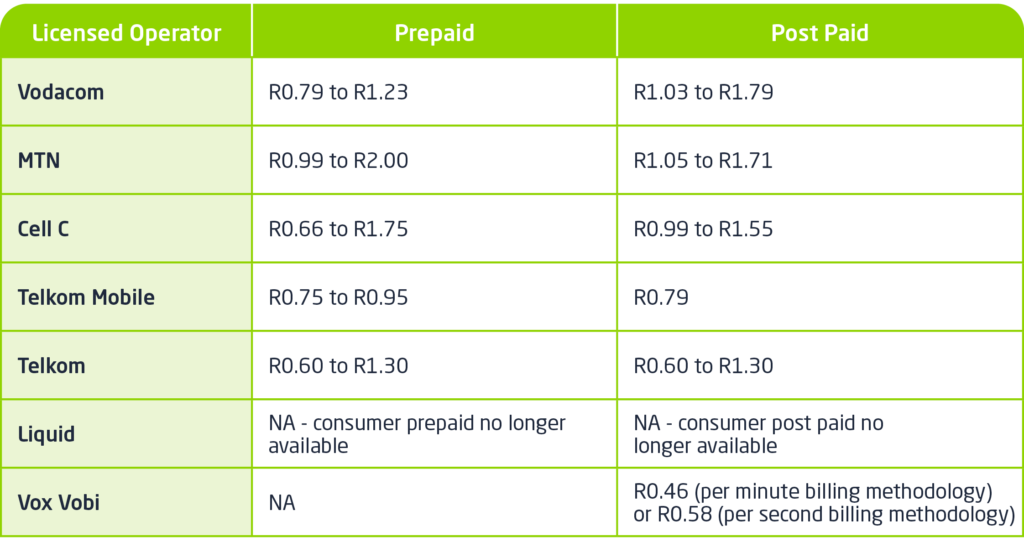
Local call rates:

Vox Vobi Call Rates | Table

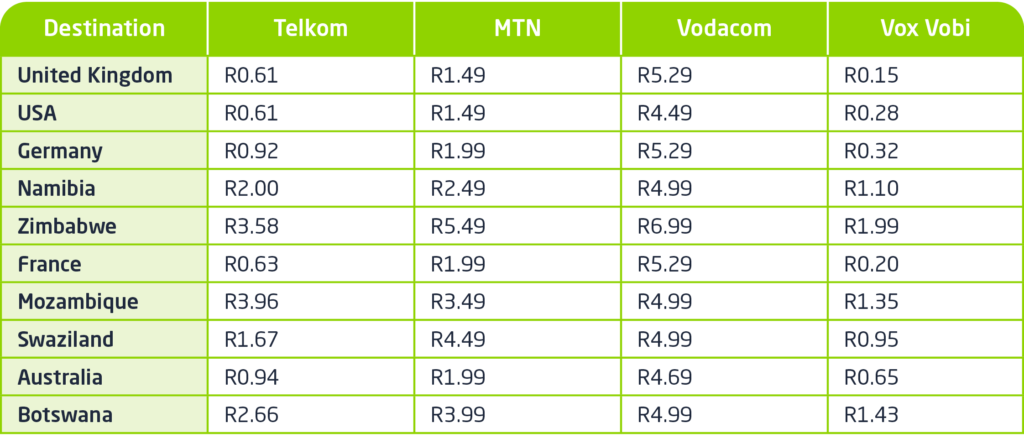
International call rates: note that international calls from mobile networks in South Africa usually take the standard prepaid or postpaid rate and then add an international surcharge.

International call rates | Table

Find out more about Vobi voice calling here.

Are you listening to your earphones or the conversation?

With the prolonged lockdown period most of, if not all, your conversations have been over some digital medium – be it your mobile phone or a video conference call on your PC or mobile device.

What you may have noticed by now is that the audio experience has started taking its toll on you.  You tire quickly during meetings and by the end of the day you feel exhausted and your ears are hurting.

We have all been on group calls where some participants are softly spoken, the microphone someone is using is of poor quality, or some participants’ connections are poor and you struggle to hear everyone clearly.

This is exacerbated by you either using a set of earphones, that you had to dig out of a drawer at the beginning of the lockdown, or you are using your laptop’s speakers – neither of which provide you with a comfortable listening experience. So you find yourself turning up the volume in an attempt to hear more clearly.

Besides the obvious strain this places on your ears, there are several other reasons that are causing you to fatigue:

  • Your brain trying to translate something it knows is not real – digital audio – into something that sounds real. The harder this is for your brain, the harder this is on you.
  • There is a lot of other noise on the calls you are having, and besides being distracting, it also makes following the conversation more difficult.

To minimise audio fatigue, you need a better quality microphone and speaker – one that has full duplex audio with echo cancellation and that delivers a more natural reproduction of the audio stream.

One such device is the Yealink CP700 portable speaker phone.  It is cost effective and allows for USB connection to your PC, laptop or Macbook and a Bluetooth connection to your mobile devices. The CP700 is certified for use with Microsoft Teams, enables quality audio pickup up to 2-meters and has a high-quality speaker.

Another reason that I love this device is that it has intuitive LED indicators that simplify collaboration while connecting to your call and during the conversation.

With this quality audio device, you will find yourself participating in the conversation instead of trying to hear those on the call or trying to make yourself heard.

How we’re using the Internet in the time of COVID-19

Besides asking Google how to brew homemade alcohol, South Africans are using the Internet now more than ever.

For many, this year was their first Easter without the entire family seated around an indulgent lunch at the dining room table.

Adjusting to staying indoors and swapping boardrooms for Microsoft Teams meetings, and the classroom for online lessons in the living room was already a challenge – the lack in physical contact leaves a void only seeing and hearing people (the closest you can get to actually being with them) can fill.

Related: What is Microsoft Teams and why your organisation needs it

The craving for connection has seen an increase in collaborative playlists during this time frame, allowing people to connect over shared music and have virtual jam sessions together, according to Spotify. Self-improvement podcasts are also proving to be popular.

Uncontended with unlimited capacity

If you’re spending the next few weeks of lockdown alone, remote working by day and Netflix by night may not be enough. And to make those Skype calls to family – both near and far – requires a stable and reliable Internet connection.

Related: Getting things done remotely? It’s easier with Fibre to the Home

According to Forbes, COVID-19 has pushed Internet usage by 70%. Such high numbers indicate the need for fast Fibre connection, especially over the next few months, and beyond.

Fibre is 250 times faster than traditional fixed-line broadband and unlike with mobile, Fibre is uncontended with unlimited capacity and speeds can be increased as required.

“As South Africans are restricted to working/studying from home, the impact of the novel coronavirus pandemic underlines the importance of information communication technologies (ICT) in South Africa now more than ever,” says Shamira Ahmed, Research ICT Africa’s Principal Researcher, Economist.

Related: COVID-19 puts focus on digital engagement

So, whether you’re streaming mediations after a tough day at ‘the office’, or watching a virtual concert by your favourite artist, you’re going to want the experience to be uninterrupted.

Check Fibre availability in your area and choose from our many options. Self-installation is available.

Visit vox.co.za or call 087 805 0990 to sign up today!