The Computing Revolution will be in the Cloud

Virtual data centres are the affordable, scalable and flexible data solution every company needs.

Cloud computing has become such a key term in the tech industry, particularly in the last year, that, at this point, it might almost be a little bit embarrassing to admit if you still don’t know what it means. If we’re all being honest, the cloud still sounds as magical and suspiciously ephemeral now as it did when it first became a tech buzzword a little over a decade ago.

Unpacking the mystery

What ‘the cloud’ really refers to are massive, remote data centres accessed by users via the Internet – usually housed on less-than-prime pieces of real estate. That’s a bit more reassuring, right?

At Vox, we host in multiple secure data centres across South Africa. Thanks to our country’s Protection of Personal Information (PoPI) act, companies need to ensure their data is only stored in countries with privacy acts as strong as ours, so, generally, it’s safest to store your data within our borders – this is a must anyway if you’re part of the financial services or government sectors.

Related: Key considerations for an effective cloud strategy 

The cloud is still an absolute fairy-tale for those of us who remember having to buy masses of external hard drives to store our photos, videos and precious documents.

Hard drives prone to malfunction, mislabelling and software incompatibility…

Cloud computing is an even bigger deal for small to medium size enterprises (SMEs) who might not have the budget to build a data centre of their own but find they can’t run a successful business without one. This is where the virtual data centre (VDC) comes in.

Changing the game

When setting up your own data centre, as a rule, it’s always been best to overestimate the number of servers needed rather than be faced with too few – which are costly to buy and take a long time to order and install. Choose too many though, and you’re at risk of blowing your IT budget on infrastructure you don’t need.

This choice of a rock or a hard place is made less so with a VDC that not only allows companies to start off with as many servers as they’d like, but scale back or add on where needed and only pay for the storage used.

Instant access

Not only does the Vox VDC offer businesses access to a complete data centre without having to worry about things like power, connectivity and floor space, it also provides users with the ability to manage virtual machines, networking and edge gateways exactly as they would on-site from a custom-built, user-friendly platform.

Companies are then able to access their data via secure online portals from wherever they happen to be, using any device at hand. The only thing needed is an Internet connection – and we’ve got you covered there too.

But, that’s enough talk. It’s time to click through to our handy tutorial and discover what spinning up a Vox VDC looks like for yourself.


Vox VMS will help you stay on the right side of the PoPI

Keep your visitors’ personal information tamper-proof and stored safely and securely in the cloud to avoid the threat of serious fines or jail time.

As South Africans, we have the constitutional right to privacy – some would argue now more than ever in the digital age of data and information sharing. The Protection of Personal Information Act (PoPI), first introduced in 2013 and instituted in full on 1 July 2020, has been established to ensure our personal information is captured, stored and shared responsibly.

What’s the big deal?

Your personal information includes everything from your name, ID number and phone number to your email address. The act applies to any person or organisation responsible for collecting and processing this type of information.

There are eight general conditions for the lawful processing of personal data that form the heart of the PoPI, and these include accountability, information quality (it should be accurate and complete), security safeguards and data subject participation.

By 30 June 2021, all responsible parties will need to comply fully with the PoPI or face the threat of serious fines (up to R10 000 000) or jail time. With the PoPI in full effect, there will hopefully be a drastic reduction in multiple daily unsolicited sales calls, spam SMSs and even identity theft.

Compliance with the PoPI is especially important for companies, body corporates and boomed enclosures overseen by homeowners’ associations who might still rely on manual logbooks for visitor record keeping and can’t guarantee the safety or security of the personal information they contain.

How can we help?

As an integrated, cloud-based security solution, the Vox Visitor Management Solution (VMS), for Corporate or Residential, ensures the safe digital capture and storage of every visitor’s personal information. Vox VMS is also process driven, which means the information collected and stored can’t be tampered with by outside parties.

In addition to all of that, Vox VMS includes value adds like handheld devices with built-in RFID and barcode scanners, passport and ID OCR scanners, keypads and more. The solution is scalable, it can be assembled based on your needs and infrastructure. As it’s cloud-based, the online portal allows you to manage your access points as well as report on access, users and events with ease, from anywhere at any time.

Not only will you feel comfortable knowing exactly who is visiting and why, your visitors can also rest assured their personal information remains private – this is how everyone wins.

Do SMEs Really Need SD-WAN?

SD-WAN offers enterprises fast, reliable connectivity at reduced cost, but that doesn’t mean it’s one size fits all.

We can all agree a fast, reliable and, yes, affordable, Internet solution is key for every business, big or small. In today’s rapidly evolving WFH environment, there’s also a need for enterprises to embrace cloud-based services and technologies that allow for increased productivity, improved communication and growth. This is where traditional wide-area networks (WANs) usually fail to meet the increased demand. That is, until software-defined wide area networks (SD-WANs) came along.

The big buzz

So, you’re a small business owner and you’ve heard all about the networking miracle that is SD-WAN, but every time you hear or read anything, it seems as though everyone is talking about something completely different.

From a marketing perspective, the term SD-WAN seems to have rapidly evolved from a tech industry buzzword in the late twenty-teens to a solution concept these days. You may read about network hardware being decoupled from control mechanisms, SD-WAN saving operational costs or even slaying the incumbent Multiprotocol Label Switching (MPLS) giant. Who’s right? Chances are, everyone is, to some extent.

Related: The ultimate SD-WAN checklist 

Cost reduction is often one of the first value propositions that comes up when talking about SD-WAN.

One of the ways SD-WAN solutions might do this is by replacing expensive MPLS WAN circuits with cheaper Internet access alternatives and by replacing the functionality of some of the expensive hardware components of your WAN.

The catch

However, most SMEs are already using the more affordable Internet Access options available to them and will most likely look at more cost-effective public cloud-based solutions instead of investing in expensive hardware.

Related: Vox launches SD-WAN Lite to give SMEs more reliable connectivity

Ironically, we’ve found that SD-WAN for the SME potentially increases costs, adds unnecessary complexity and results in much of the functionality of the solution going unused.

The SME solution

There is some good news though. Vox SD-WAN Lite is specifically tailored to meet the connectivity needs of SMEs. A simplified and scaled-down version of SD-WAN, Vox SD-WAN Lite offers SMEs the opportunity to enjoy all the perks of the solution without the resource wastage.

Vox SD-WAN Lite integrates any combination of ADSL, LTE, Wireless and Fibre connectivity to create the best network possible. It can accommodate up to three separate Internet connections and will prioritise the best one for fast, reliable Internet resiliency.


Conquering the Cloud with Azure KickStart

Thanks to Azure KickStart, Braintree is perfectly positioned to provide a cloud-adoption journey unique to your business needs.

As incredible and increasingly necessary as migrating your business assets to the cloud may be, there is no one-size-fits-all adoption solution for businesses to follow. Your cloud migration journey will always be unique to your business. It will be defined by your motivations for the move as well as your business goals for the future. And that’s where Braintree, and Azure KickStart, comes in.

Downscale your office, grow your business

Braintree, a Microsoft technology and software partner, artfully combines technology, people and processes.

As Chris Badenhorst, Strategic Head of Azure at Braintree, explains, “We know the cloud looks like a scary place but Azure KickStart was designed with you, the customer, in mind. Azure KickStart will guide you in a gradual adoption of cloud services to take your business to the next level.”

Getting started

Your motivations for the move may include everything from needing remote access to data anywhere, at any time, to saving costs and increasing productivity. While these aspects are important for every business, Braintree’s Azure KickStart will identify the ones most important to your business, both now and in the future.

Related: Moving to the Cloud with Azure

After an initial assessment, Braintree will be able to gauge your readiness to move to the cloud. Azure KickStart offers the possibility of moving everything, from your servers and databases to virtual desktops and web apps, to the cloud at a pace that suits you.

The Azure KickStart migration programme makes this process as easy as possible with best practice guidance and the right mix of expertise.

You’ll also be able to track the progress of your migration journey with personalised assessment tools and recommendations.

Making the move

Azure KickStart will allow you to migrate your essential business information from costly onsite servers, prone to hardware failures, to a secure and scalable virtual data centre. In addition to offering a sustainable, energy-efficient means of operating your business, Azure KickStart also provides further cost-saving opportunities with its Windows and SQL Servers.

Related: Now is the best time to consider a cloud strategy

Azure KickStart also offers various tools for managing your cloud budget and usage, allowing you to forecast costing while optimising your workloads for maximum productivity. Braintree will be able to identify underused resources as well as allocate and de-allocate resources to match your productivity needs and cost management.

Staying secure

Security is assured at every stage of your journey to the cloud thanks to Microsoft’s multi-layered security across data centres, infrastructure, and operations. Azure has spent over a billion dollars on security research and development to date, and there are over 3500 security experts constantly monitoring the safety of your data.

While it may have moved into the cloud, with Azure KickStart, you can be sure your data will always remain your own. Your business information will also be protected by Azure KickStart’s core privacy principle, ensuring your data will never be used for marketing or advertising purposes.

With Azure KickStart, Braintree offers your business the ability to adapt to the current work environment with ease while also making sure your business is perfectly positioned to handle whatever the future may throw at it.

To find out more about kickstarting your business into the cloud, visit vox.co.za

Introducing Vox ICE Home Care Monitoring

Life begins at 60 – ask your parents! They need their independence, and you need peace of mind – get the best of both, with Vox ICE.

It’s estimated that 9 % (5.2 million people) of South Africa’s current population is over the age of 60. By 2050, 16 % (12 million people) of an estimated total population of 75.5 million people in South Africa will be older than 60. Globally, this phenomenon is known as the silver tsunami.

Thanks to advancements in medical care, the average life expectancy of people is increasing while their income decreases due to retirement. It’s fair to assume that a substantial number of seniors won’t consider moving to a retirement facility for a variety of reasons, including cost and loss of independence, and will choose to age at home instead.

The golden years

Relatively healthy seniors crave their independence and retirement villages aren’t a part of the lifestyle they envisioned for their golden years. People are used to certain routines and there’s also a growing trend for elderly persons to live alone amongst all population groups. A more mobile senior may choose to live in their current home without the need for live-in help or a caregiver at all.

Sadly, advanced aging will always be accompanied by changes in mobility, mental capacity and health, and with that comes a need for help.

One fall can change it all

While most seniors can be self-supportive to a large degree, certain risks include:

  • Accidental fall.
  • Forgetting to perform routine tasks (i.e. closing doors).
  • Unexpected illness and an inability to get out of bed.
  • Leaving home without any form of communication, and the caregiver is unaware of their whereabouts.

According to the World Health Organization (WHO)’s Global Report on Falls, most falls occur during the day with only 20 % of falls occurring at night. Of those at night, most occur between 9pm and 7am, perhaps during trips to the bathroom.

An accidental fall – from age-related illnesses such as Alzheimer’s, muscle weakness or visual impairment – can change the independence and the amount of care for an older person in an instant. In some cases, it may be fatal. The WHO reports adults over the age of 65 suffer the greatest number of fatal falls globally, while 20 to 30 % of seniors in the United States of America who fall typically suffer debilitating injuries such as hip fractures or head trauma.

The next generation of independent care

While technology will never replace the need for physical interaction between seniors and caregivers, it does provide an alternative solution for caregivers to monitor a senior’s behaviour and use that information proactively within the caregiving process or act immediately during emergencies.

Vox ICE home care monitoring devices are easy to install, scalable according to your needs and connect seamlessly to any network with limited human interference.

Vox ICE home care monitoring consists of:

  • Motion sensors installed at strategic points in the home. These devices detect motion to create a pattern of the person’s normal day-to-day movements.
  • An open/closed sensor placed at a regularly used door, like the front or back door.
  • A wearable geolocation device.

“At the heart of this monitoring system is a unique algorithm that analyses a person’s normal behaviour over a certain period. This gives it the ability to detect anything unusual that may be of concern, such as a fall, an open door or too much time in bed,” explains Poena van Heerden, Senior Product Manager of IoT at Vox. “In addition, this system also offers a reporting platform for users to record or detect any changes in behaviour. This type of analysis allows caregivers to be more proactive and take action against potential underlying illnesses.”

Vox ICE to the rescue IRL:

  • Beryl forgets to close her front door – an alarm is sent to her son to remind her to close it.
  • If she’s not feeling well and decides to stay in bed all day, the algorithm of the Vox ICE system will detect this unusual behaviour and send an alarm to her son to check up on her.
  • Beryl accidentally falls and can’t get up – the motion sensors will detect the abnormality and send an alert out for assistance.
  • With the geolocation device on her keyring, she can be tracked and easily located by her caregivers if she needs any help while out shopping.

Vox ICE is an accessible, affordable care giving support system that can be easily upgraded as your care requirements change.

The Wonders of Vox Wi-Fi Home Executive

It’s possible to work smarter, not harder, at home thanks to Vox Wi-Fi Home Executive.

There was a time when the only requirement we had for a Wi-Fi router was its affordability. If it arrived already bundled with our Internet Service Provider (ISP) connectivity solution, no questions were asked. That’s because, back then, the only things we had to worry about Internet access for were two laptops and a personal computer.

As our home Wi-Fi networks become more complex, so too does our need to manage them properly to ensure the signal remains as strong and reliable as we’ve come to expect – especially as more of us migrate to work from home.

There are some devices or structures in almost every home that might potentially cause interference with your Wi-Fi signal, degrading the performance of your network – including your neighbour’s devices.

Related: Remote work is a driver for productivity

You may wish to prioritise certain devices or applications on your Wi-Fi network to maximise your optimum user experience. This is especially relevant in a work environment where, for example, you would want to ensure that a video conference with your boss takes preference over your children watching TV in the other room.

Here’s the good news: the Vox Wi-Fi Home Executive offering will allow you enjoy the benefits of your home Wi-Fi without the stress of having to manage your network or having to track down problems and resolve them when something goes wrong.

Related: Is your Managed Services partner geared to support your users at home?

Vox Wi-Fi Home Executive will take care of your Wi-Fi and Internet needs while you focus on what’s more important to you, like having the free time to watch Netflix with your kids because you just got news of that promotion you were hoping for via a flawless video conference with your boss…

Moving to the Cloud with Azure

Needless to say, the need for Cloud computing solutions is more prevalent in 2021 than ever before. We already know how Covid19 and the resulting lockdowns have impacted businesses, but with an added emphasis on remote workspaces, companies are becoming increasingly reliant on cloud-based solutions to replace their in-office counterparts. Thankfully, Braintree offers an all-in-one service offering that covers exactly that.

So, what is Microsoft Azure?

Well, the lack of understanding around cloud computing may lead some to say: “The Cloud is just someone else’s computer,” or  “where is my data?” But the full range of Microsoft Azure services covers so much more than simply relocating on-premises servers to the cloud. In addition to those services, customers have a full range of platform options, giving their organisations access to cloud-based storage without the necessity of managing a server.

Microsoft Azure is Microsoft’s public cloud-computing platform, offering tools that support businesses from pretty much any industry.

Their variety of cloud services include computing, storage, analytics, networking and more. The software also offers various third-party applications and ranges from Basic to Premier. The former (ideal for small businesses) includes 24/7 self-help resources, unlimited support tickets and a free personalised Azure Advisor, whilst the latter (for bigger organisations and corporates) offers complete coverage, onsite or online support and a technical account manager assigned to your specific profile.

How does it help my business?

Well, that is entirely up to you. The most popular use for Azure would be eliminating the need for conventional “hard” servers and on-site hardware as you transition to the cloud. It also allows users to host infrastructure components and offers industry solutions to fields such as Manufacturing, Retail, Financial Services, Government and Healthcare.

Furthermore, the cloud adoption framework is perfect for achieving both short and long-term goals. These include accelerating developer frequency and time to market, gaining deeper data insights, optimising costs to save money and, most importantly, protecting your business assets or data against threats with built-in, multi-layered security.

In a nutshell, Microsoft Azure is the perfect platform for relocating your physical business to the cloud. Your data is safely stored and accessible wherever you are, their variety of platforms are tailor made to maximise productivity and, of course, your business ROI can reach new heights as you find new, more efficient ways to adapt to the post Covid-19 digital world.

Better yet, your journey into said cloud does not end once you have activated Azure. At Braintree, our track record of over 25 years of experience means we have become experts at cost-optimisation, managing your platforms efficiently and ultimately helping you get to grips with Azure as a whole. For a more comprehensive breakdown of all our Braintree offerings, visit the Azure Services or KickStart product pages.

One click can kill your company

An innocent click can unleash digital disaster and sink your business. Keep your employees and your information safe with Vox and King Price

The last thing you want is to be headlining the evening news with “How Karen destroyed the company”. Your company. That you built brick by brick – and it could all come crashing down with one click.

Cybercrime has been identified as the most disruptive economic crime likely to affect organisations. 94% of businesses fall victim to cybercrime, 71% of businesses experience malicious attacks and 61% of businesses suffer negative impacts from cybercrime. Cybercrime is on the rise and wreaking more havoc than ever in an increasingly digital ‘work-from-home’ world.

Most common cyber attacks such as phishing and ransomware occur due to human error. You might be cyber savvy, but the chances are that many in your organisation aren’t.

Watch: Cybersecurity in the physical security world

According to the State of Email Security 2019 report by Mimecast, the number of global phishing attacks have increased and it is quite complex for SMEs to secure themselves as best as possible, says Craig Freer, Executive Head of Cloud at Vox. “It really is a case of they do not know what they do not know.”

South Africa has the third highest number of cybercrime victims worldwide, with the impact of an attack ranging from financial to reputational loss. Your business doesn’t have to be a statistic. Arm your company with three powerful tools:

Best of breed cybersecurity

It is becoming increasingly complex for SMEs to secure themselves, but cyber risk management doesn’t have to be complicated and costly. An easy-to-use platform help manage cyber risks facing your organisation and track your improvement progress.

The Vox Cybersecurity Platform offers an effective self-service platform to assess your cyber risks, train and test your employees and track your progress.

Related : Vox Cybersecurity Portal

Cyber insurance to keep you in business

You need a plan to ensure that your business is fully protected against cyber risks. A few clicks can lead your business to being hacked, phished or scammed through infected attachments – and you could lose everything.

King Price Cybersure cover includes cyber liability and cybercrime, data breach expenses, damage to computer systems and data, extra costs, and loss of income, as a result of insured incidents.

A comprehensive IT security toolkit

As targeted security attacks grow exponentially, the right tools are a critical element of every business strategy.

The Vox IT Security Toolbox helps you monitor your security environment 24/7, while keeping endpoint devices safe from viruses, malware and ransomware. Control what enters and leaves your network, and what your employees have access to with Vox’s intelligent all-in-one solution.

Related: Protect your business with this cybersecurity toolbox

Vox has joined forces with King Price Cybersure to arm you with comprehensive cyber protection. Sign up for the Vox Cybersecurity Portal, from as little as R75 per month per user, and you’ll get 20% off King Price Cybersure to cover the assets that your business needs to perform in this digital age.

To enquire more about our cybersecurity solutions, leave your details with us here and one of our specialised solution architects will give you a call.

Vox adds Kyocera multifunction printers for home workers

Integrated ICT and infrastructure provider Vox, is further enabling remote workers with connectivity, hardware, software and managed services, with the latest offering being Kyocera multifunction printers that are aimed at bringing reliable, corporate-level printing, copying, scanning and faxing capability at a price point that is affordable for the home user.

According to Craig Freer, Executive Head of Cloud and Managed Services at Vox, the company partnered with Kyocera Document Solutions South Africa as they have a strong portfolio of printers and multifunction printers (MFPs) for all markets ranging from the Small Office/Home Office, to large corporates.

“Many of our work from home clients have come to learn, after a few months of working from home, that they spend disproportionate amounts on printer ink per month for their inkjet devices, only because they bought the cheapest printer they could find not fully considering the cost of replacement ink cartridges. In some instances two new ink cartridges cost more than the original printer did.

“While a lower upfront cost makes entry level devices an attractive option for printing a few pages now and then, it is clear that they are not sustainable for an efficient home office environment,” says Freer.

“Our new printer rental offering provides customers with a choice of three Kyocera models that meet their home-based printing, copying and scanning needs. These black and white or colour multifunctional laser printers (MFPs) are available as a once off purchase, or a rental model.

As part of the rental offering, Vox will also provide free frontline support service, a three-year warranty and remote troubleshooting support – enabled by Kyocera’s onboard software – to ensure longevity of the devices.

Freer adds that an enhanced warranty is also available, where technicians are sent out to the customer to solve any issues that cannot be resolved remotely, as well as optional Managed IT support which customers can request for general IT assistance at the click of the button – available for a monthly fixed fee or on a pay per transaction basis.

According to Nancy Meyer, Business Development Director, Kyocera Document Solutions South Africa, the company has a strong history of excellence in South Africa having attained first place in southern Africa market share for A4 copier/MFPs in the office print segment for the last two years.

Kyocera has predominantly played in the business-to-business (B2B) space until now, and this partnership extends the brand’s offering to the business-to-consumer (B2C) market, affording us the ability to service all sectors of the market.

These multifunctional laser printers are available for purchase or on a rental option for between one and three years. Visit the product page on the Vox website for more information.

Individual remote working solutions? We’ve got you

Stay productive, stay safe, stay connected with the complete Work From Home Solution from Vox.

If working from home (WFH) has been challenging, don’t let it be because of a lack of the right tools to make it a success.

It takes more than your swivel office chair, your desk telephone and canteen lunches with colleagues to get work done. You know that now.

Related: Remote Working: It’s not that bad

With the right resources, you can engage with your team like you never left the office. All you need is a superfast connection that enables you to show off your presentation skills, share your ideas in a live brainstorm, or call clients and continue to offer the best service they’ve come to expect from you.

WFH made easy

Choose your connection, chase those deadlines and stay online, all from your home office, and be more productive than ever.

 Connect your world with home WiFi

How does high-speed WiFi in every corner of your home sound? Vox WiFi is designed to optimise your coverage, range and networking possibilities in the least invasive and most power efficient way.

Get things done quicker with ultra-reliable, stable and manageable 100% coverage where you need it most.

Standard Home

Get the most out of your Fibre with proper Home WiFi for any budget and need. Our entry level WiFi offering is a cost effective, yet powerful connectivity solution for your home.

Related: Hating Your Home WiFi Network? Let’s Fix It

With five high-speed network ports available you connect non-WiFi devices easily or even extra WiFi Access points to increase coverage in your home. Now you can stay connected to your Teams meeting while an online teaching lesson is in session in the next room.

Home Mesh

Eliminate weak signal areas once and for all! Vox Home WiFi Meshing with TP-Link Deco provides the

simplest way to quickly and easily get good reliable WiFi signal into every corner of your home.

By stringing together a series of small, low-power and smart access points, meshing ensures

100% wireless coverage in any home, providing even faster network speeds and seamless coverage.

Executive Home

Here’s your answer to ultra-reliable, predictable bandwidth and unprecedented high-speed performance for real-time video distribution and data transmission in the home.

Our Executive offering is based a centralised controller managing all of your WiFi Access Points. This managed WiFi solution ensures worry-free connectivity for all your wireless devices, optimised connection speeds and better WiFi coverage throughout your home.

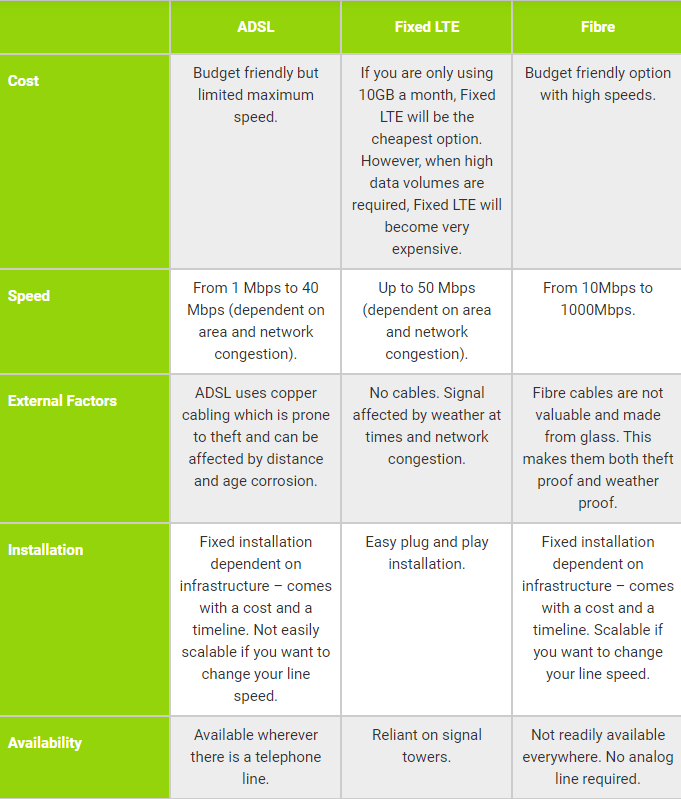
Here is a guideline to possible connectivity options for working remotely, in addition to home WiFi:

Table3 | Vox | Individual remote working solutions? We’ve got you

Create and collaborate with Microsoft 365 Personal

With Microsoft 365, every day is an opportunity to achieve something that matters to you. Create, edit, and share from multiple devices with anyone, wherever you are.

Choose the package that suits you and your WFH needs: Get the Home package for up to six users or the Personal package for just yourself.

Microsoft 365 can be installed for use on multiple PCs, Macs, tablets, and phones (including Windows, iOS, and Android) and offers:

  • Premium versions of Word, Excel, PowerPoint and Outlook, plus Publisher (access for PC only).
  • 1TB OneDrive Cloud storage with advanced security.
  • 60 Skype calling minutes per month.
  • Exclusive monthly upgrades and new features included for Microsoft 365 subscribers only.

Power up with the Vox UPS

With the Vox UPS, you can keep your Fibre or LTE router connected for up to three hours whilst the power is down. This allows you to stay connected so you can continue researching, brainstorming and getting work done, uninterrupted, during rolling blackouts.

The small UPS features:

  • Three hours uptime
  • Automatic activation
  • Small and compact design
  • Plug and play installation
  • 24/7 support

Related: Addressing the power challenge for remote workers

Need to connect to your team and colleagues? Vox has you covered. From Fibre to LTE, ADSL to Satellite and a whole host of other options to suit your remote working needs. Enquire now by clicking below.